Email Hosting vs Web Hosting: What Irish Small Businesses Need
Email hosting and web hosting do different jobs. See how they differ, when to split them, and which DNS records connect your .ie domain to business email.

Web hosting keeps your website online. Email hosting looks after your mailboxes and the delivery of your messages. You can buy both from one company or from two, and for most small businesses that rely on email to win work, two separate services is the safer setup.
This guide explains what each one does, compares the three realistic options, and shows the DNS records that tie it all to your domain. It is written for sole traders and small firms, including those across Galway and Mayo, who need to make a decision and get on with the day job.
TL;DR
- Web hosting stores your website files and serves them to visitors. Email hosting stores mailboxes and handles sending and receiving for addresses like name@yourbusiness.ie.
- Email bundled with web hosting is fine for a very small business with light email use. Separate email suits you once email brings in customers or you want to change website host freely.
- Microsoft 365 and Google Workspace are the usual separate options. Both connect to your domain through DNS records, mainly MX, SPF, DKIM and DMARC.
- Whatever you choose, turn on multi-factor authentication (MFA) and set up SPF, DKIM and DMARC. Irish official guidance asks for both.
- Agree who looks after the domain, the website and the mail before you move anything.
Table of Contents
- The difference in plain terms
- What email hosting usually gives you
- Your three realistic options
- When bundled email is perfectly fine
- When to separate email from web hosting
- Microsoft 365 vs Google Workspace for business email
- The DNS records that connect your email
- Security questions to ask whichever you choose
- Our view on email and web hosting
- Do you need both?
- Moving email without losing mail
- How hostme.ie can help
- FAQ
- Sources
The difference in plain terms
Think of three separate things: your domain, your website and your email.
- The domain is the name, such as yourbusiness.ie. You register it and renew it.
- Web hosting is where the website files live. When someone types your address into a browser, the host delivers the pages. Web hosting stores and delivers website files, while email hosting stores and manages mailboxes and message delivery, and the two can share a domain while running independently.
- Email hosting is the service that holds your mailboxes, receives mail sent to your addresses and sends mail from them.
A website can exist with no email on the domain. Email can run on a domain with no website at all. A typical business that wants a public site and addresses like info@yourbusiness.ie needs both, whether bought together or separately.
The confusion comes from the fact that many web hosting plans include a few mailboxes. That is convenient, but it does not make the two services the same thing. It means one company is running two jobs for you.
Our Domains service covers the name itself, and our Web hosting service covers the website side.
What email hosting usually gives you
The features differ by provider, but you can generally expect:
- Webmail, so you can read mail in a browser
- Forwarding and aliases (for example, sales@ landing in your own inbox)
- POP3 or IMAP access, so mail works in Outlook, Apple Mail or on a phone
- Storage limits and a cap on the number of accounts, which vary by plan
- On some plans, spam filtering and virus scanning
Separate business email platforms add shared calendars, mobile apps and one place to manage users and security settings. We come back to those below.
Your three realistic options
Most Irish small businesses end up choosing between these.
| Email bundled with web hosting | Email on a separate hosting plan | Microsoft 365 or Google Workspace | |
|---|---|---|---|
| Best for | One person or a very small team with light email use | Businesses that want simple mailboxes but not tied to the website | Teams that rely on email, calendars and shared files |
| Cost | Usually included or low | A small extra cost | Charged per user, per month |
| If the website host has an outage | Site and email can fail together | Email keeps running | Email keeps running |
| Changing website host | Mail has to move too | Mail is unaffected | Mail is unaffected |
| Calendars, mobile apps, user management | Limited | Limited | Built in |
| Security controls (MFA, admin settings) | Depends on the host | Depends on the provider | Strong admin controls available |
The pattern is simple. Bundled is cheapest and simplest. Separate costs more but protects your email from website problems, and gives you more control.
When bundled email is perfectly fine
If you are a sole trader with a brochure website, a couple of addresses and a modest volume of email, keeping mail with your web host is a practical choice. You pay once, manage one login and have one place to call.
It works best when:
- You send and receive a small number of emails a day
- Nobody needs a shared calendar or shared mailboxes
- You are happy that a problem at the host could affect both site and email for a time
- You do not plan to move your website soon
Where bundled email goes wrong is rarely a dramatic failure. It is usually storage creeping up to the plan limit, or a website move that quietly takes the mail with it. Both are avoidable if you know the limits of your plan and who to call.
When to separate email from web hosting
The general advice from hosting providers is that separating them makes sense once you need higher reliability, depend heavily on email, or want to move your website without disrupting mail. In practice, that means:
- Email wins you customers. Quotes, bookings and enquiries all arrive by email. A day of lost mail costs real money.
- You have more than a couple of staff. Shared calendars, shared mailboxes and leaver processes are much easier on a platform built for them.
- You plan to redesign or move the website. A site rebuild is far less stressful when it cannot take your mailboxes with it.
- You handle customer data by email. Stronger admin controls, MFA and audit logs matter more (see the security section below).
- You use Outlook or Gmail heavily on phones and laptops. Separate platforms are designed for that.
If you recognise two or more of these, separate email is usually worth the extra cost.
Microsoft 365 vs Google Workspace for business email
These are the two platforms most small businesses choose. Both give you a mailbox on your own domain, calendars, mobile apps and a central admin console. Microsoft 365 suits businesses that live in Outlook, Word and Excel. Google Workspace suits businesses that prefer Gmail and work mostly in the browser.
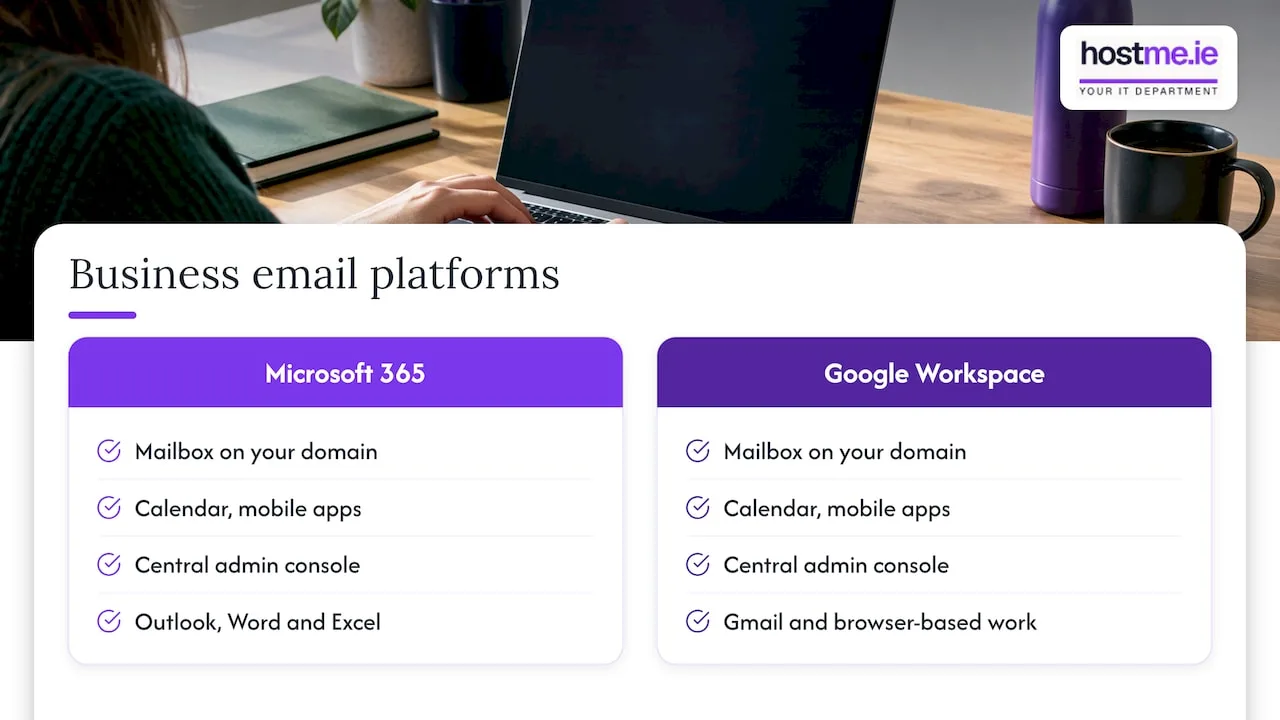
Both are priced per user per month, with different plans and annual or monthly commitments, and prices are published in euro on each vendor’s own pricing page. Check the current figures there before you decide, as they change.
We have written two detailed comparisons if you want to go further: Microsoft 365 vs Google Workspace for business and Gmail vs Outlook for small businesses. If you are going the Microsoft route, our guide to setting up Microsoft 365 for a small business walks through the steps.
One practical point: if you choose either platform, your website stays where it is. You only change a few DNS records so that mail goes to Microsoft or Google instead of your web host.
The DNS records that connect your email
DNS records are the instructions attached to your domain. They tell the internet where your website lives and where your mail should be delivered. This is where web hosting and email hosting meet, and where most setup mistakes happen. Our DNS records explained guide covers the basics in more detail.
For email you will normally deal with four types.
MX records
An MX record names the mail server responsible for accepting email for your domain. If you move to Microsoft 365 or Google Workspace, you replace the old MX values with the ones they give you.
- Microsoft 365: the MX hostname is specific to your tenant, so copy it from the Microsoft 365 admin centre rather than from a generic guide.
- Google Workspace: current onboarding uses smtp.google.com as the MX value, and Google’s older MX values remain supported. Use what the Google admin console shows you.
If your website host and your mail provider are different, only the MX record changes mail delivery. Your website’s A record or CNAME stays pointing at the web host.
SPF
SPF is a text record listing which servers may send mail for your domain. For Microsoft 365 it should authorise Microsoft’s servers, and for Google Workspace it should authorise Google’s. Only publish one SPF record per domain. If you still send from an old host, newsletter tool or invoicing system, those need to be included too.
DKIM
DKIM adds a digital signature to your outgoing mail so receiving servers can check it was not altered. Your provider gives you the record to publish, and you then switch signing on in the admin console.
DMARC
DMARC tells receiving servers what to do with mail that fails SPF or DKIM, and sends you reports. Start with a monitoring policy and tighten it once you are sure all your legitimate senders are covered.
SmarterTools recommends SPF, DKIM and DMARC to combat spam and show that your mail server and senders are legitimate. Ireland’s National Cyber Security Centre goes further: its guidance on business email compromise recommends enforcing MFA on email accounts and implementing and monitoring SPF, DKIM and DMARC on your domains.
A sensible order of work
- Note your current DNS records before changing anything, including any you do not recognise.
- Create the new mailboxes on the new platform.
- Lower the TTL (the caching time) on your MX records a day or so ahead, if your DNS host allows it.
- Change the MX record, then add SPF, DKIM and DMARC.
- Test sending and receiving from outside your own domain.
- Move old mail across, then update phones and laptops.
Our business email setup and migration checklist goes through this in full.
Security questions to ask whichever you choose
Price is only one part of the choice. Email is where most business impersonation and phishing attacks start, so the setup matters.
The Data Protection Commission’s phishing guidance for organisations, dated October 2019, recommends MFA for administrators and remote email users, suspicious-mail filtering, audit logs and controls on automatic forwarding. It also suggests turning on email auditing and setting alerts for unusual sign-in behaviour, such as access from an unexpected location.
For GDPR, businesses acting as data controllers are responsible for appropriate technical security. The DPC’s microenterprise guidance gives examples such as encryption at rest for mailboxes and TLS 1.2 for email in transit. Our GDPR for small Irish businesses page puts this in plain terms.
A short checklist for any email provider:
- Can you enforce MFA for every user, not just the owner?
- Who has administrator access, and can you see what they do?
- Can you control or block automatic forwarding to outside addresses?
- Is mail encrypted in transit and at rest?
- What happens when someone leaves? Can you remove access the same day?
- Is there a backup of mail, separate from the provider’s own service?
The same questions apply to any cloud tool you rely on. This piece on SaaS vendor security questions gives a useful frame for asking them of any supplier. If you choose Google Workspace, our Google Workspace security guide covers the settings worth turning on, and our Microsoft 365 backup guide explains why a separate backup is worth having.
Our view on email and web hosting
We see the same pattern with small businesses again and again. The website and the email were bought together years ago, nobody is quite sure who manages what, and the first time anyone looks is when something stops working.
Our view is simple: treat email as its own system. It deserves its own decision, its own security settings and its own backup, even if it sits on the same domain as your website. For many of the sole traders and small firms we work with, that means a hosted website and a Microsoft 365 or Google Workspace mailbox, with the DNS records set up once and written down.
That is also why we work as one person to contact. Domain, website host, email platform and DNS often sit with three different companies, and the problem is rarely in only one of them. We agree the scope before work begins, whether that is a one-off migration or ongoing support, so you know what is covered.
hostme.ie
Do you need both?
Only if you need both a website and email on your domain. Here is a quick way to decide.
- Website only: you need web hosting and a domain.
- Email only: you need a domain and email hosting. No website is required.
- Website and branded email: you need both. Buy them together if you are small and email is light. Buy them separately if email matters to your income.
One warning from experience: using a free address such as one from your broadband provider looks less professional and ties your contact details to a service you may leave. We explain why in stop using ISP email for business.
Moving email without losing mail
Changing provider is routine when it is planned. The risks come from rushing. Before any move:
- List every mailbox, alias and forwarder.
- Check how much mail each mailbox holds, so you know how long the copy will take.
- Check which other services send as your domain (invoicing, booking tools, website forms) and add them to SPF.
- Choose a quiet time of the week for the MX change.
- Keep the old mailboxes live until you have confirmed that nothing is still arriving there.
Website contact forms are the usual casualty. If your site sends form emails through the old host’s mail server, check they still deliver after the change.
How hostme.ie can help
We set up and look after business email on your own domain, alongside hosting, domains and DNS, for sole traders and small businesses in Galway, Mayo and across Ireland. That includes choosing between bundled and separate email, moving mailboxes, setting SPF, DKIM and DMARC, and switching on MFA. Scope is agreed before work starts.
If you want a hand, start with our business email service page and message us on WhatsApp from there. Phone and email are also available if you prefer them.
FAQ
Can I use the email that comes with my web hosting?
Yes. Most shared hosting plans include mailboxes, and it is a sensible choice for a very small business with light email use. Check the storage limit and the number of accounts your plan allows, and remember that a problem or a move at the host can affect your mail as well as your site.
Do Microsoft 365 or Google Workspace replace my web hosting?
No. They replace your mailboxes, not your website. Your website stays on your web host, and you change only the MX, SPF, DKIM and DMARC records so mail goes to Microsoft or Google.
Which DNS records do I need for business email?
An MX record to send incoming mail to the right server, an SPF record to say who may send for you, a DKIM record to sign outgoing mail, and a DMARC record to set the policy for failures. Your provider’s admin console shows the exact values to use, and Microsoft 365 MX values are specific to your account.
Is it safe to change email provider on my own?
It can be done, but a wrong MX record sends mail nowhere, and a missing SPF entry can send legitimate mail to spam. Record your current DNS settings first, test from an outside address, and ask for help if your domain, website and email sit with different companies.
Sources
- Web Hosting vs. Mail Hosting (Mailtrap)
- DNS MX Record Explained (DNScale)
- DNS Configuration for a Mail Server (SmarterMail Help)
- NCSC business email compromise guidance
- Data Protection Commission: guidance on phishing for organisations
- Data Protection Commission: personal data security for microenterprises
- Web Hosting With Business Email: Bundled vs Separate
- Construction SaaS security: what to demand from every vendor