Shared Hosting vs VPS: Which Suits a Small Business?
Shared hosting or VPS for your business website? Plain-English differences, what to check, when to upgrade and who looks after the server.

For most small business websites, shared hosting is enough: a brochure site, a booking form, a small WordPress blog or a modest shop. A VPS (virtual private server) makes sense when your site keeps hitting resource limits, handles payments or customer data at volume, or needs software that shared plans do not allow. The catch is that a VPS is only better if someone looks after it. An unmanaged VPS you never patch is a bigger risk than a well-run shared plan.
This guide explains the real differences in plain words, shows how to decide, and covers what to check before you pay for either.
TL;DR
- Shared hosting: your site sits on one server with many other sites. It is cheaper, the provider runs the server, and it suits most small business sites.
- VPS: you get a reserved slice of a server (CPU, RAM, storage) with more control. It suits busier sites, shops and custom software, but someone must manage it.
- The deciding factor is usually not traffic. It is who patches, secures, backs up and monitors the server.
- Move up when you see repeated slowdowns, resource-limit warnings or a software requirement your plan cannot meet, not just because “VPS” sounds stronger.
- Before buying either, check backups held off the server, a written uptime commitment, support access and the upgrade path.
Table of Contents
- The difference in one minute
- Shared hosting vs VPS at a glance
- What each option costs
- Who looks after the server?
- When shared hosting is the right choice
- Signs you may have outgrown shared hosting
- Worked example (fictional)
- What to check before you buy
- How to move from shared hosting to a VPS
- Our view
- Getting help with hosting decisions
- FAQ
- Sources
The difference in one minute
Think of both as ways to rent space on a computer that is always on and connected to the internet.
Shared hosting puts your website on one server alongside many others. All of the sites draw on the same pool of processor, memory and disk. The provider looks after the operating system, security updates and server software. You manage your website and little else. A busy neighbour can slow things down, which is the main weakness. One Irish guide notes that shared hosting places your site alongside potentially hundreds or thousands of others, and that performance can suffer when those sites get busy.
A VPS is a virtual machine on a larger physical server. Several VPSs run on the same hardware, but each has its own pre-allocated CPU, RAM and storage, and its own operating system. Your processes and files do not overlap with other customers. Note that this is virtual separation, not a separate physical machine. That is why the host hardware, the number of virtual CPUs, the type of storage and the upgrade path are all fair questions to put to a provider.
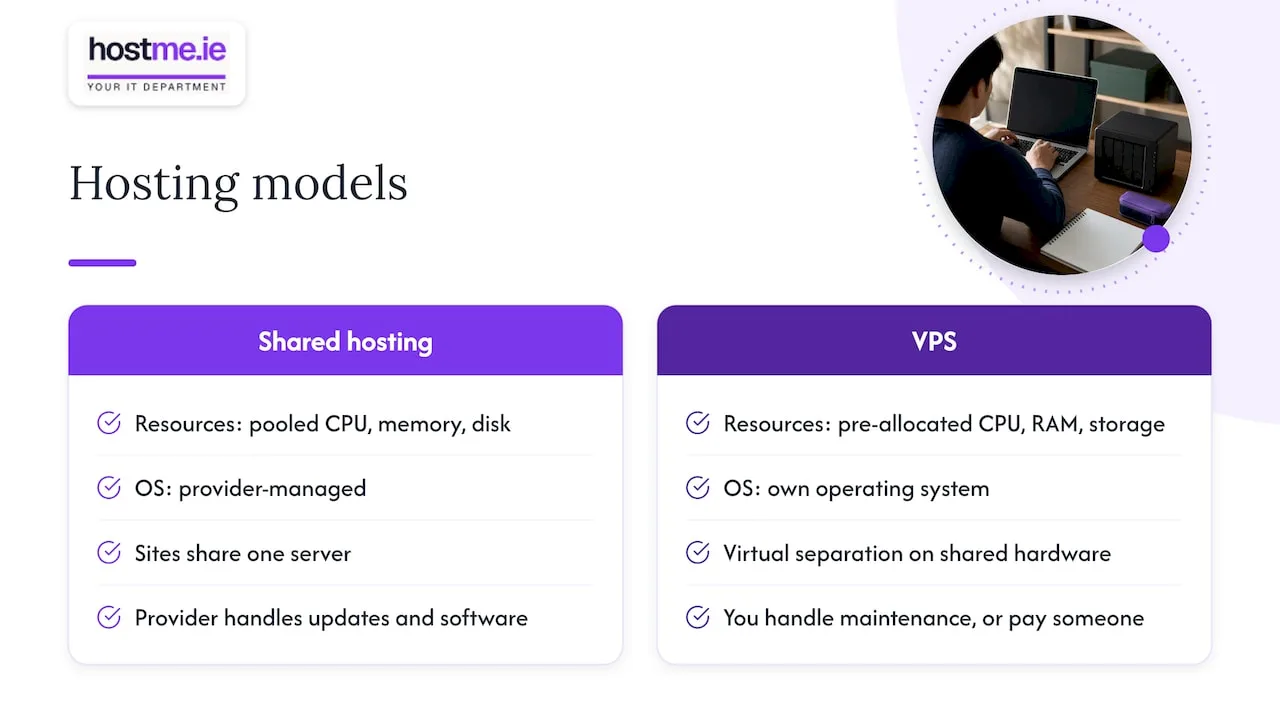
A good way to see it: shared hosting is a flat in a block where the landlord handles the boiler and the roof. A VPS is a house you rent. You get more room and more say, but you now deal with the maintenance yourself, or pay someone to.
Shared hosting vs VPS at a glance
| Point | Shared hosting | VPS |
|---|---|---|
| Resources | Pooled with other sites | Allocated to you |
| Performance under load | Can dip when neighbours are busy | More consistent, within your allocation |
| Control | Limited to your hosting panel | Often full admin (root) access |
| Security isolation | Provider-managed, shared environment | Separate virtual environment |
| Who runs the server | The provider | You, or a managed service |
| Technical skill needed | Low | Basic Linux administration if unmanaged |
| Typical cost | Lower | Higher, and more again if managed |
| Best for | Brochure sites, small blogs, simple WordPress | Busy sites, shops, custom apps, specific software |
One Irish buying guide sums up the VPS side as consistent performance, stronger isolation and full root access to tailor the software stack. That is accurate, and the same page is clear about the other half: shared hosting is managed by the provider, whereas an unmanaged VPS needs at least basic Linux system administration for software, security and updates.
What each option costs
Shared hosting is the cheaper option and VPS costs more, and a managed VPS (where the provider or an IT person looks after the server) costs more again. Irish providers publish their prices openly, usually per month and often excluding VAT, so check the current price on the provider’s own page before comparing. Two details catch people out:
- Introductory prices. A low first-month or first-year price often rises on renewal. Look for the renewal price.
- VAT. Business prices are often shown ex VAT. Compare like with like.
hostme.ie does not publish hosting prices on its site, so we do not quote any here. Scope and cost are agreed with you before work starts.
The real cost of a VPS is rarely the monthly fee. It is the time (or the invoice) for updates, security hardening, monitoring and restoring from backup when something goes wrong. If you are a sole trader running a business, that time is usually worth more than the price gap between the plans.
Who looks after the server?
This is the question that settles most decisions.
On shared hosting
The provider patches the operating system, runs the web server software and handles most of the security at server level. You look after your website: the WordPress core, themes and plugins, your passwords and your content.
On an unmanaged VPS
You are the system administrator. That means:
- Installing security patches and software updates on a schedule.
- Configuring the firewall and securing remote access.
- Setting up and testing backups.
- Watching disk space, memory and uptime.
- Fixing it when something breaks at an awkward hour.
If nobody in your business does this, the server slowly falls behind on updates. Out-of-date server software is one of the easier ways for a small site to get compromised. For the network side of the same problem, our small business firewall checklist covers the basics.
On a managed VPS
Someone else does the list above for a fee. This can be the hosting provider or an IT support provider. Before signing, ask exactly what is included: patching, monitoring, backups, restores, security incidents, and what counts as extra work.
When shared hosting is the right choice
Stay on shared hosting if most of these are true:
- Your site is a brochure, portfolio, blog or small WordPress site with modest traffic.
- Nobody in the business wants to administer a server.
- You do not need software installed at server level.
- Pages load acceptably and you are not seeing resource-limit errors.
- Your provider backs up your site and you can restore it.
A lot of small business owners are pushed towards a VPS by sales pages when the real problem is something else: a heavy theme, 30 plugins, uncompressed images, or no caching. Fix those first. A VPS will not repair a badly built site, it will just run the same site on a bigger plate.
Signs you may have outgrown shared hosting
These are the practical triggers for considering a VPS:
- Repeated slowdowns at busy times that are not explained by the site itself.
- Resource-limit warnings or temporary suspensions from your host for CPU, memory or process usage.
- A web shop or booking system where speed and availability affect sales directly.
- Software requirements your shared plan cannot meet, such as a specific PHP configuration, a background service or a custom application.
- Several sites under one account that compete for the same limits.
- Security or compliance needs where you want your own isolated environment and more control over configuration.
Before you move, check the basics. Look at your host’s usage graphs if it offers them, run a test of your page speed, and ask the host whether you are actually hitting limits. Sometimes the answer is a higher shared tier or a managed WordPress plan rather than a full VPS.
Worked example (fictional)
To make this concrete, here is an invented scenario, not a real client.
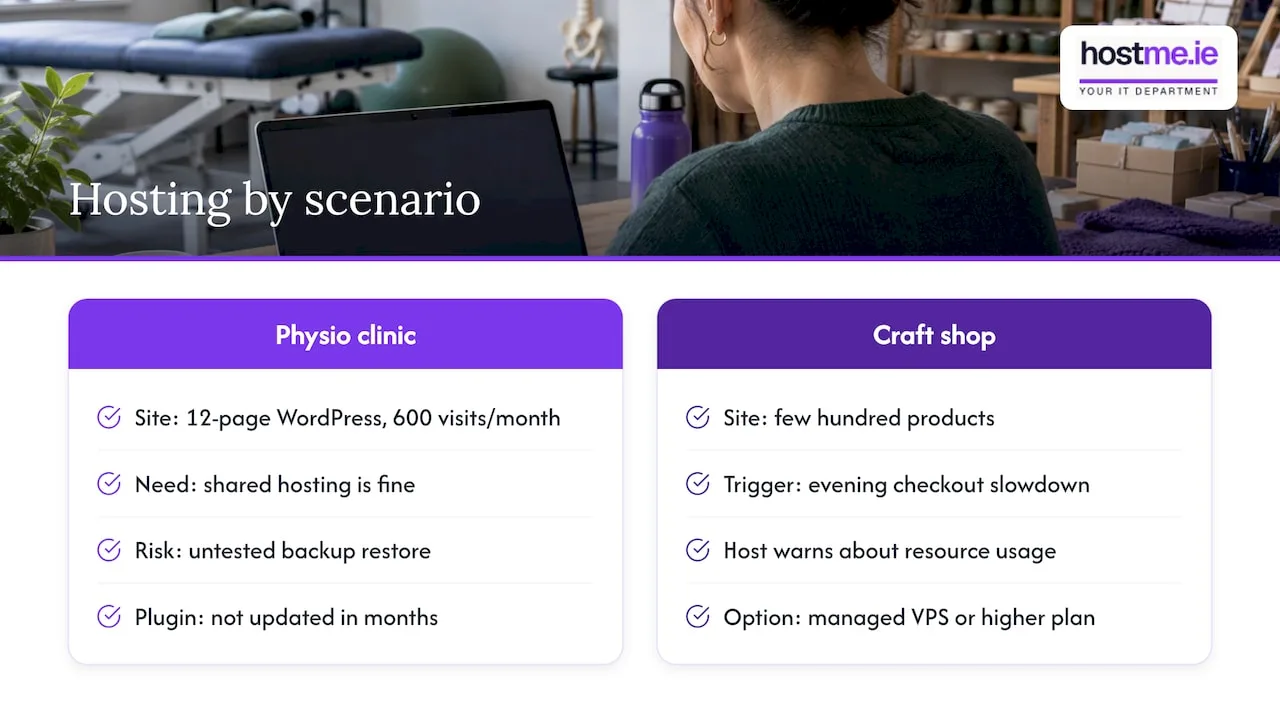
A small physiotherapy clinic in Galway has a 12-page WordPress site with an online booking form. About 600 people visit a month. The site is fine on shared hosting. The owner’s real exposure is not speed: it is that nobody has tested a restore from backup, and the booking plugin has not been updated in months. A VPS would add cost and server admin without solving either problem.
Now change the scenario. A small online craft shop with a few hundred products starts running seasonal promotions. Checkout slows down in the evenings and the host warns about resource usage. Here a VPS, ideally managed, or a higher plan with more guaranteed resources, starts to make sense, because slow checkouts cost sales.
Same technology question, different answer, because of what the site does for the business.
What to check before you buy
Whichever you pick, put the same questions to the provider.
Backups
Ask how often backups run, how long they are kept, and where they are stored. Backups on the same server as your site are not enough: if the server fails, both go together. Look for automated copies held elsewhere, and ask whether anyone tests a restore. A backup you have never restored is a hope, not a plan. Our guide to choosing between backup tools explains the thinking for wider business data.
Uptime
Look for a written uptime commitment rather than a vague “reliable” claim. It helps to know what the number means. At 99.9% uptime, the arithmetic allows about 8.76 hours of downtime a year (0.1% of 8,760 hours). At 99.99% it is under an hour. Also read what the remedy is when the provider misses it.
Support
Find out how you reach support, what hours it covers, and whether it includes help with the server or only with the platform. For a VPS, ask whether support will touch your server at all or only the underlying hardware. Do not assume a reply time that is not written down.
Resource limits
On shared plans, look for limits on CPU, memory, processes, inodes (file counts) and email sending. On a VPS, ask how many virtual CPUs, how much RAM and what type of storage you get, and how easily you can upgrade without migrating.
Location and data
If your site collects personal data through forms, bookings or accounts, ask where the servers are located. Providers should be able to tell you.
Security layers
Hosting is one layer. A firewall or web application filter, SSL certificates and good account hygiene matter just as much. If you are weighing a protection layer for your site, see our comparison of Cloudflare and Sucuri for small business sites, and our page on security and SSL.
How to move from shared hosting to a VPS
If you do decide to move, a careful migration looks like this:
- Take and test a full backup of files, database and email settings.
- List everything that runs on the current host: sites, databases, email accounts, cron jobs, DNS records and SSL certificates.
- Build the new server and secure it before pointing anything at it: updates, firewall, remote access, backups.
- Copy the site and test it on the new server using a temporary address.
- Lower DNS time-to-live a day or so ahead so the change spreads quickly.
- Switch DNS at a quiet time, then monitor.
- Keep the old hosting for a short overlap in case you need to go back.
Business email is the part people forget. If your email currently lives on the same hosting account, moving it carelessly can interrupt mail. Many businesses are better off with email on its own service, which is why we often suggest looking at business email as a separate decision from where the website lives. Domain and DNS records also sit at the centre of any move, so know where your domain is registered and who can log in.
Our view
We see the same pattern with small businesses again and again. The question is rarely “shared or VPS”, it is “who is responsible for this when something goes wrong?”
A site on a well-run managed hosting plan, with tested backups, up-to-date software and one person to contact, will usually serve a sole trader better than a powerful server nobody has time to maintain. Extra capacity helps only when someone is looking after it.
That is how we approach hosting at hostme.ie: start with what the website does for the business, look at what the current plan is actually doing, and recommend the simplest set-up that fits. If a bigger environment is justified, we agree the scope, who handles updates, backups and monitoring, and the cost before any work begins.
We also treat hosting as one part of the wider picture: domain, email, security and backups. Fixing one in isolation often leaves a gap in another.
hostme.ie
Getting help with hosting decisions
hostme.ie offers managed web hosting for Irish sole traders and small businesses, with remote support and on-site work in County Galway and County Mayo where agreed. If you are not sure whether your current plan is the problem, we can look at what your site runs, how it is backed up and where the bottleneck really is, then agree scope and cost before any work starts.
Ad-hoc help and separately scoped projects are available. Managed support has an initial 12-month term, and the terms are agreed before work begins. The simplest next step is to message us on WhatsApp from the web hosting page. Phone and email work too if you prefer.
If you are earlier in the process and still deciding what your business needs, our small business technology setup guide is a sensible place to start.
FAQ
Is a VPS better than shared hosting?
Not automatically. A VPS gives you reserved resources and more control, so it can perform more consistently under load. But it also hands you the server’s upkeep unless you pay for management. For a small brochure or blog site, well-run shared hosting is often the better fit.
Is VPS hosting more secure than shared hosting?
A VPS isolates your environment from other customers, which is a real advantage. But security depends on how the server is configured and kept up to date. An unpatched VPS can be less safe than a shared plan where the provider handles updates. Whichever you use, keep your website software updated and use strong, unique logins.
Do I need technical skills to run a VPS?
If it is unmanaged, yes: you need at least basic Linux administration to handle software, security and updates. If you do not have those skills in the business, choose a managed VPS or have an IT provider look after it, and agree in writing what that covers.
How do I know my website has outgrown shared hosting?
Look for repeated slowdowns at busy times, resource-limit warnings from your host, or a need for software your plan does not allow. Check the basics first, such as plugins, images and caching, because these cause many problems that a bigger server will not fix.
Can I switch from shared hosting to a VPS later?
Yes. Moving is a routine job if you plan it: test the backup, build and secure the new server, copy and test the site, then switch DNS. Keep the old hosting briefly so you can go back if needed, and take care with any email hosted on the same account.