QNAP vs Synology: Which NAS Suits a Small Business?
QNAP or Synology for your office? A plain comparison of ease of use, hardware, backup, security and Irish prices, with advice on when a NAS is the wrong choice.
For most small offices with no in-house IT person, Synology is the safer pick. Its software is simpler and more consistent day to day. QNAP is the better pick if you want more hardware for the money, faster built-in networking or deeper configuration, and you have someone who will look after it. Neither brand is objectively better. The right choice depends on who will run the box, what you store on it and how you will back it up.
This guide compares the two on the things that matter to a sole trader or a team of five to twenty: setup, performance, backup, security, cost in Ireland and ongoing admin. It also covers two questions that come up alongside: why a NAS can feel slow, and how Bitdefender and Sophos differ.
TL;DR
- Synology suits businesses that want an appliance-like experience with little tinkering. Its DSM software is widely described as the more polished of the two.
- QNAP suits businesses that want more hardware per euro, more configuration depth and a mature container setup, and that have the skills to manage it.
- A NAS is not a backup. RAID protects against a failed disk, not against ransomware, deletion, fire or theft. Keep a separate copy elsewhere.
- Slow NAS? Check the network (Wi-Fi, cables, port speed, switch) and disk health before blaming the brand.
- Price check: budget for drives, setup time and ongoing admin, not only the box.
Table of Contents
- What a NAS is, and when you do not need one
- QNAP vs Synology at a glance
- Ease of use and daily admin
- Performance and expansion
- Backup features
- Security
- What it costs in Ireland
- How to choose: a five-step method
- Perspective: what we see for small businesses
- Bitdefender vs Sophos: a quick note for the same shopping list
- Getting help with your decision
- FAQ
- Sources
What a NAS is, and when you do not need one
A NAS (network attached storage) is a small, dedicated computer with one or more drives that shares files across your office network. Staff open the same folders from their PCs and Macs, and you can add backup, user permissions and remote access on top.
A NAS is a good fit when:
- You have large files (drawings, photos, video, accounting archives) that are slow or costly to keep only in the cloud.
- You want a fast, local shared drive for a fixed office.
- You want local copies of data that also sits in the cloud.
It is a poor fit when your team works mostly from home, from vans or on site visits, and your files already live in Microsoft 365. In that case cloud storage is usually simpler, because there is no hardware to patch, no port to expose and no box to replace. If that sounds like you, read our comparison of SharePoint and OneDrive before you spend money on hardware.
The usual middle route is cloud for day-to-day collaboration and a NAS for bulk storage and local backup copies. Cloud services such as Synology Drive or Nextcloud, which you host on your own NAS, give you cloud-style sharing from your own hardware. The trade-off is that you become the administrator.
QNAP vs Synology at a glance
| Factor | Synology | QNAP |
|---|---|---|
| Software feel | Polished, simple, consistent | More options, more depth, more to configure |
| Hardware for the price | Often more modest | Often stronger, with more built-in 10 GbE options |
| Built-in backup tools | Active Backup for Business (free) | Hybrid Backup Sync |
| Containers and virtualisation | Available | Generally seen as more mature |
| Best for | Owners with no IT person | Owners or staff who like tinkering |
| Main risk | Paying more for less raw hardware | Complexity in setup and security management |
These are the broad conclusions reached by independent comparisons, not lab results. A French SME comparison describes DSM as the most polished NAS operating system and notes QNAP’s stronger hardware at equivalent prices. Storware’s comparison draws the same line: QNAP for hardware performance and flexibility, Synology for polished, beginner-friendly software. Need to Know IT, in an update from October 2026, says Synology is easier to set up and more consistent day to day, while QNAP offers more configuration depth and a more mature Docker environment.
Ease of use and daily admin
This is where most small businesses should decide. If nobody in your business enjoys reading release notes, the simpler system wins, because a NAS that is neglected is a NAS that is out of date.
Synology’s approach leans towards “set it up and leave it”. QNAP gives you more switches to flip. That is useful for a technical user and a liability for someone who just wants a shared drive. UK-based Serverman makes a similar point: QNAP’s strength with virtualisation and home-lab use often brings added complexity in configuration and security management.
A sensible question to ask is who will do each of these jobs over the next three to five years:
- Install firmware and app updates.
- Check disk health and storage alerts.
- Add and remove staff accounts and folder permissions.
- Test restores from backup.
- Replace a failed drive or the whole unit.
If the honest answer is “nobody, really”, choose the simpler system and arrange for someone to handle those jobs.
Performance and expansion
QNAP often gives you a faster processor, more memory or built-in 10 GbE at a similar price. That matters if you edit video straight from the NAS, run virtual machines or serve many users at once. For a typical office sharing documents and spreadsheets, both brands are fast enough, and the bottleneck is almost always your network, not the NAS.
One point from CircleBytes’ small office comparison is worth keeping: QNAP’s flexibility can reduce friction when you upgrade later but may cost more up front, while Synology’s out-of-the-box approach can cut setup time and risk. Think about data growth over three to five years. A unit with spare bays and room to add faster networking costs more now and less later.
Why does a NAS feel slow?
Slow file transfers are a common complaint, and the cause is usually not the brand. Synology’s own guidance on slow file transfers points you to the network first. Work through this order:
- Wi-Fi or wired? Test from a PC on a cable.
- Cables and ports. Check the negotiated link speed: a 1 Gb port that has dropped to 100 Mb will crawl.
- Switch and router. Check configuration, and that MTU settings are consistent across devices.
- Storage pool health. A degraded pool needs repair, and a rebuild or expansion in progress slows everything until it finishes.
- Volume fullness. Synology advises freeing space once usage passes 90%.
- Load. Heavy services running on the NAS compete for the processor.
If you use iSCSI, Synology’s iSCSI troubleshooting checklist also points to unhealthy drives, a degraded SSD cache and unsuitable network design, and recommends a dedicated VLAN with properly configured multipath I/O. Models with the right ports can also use link aggregation or faster network cards, as Synology’s performance guide explains. The same advice applies to a QNAP: fix the network and drives first.
Backup features
Both brands include backup software. Synology’s Active Backup for Business is free and covers Windows, Mac and Linux, Microsoft 365, Google Workspace and VMware. QNAP offers Hybrid Backup Sync. Synology’s own documentation says Active Backup for Business can centrally manage backups for Windows computers, physical servers, Linux servers, VMware vSphere, Hyper-V and SMB file servers. Compare that list with what your business actually needs to protect: laptops, a file server, Microsoft 365 mailboxes, a Dynamics 365 setup.
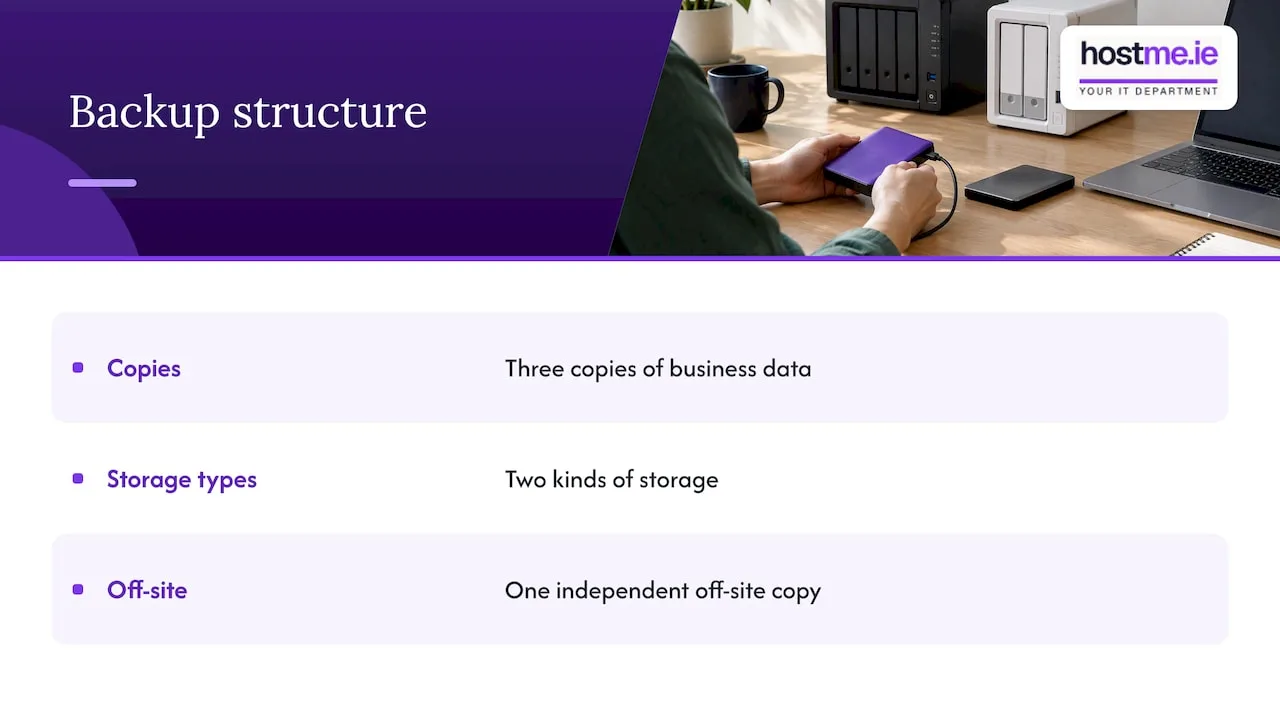
The larger point is that a NAS holding your files is not protecting them. Storware notes that RAID guards against disk failure, not ransomware, accidental deletion, a failed unit, fire, theft or a controller fault, and recommends an independent, ideally immutable backup elsewhere. In practice that means the 3-2-1 idea: three copies, two kinds of storage, one off-site. Our guide to cloud backup as business insurance explains the off-site part, and our Microsoft 365 backup guide covers mailboxes and SharePoint, which a NAS does not protect by itself.
Security
A NAS is a computer on your network holding your most important files, so it needs the same care as a server. Synology’s security page lists firewall rules, automatic blocking of IPs after repeated failed logins, account protection, multi-factor or passwordless sign-in, security scans and encryption. QNAP offers comparable controls. Whichever you buy, a few habits matter more than the brand:
- Turn on multi-factor sign-in for every admin account.
- Do not expose the admin page directly to the internet. Use a VPN or a managed remote access route.
- Rename or disable the default admin account and use unique passwords.
- Install updates on a schedule, and set alerts to reach a mailbox somebody reads.
- Encrypt the volumes, and keep the recovery key somewhere safe and separate.
For laptops, encryption is a related job: see our guide to BitLocker for small businesses.
What it costs in Ireland
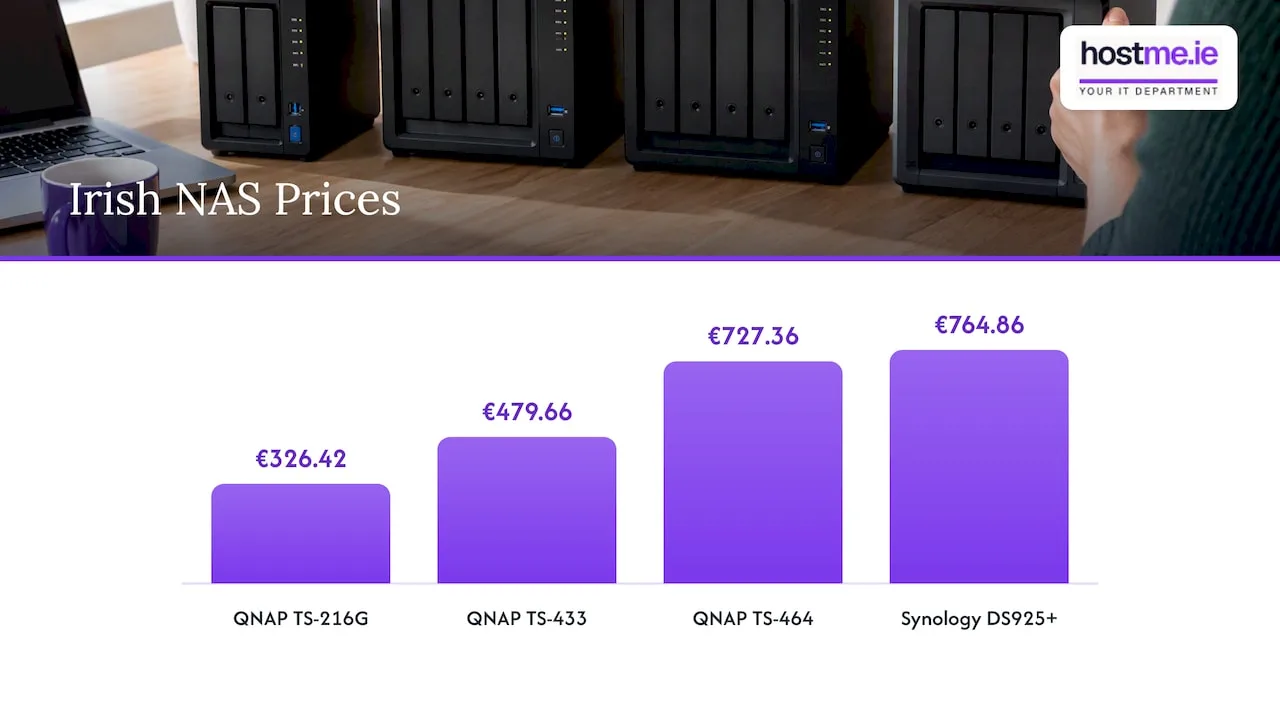
Prices move often, so treat these as examples of the range, not a quote. Irish retailer Probyte lists the QNAP TS-216G at €326.42, the TS-433 at €479.66 and the TS-464 at €727.36. A listing on Kelkoo Ireland, updated on 31 July 2026, shows the Synology DS925+ at €764.86 without drives, plus €9.95 delivery. Check current prices before you decide.
Those figures are for the empty box. Add:
- Drives. NAS-rated drives, in pairs or more.
- A backup target. Another device or a cloud service.
- A UPS (battery backup) to protect against power cuts, which are a real consideration in rural parts of Galway and Mayo.
- Setup and admin time. CircleBytes advises comparing total cost of ownership, including setup and ongoing administration, not only the hardware saving.
A cheaper QNAP that takes your own weekend to configure and maintain is not always cheaper than a dearer Synology that you can leave alone.
How to choose: a five-step method
- List your workloads. Plain file sharing, backup target, video editing, virtual machines, a small database?
- Estimate growth. How much data now, and in three to five years?
- Decide who administers it. An owner, a staff member, or an outside person you trust.
- Score the shortlist. Buralog’s small business approach is to score things like simultaneous file sharing, snapshots, expansion, administration, support and value, then pilot the shortlisted system with real workflows before migrating.
- Plan the backup before you buy. Decide where the second and third copies will live.
| If this describes you | Lean towards |
|---|---|
| One to ten staff, mostly documents, no IT person | Synology |
| Heavy video or large media files, someone technical on hand | QNAP |
| Containers or virtual machines on the same box | QNAP |
| You want minimal admin and predictable updates | Synology |
| Mostly remote staff, files already in Microsoft 365 | Possibly neither: cloud first |
Perspective: what we see for small businesses
We are one person to contact for practical business IT, so we look at this choice from the aftercare side. The question we would ask first is not “which brand?” but “what happens when something goes wrong at 4pm on a Friday?” A NAS that nobody monitors, with no tested restore and an admin page open to the internet, is a risk whichever logo is on it.
For most sole traders and small offices we speak to, simpler is better, and a cloud-first setup with a NAS as a local copy is often enough. Where a NAS makes sense, we would put the effort into backup, access control and a written note of how to recover, rather than into chasing the last bit of speed. We agree scope and cost before any work, and we will say so if you do not need a NAS at all.
— hostme.ie
Bitdefender vs Sophos: a quick note for the same shopping list
If you are buying a NAS you are probably also looking at protecting the PCs that connect to it, so here is the short version. Both vendors sell business endpoint protection. Bitdefender GravityZone Business Security offers multi-layered endpoint protection with a central console, covering 1 to 100 devices, with free trials. Sophos pitches its Fusion platform as a coordinated defence across control points and says its endpoint product has ransomware protection on by default. Each vendor’s own comparison favours itself, so judge on what you can manage: how many devices, who watches the alerts, and what licence terms apply in Ireland. Our endpoint protection comparison goes through this for small businesses.
Getting help with your decision
hostme.ie can help you scope a NAS or a cloud alternative, set up access and permissions, and put a backup and recovery plan around it. Remote support is the default, with on-site work where agreed. Ad-hoc help and separately scoped projects are available, and scope, cost and contract terms are agreed before work begins. Managed support has an initial 12-month term. Start with our IT support page, or see backup and recovery if protecting your data is the priority. Reach us by WhatsApp, phone or email from there. We will not promise instant availability, but we will tell you plainly what we can do.
FAQ
Is QNAP as good as Synology?
In hardware terms, often yes, and sometimes better for the money. In software simplicity, most independent reviewers give Synology the edge. If you will manage it yourself with little time, Synology tends to suit better. If you have the skills and want more control, QNAP is a strong option.
Is Nextcloud better than Synology Drive?
Neither is better across the board. Synology Drive is built into DSM and is quick to set up. Nextcloud is a separate open-source platform that gives more flexibility but needs more upkeep. For a small business without an IT person, the simpler, built-in option usually causes fewer problems.
Can a NAS replace my backup?
No. A NAS with RAID survives a single disk failure, but not ransomware, deletion, fire, theft or a controller fault. Keep an independent copy off the NAS, ideally off-site, and test restoring from it.
Why is my Synology NAS slow?
Start with the network: Wi-Fi, cable quality, negotiated port speed and switch settings. Then check for a degraded pool, a rebuild in progress, a volume over 90% full and heavy services running. Most slow-NAS problems are found in that list.
Sources
- SME NAS comparison 2026: Synology vs QNAP vs Asustor
- QNAP vs Synology NAS | Storware
- QNAP vs Synology: Real Setup Experience and Daily Use 2026
- Synology vs QNAP: Which NAS Should You Buy in 2026?
- Synology vs QNAP NAS Comparison for Small Offices
- What can I do with low data transfer rate? | Synology Knowledge Center
- How do I troubleshoot iSCSI storage performance issues? | Synology
- Synology Solution Guide: Increasing System Performance
- Synology DSM 7.0 user guide
- Synology DSM security overview
- Probyte: NAS servers in Ireland
- Kelkoo Ireland: Synology DS925+
- Synology vs QNAP: Choosing the right NAS for small and medium businesses
- Bitdefender GravityZone Business Security
- Sophos vs Bitdefender