BitLocker for Small Businesses: Intune, Recovery Keys Before Rollout
Plan a small business BitLocker rollout with Intune where supported, check TPM and UEFI, escrow recovery keys, and test the process with a pilot.

BitLocker is the right disk‑encryption choice for Windows business devices, and we recommend turning it on under central management rather than one device at a time. Deploy it through Intune or Active Directory, and escrow recovery keys before you switch it on. Three things to do this week: confirm your Windows licence covers BitLocker, check which devices have TPM and UEFI, and set up automatic recovery key backup.
TL;DR:
- BitLocker is included with Windows Pro, Enterprise, and Education, but advanced management may require Enterprise licensing, while Intune control depends on your Microsoft 365 plan.
- Silent Intune encryption requires an enabled TPM version 1.2 or 2.0, UEFI with Secure Boot, configured WinRE, and a Windows build joined to Entra ID.
- For mixed fleets, use silent mode on compliant newer devices, interactive Intune policies on devices that miss prerequisites, and manual enablement for older equipment.
- Map each escrowed recovery key to its device in the asset register, restrict helpdesk retrieval to authorized staff, and rotate keys after disclosure.
- Run a pilot on similar devices and verify that an escrowed recovery key can be retrieved and used before expanding encryption across the fleet.
Table of Contents
- What BitLocker is and where it’s included
- Hardware and software prerequisites for silent or managed encryption
- Deployment options: manual vs Intune (standard and silent)
- Recovery key governance: escrow, retrieval and rotation
- Practical rollout checklist and pilot plan
- Staff training and policy enforcement for BitLocker
- Common BitLocker problems and practical fixes
- Managing BitLocker through Microsoft Endpoint Manager
- Quick advice for busy decision-makers
- How we can help with your BitLocker rollout
- FAQ
- Sources
What BitLocker is and where it’s included
BitLocker encrypts an entire drive, so if a laptop is lost or stolen, the data on it stays unreadable without the recovery key or device password. It’s different from Windows Device Encryption, a lighter consumer feature that works automatically on some hardware but offers less control over policy and key management. For a business, BitLocker is the one you want to plan around.
Licensing determines what you can actually do:
- Windows Pro, Enterprise and Education editions all include BitLocker, so most business laptops already qualify.
- Some of the more advanced management features are tied to Enterprise-level licensing rather than Pro.
- Microsoft 365 Business Premium or similar bundles often matter here too, since they affect what you can manage through Intune.
Before planning an Intune‑led rollout, check your Windows and Microsoft 365 licences line up with the management features you actually need.
Hardware and software prerequisites for silent or managed encryption
Not every device is ready for automatic encryption, and it’s worth checking before you commit to a rollout date. Silent, no‑click encryption through Intune depends on a specific set of conditions being met.
- A TPM chip, version 1.2 or 2.0, present and enabled in firmware.
- Native UEFI boot mode, not legacy BIOS, with Secure Boot turned on.
- A correctly configured Windows Recovery Environment (WinRE).
- A supported Windows build joined to Microsoft Entra ID or hybrid‑joined.
These are device prerequisites, not a guarantee of silent encryption. Confirm Intune enrolment, licensing and policy settings against Microsoft’s current guidance, including settings that suppress user prompts and permit standard-user encryption where needed. If it doesn’t, you’re looking at interactive encryption, where the user is prompted, or manual enablement on that specific machine. Older desktops without a TPM can still use BitLocker with a USB startup key or a boot password, though that adds a manual step every time the device starts.
Pro Tip: Run a hardware check across your fleet before you choose silent mode for everyone, a handful of older machines can otherwise stall the whole rollout.
Deployment options: manual vs Intune (standard and silent)
How you turn BitLocker on depends on fleet size and how standardised your hardware is. A business with five laptops has different needs to one managing forty devices across two offices.
- Manual, local enablement suits very small fleets or one‑off devices: open Settings, turn on BitLocker, and store the recovery key somewhere safe. It’s quick but doesn’t scale and leaves key storage to individual judgement.
- Intune standard (interactive) prompts the user to start encryption and works on devices that don’t fully meet silent prerequisites, giving you central policy control without requiring a perfectly uniform fleet.
- Intune silent encrypts automatically in the background on devices meeting the prerequisites above, which is the smoothest experience for staff and the lowest support overhead once set up correctly.
For a mixed estate, a sensible approach is to pilot silent encryption on standardised, newer hardware, fall back to interactive mode for devices that are close but not quite compliant, and handle genuinely old or non‑compliant machines manually while you plan their replacement.
Recovery key governance: escrow, retrieval and rotation
The single most common cause of a BitLocker incident isn’t the encryption itself, it’s not being able to find the recovery key when a device locks. Decide on your escrow and retrieval process before you enable encryption anywhere, not after the first support call.
- Escrow recovery keys automatically to Microsoft Entra ID or Active Directory rather than relying on local printouts or spreadsheets.
- Give your helpdesk or support contact a documented retrieval process, with role‑based access so only authorised people can pull a key.
- Record which device owns which key ID against your asset register, so retrieval during a real lockout takes minutes, not hours.
- Rotate the recovery key whenever one is disclosed to a user or support contact, and treat removable drives (BitLocker To Go) separately, since they don’t always escrow automatically.
Automatic backup to Entra ID or AD DS, configured before encryption is turned on, is the step Microsoft’s own recovery guidance treats as a prerequisite rather than an afterthought. Skip it, and a routine firmware update can turn into a locked‑out laptop with no way back in.
Practical rollout checklist and pilot plan
A BitLocker rollout goes smoothly when it follows a sequence rather than switching everything on at once. This is the order we’d work through with a small business fleet.
- Inventory your devices: record Windows edition, TPM version, firmware mode (UEFI or legacy BIOS) and WinRE status for every machine. Our Free Business IT Inventory Worksheet is built for exactly this task.
- Pilot on a small, standardised group: pick a small group of similar machines and test silent enablement end to end, including a genuine recovery key retrieval.
- Set your policy choices: encryption method, startup authentication (TPM only or TPM plus PIN), where keys escrow to, and how often they rotate.
- Document suspension steps: BitLocker needs to be suspended, not removed, before certain firmware or BIOS updates, then resumed afterwards.
- Scale gradually: move through the rest of the fleet in batches, watching Intune’s encryption reporting for failures before moving to the next group.
Pro Tip: Treat the pilot’s recovery test as mandatory, not optional, a policy that’s never been tested against a real lockout is a policy you don’t actually have.
Staff training and policy enforcement for BitLocker
Technology only does half the job. Staff need to understand two things: what BitLocker protects them against, and what to do when a recovery prompt appears instead of a normal login screen.
Keep training short and specific rather than a long security lecture. Cover what a recovery key screen looks like, who to contact if one appears, and why they shouldn’t try to guess their way past it or search online for a fix themselves. Make clear that BitLocker runs quietly in the background and shouldn’t need daily attention, so a prompt out of nowhere is the signal to call for help, not to panic or reboot repeatedly.
On the policy side, enforce encryption through Intune compliance policies rather than relying on individual goodwill. A device that isn’t encrypted shouldn’t be able to access company email or files, and that rule is far easier to hold once it’s built into conditional access rather than a line in a handbook nobody rereads. Review compliance reports periodically so a laptop that falls out of encryption, say after a factory reset, gets caught and remediated rather than quietly carrying on unprotected.
Common BitLocker problems and practical fixes
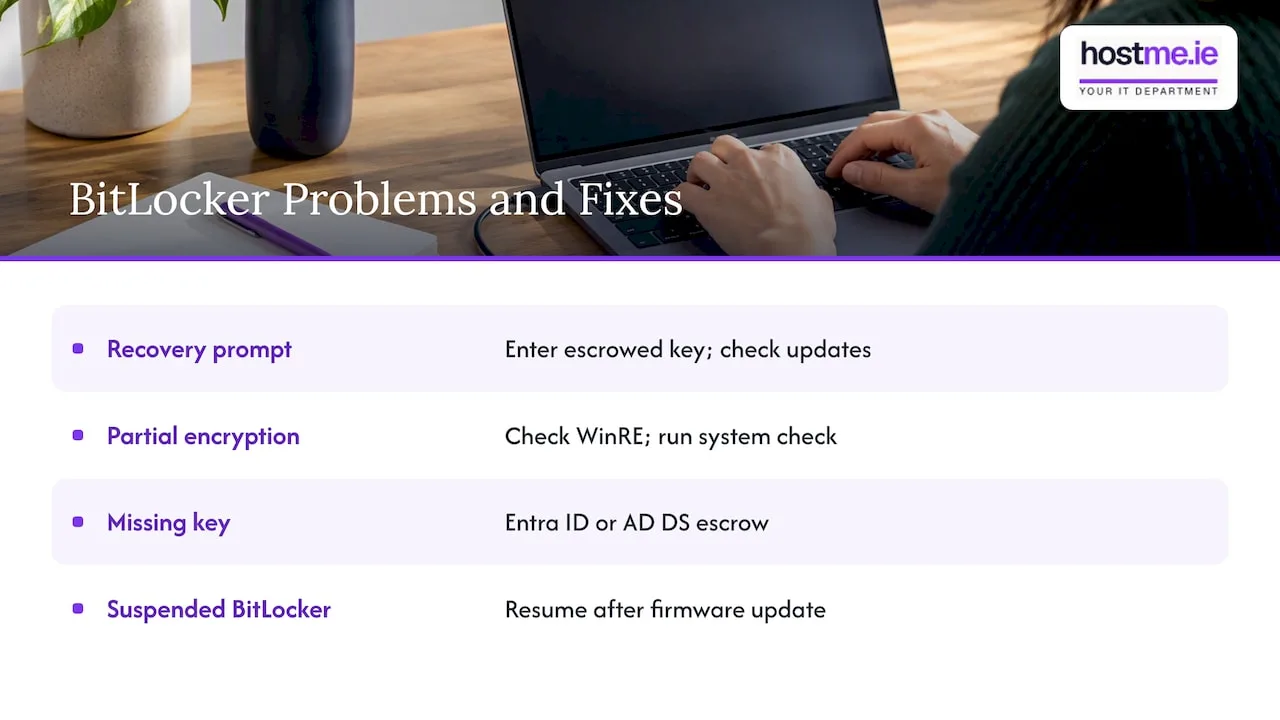
Most BitLocker issues small businesses hit fall into a handful of repeatable categories, and nearly all of them trace back to the same two causes: a missing recovery key or an unexpected firmware change.
Unexpected recovery prompts are usually triggered by a BIOS or firmware update, a changed boot order, or a disconnected TPM, rather than anything malicious. Windows updates are a frequent trigger for this, so it’s worth checking recent update history before assuming a security issue. The fix is almost always entering the escrowed recovery key and then investigating why the prompt appeared.
Encryption stuck at a partial percentage is often down to the WinRE partition being missing or misconfigured. Running the BitLocker system check before wide deployment catches this early rather than mid‑rollout.
Can’t find the recovery key is the scenario good escrow practice prevents: if keys are stored centrally in Entra ID or AD DS with device ownership recorded, retrieval is a lookup, not a crisis.
Suspended and forgotten happens when BitLocker is suspended for a firmware update and nobody resumes it afterwards, leaving key protection suspended even though the data remains encrypted. Build a resume step into your firmware update checklist so this doesn’t slip through.
Managing BitLocker through Microsoft Endpoint Manager
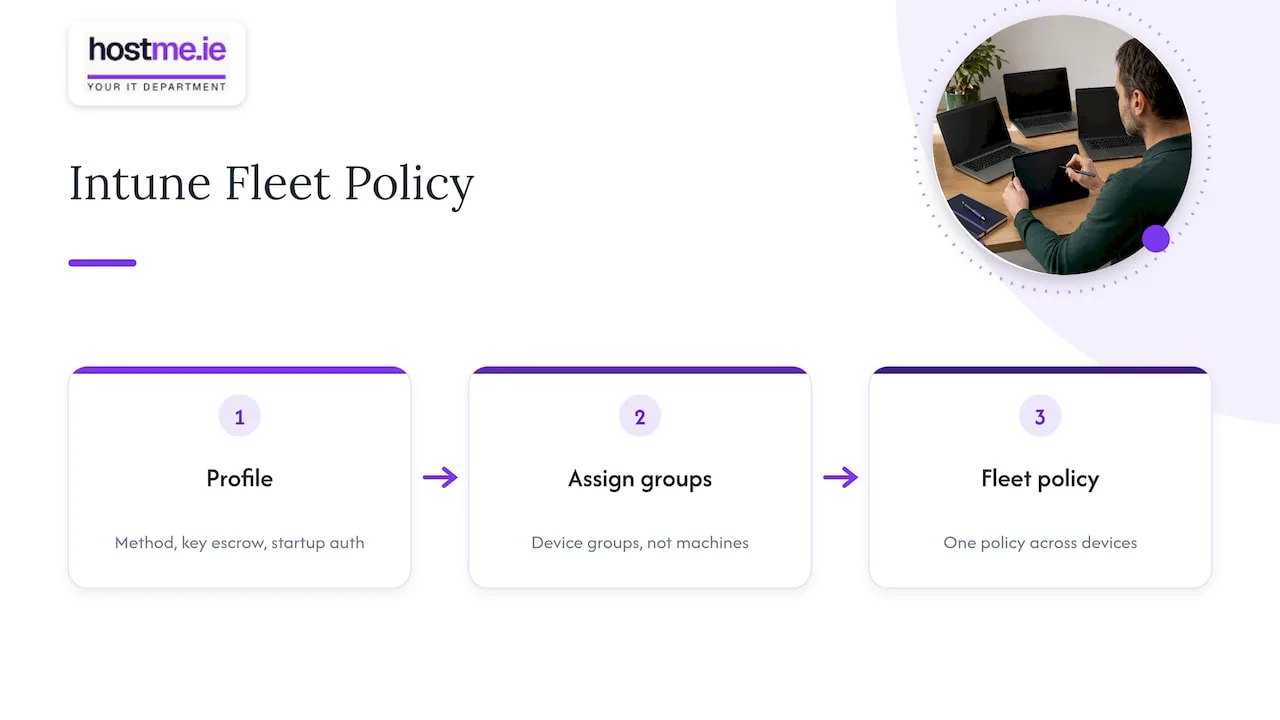
For a small business with more than a handful of devices, managing BitLocker through Microsoft Intune, part of Microsoft Endpoint Manager, is worth the initial setup effort. It replaces device‑by‑device configuration with a single policy applied across the fleet, and gives you reporting on which devices are encrypted, which have failed, and which are still pending.
Set up an endpoint protection configuration profile covering encryption method, recovery key escrow and startup authentication, then assign it to your device groups rather than individual machines. This is also where you’ll choose between silent and standard encryption, based on the prerequisites your inventory confirmed earlier.
Intune’s compliance dashboard becomes your ongoing monitoring tool: a quick weekly glance shows any device that’s dropped out of compliance, which matters far more for a small IT setup without a dedicated security team than it does for a large enterprise with full-time monitoring staff. Pair this with the key rotation device action, which lets an administrator remotely refresh a device’s recovery key after a support event or disclosure, without needing physical access to the laptop.
Quick advice for busy decision-makers
If you only do one thing from this article, test your recovery process before you enable encryption on more than a handful of devices. That single check, confirming a key can actually be retrieved and used, helps avoid a lockout caused by an unavailable recovery key.
Standardise hardware where you can; it makes silent rollouts realistic and cuts support overhead later. And treat any recovery‑key disclosure as a security event worth rotating, not a one‑off inconvenience.
— hostme.ie
How we can help with your BitLocker rollout
Getting BitLocker running properly, with the right licensing, a tested recovery process and sensible policy choices, takes a bit of groundwork most small businesses don’t have time for alongside everything else. We provide hands‑on IT support for Irish sole traders and small businesses, including Microsoft 365 and Intune setup, device management and backup planning, so the pieces fit together rather than being configured in isolation.
If you’d like a hand scoping your rollout, from the device inventory through to recovery key escrow, message us on WhatsApp and we’ll talk through what your fleet needs. Phone and email are also available as alternative ways to reach us.
FAQ
Can I get BitLocker for free?
BitLocker itself has no separate purchase cost: it’s built into Windows Pro, Enterprise and Education editions, so if your devices already run one of those, you have access to it. What you may pay for separately is the management layer, such as Intune, if you want centralised deployment and reporting.
What should I check before relying on BitLocker?
BitLocker is a strong technical control, but it isn’t complete protection on its own. The Data Protection Commission’s microenterprise guidance frames encryption as one measure among several, alongside backups and access controls, within a risk‑based approach rather than a single fix.
How much does BitLocker cost?
There’s no standalone price for BitLocker, since it’s included in qualifying Windows editions rather than sold separately. Costs typically come from management tooling like Intune licensing or from the time needed to plan and roll it out properly, which varies by fleet size and setup.
Is BitLocker mandatory?
BitLocker itself isn’t a legal requirement, but encrypting devices that hold business or personal data is widely treated as a baseline security expectation, including in Irish data protection guidance for small businesses. Whether it’s mandatory for your business depends on your own risk assessment, sector rules and any contractual obligations with clients or suppliers.
Sources
- BitLocker Drive Encryption – Microsoft Learn
- Microenterprises and GDPR – Data Protection Commission (Ireland)