Cloudflare vs Sucuri: Which Suits a Small Business Site?
Cloudflare or Sucuri for your business website? Compare price, WAF, malware cleanup and outage risk, with a plain way for Irish small firms to choose.

Cloudflare and Sucuri both put a firewall in front of your website, but they solve different problems. Cloudflare is mainly a network, DNS and speed service with security built in. Sucuri is a security service first, and its main selling point is that someone cleans your site if it gets infected. For most small business sites, the choice comes down to one question: do you mainly want to stop attacks and speed things up, or do you want a safety net if the site is hacked?
This guide is for sole traders and small firms in Ireland who run a business website, often on WordPress, and have to decide what to put in front of it. We are hostme.ie, one person to contact for practical business IT help, so we cover what each tool does, what it costs, where it falls short and how to decide.
TL;DR
- Cloudflare is the better default for most sites: a free plan with DDoS protection and a basic CDN, paid plans from $20/month billed annually, and fast setup.
- Sucuri is the better fit if your real worry is malware: its Security Platform plans start at $229/year and include malware removal, which Cloudflare does not offer.
- Sucuri’s cheaper firewall plans (from $9.99/month) are protection only, with no cleanup. Check which product you are buying.
- You can use both. Many sites do not need to, and a well-maintained site with good backups needs neither urgently.
- Neither tool replaces updates, strong logins, multi-factor authentication and tested backups.
Table of Contents
- What each service actually does
- Cloudflare vs Sucuri at a glance
- The firewall: how the WAF compares
- Malware: the clearest difference
- Speed and availability
- What it costs over a year
- Which one should you choose?
- Can you use both?
- What neither tool will do
- Our view
- Getting help with the decision
- FAQ
- Sources
What each service actually does
Cloudflare: a network that sits in front of your site
Cloudflare works by routing your site’s traffic through its network. That lets it cache content close to visitors, absorb floods of junk traffic, manage your DNS and filter requests through a web application firewall (WAF). One review describes it as primarily a CDN and DNS service with security features layered on top. That matches how most people use it.
The free plan is real, not a trial. According to Cloudflare’s pricing page, it costs $0 a month, and the research we checked shows it includes unmetered DDoS protection and a basic global CDN. Cloudflare’s own page positions Free for personal or hobby projects that are not business-critical, and Pro for professional sites that are not business-critical either. Take that wording seriously when you decide for a business.
Sucuri: security first, with cleanup
Sucuri sells two product lines. The Security Platform combines monitoring, a firewall and malware removal. The Firewall with CDN plans give you the website application firewall that filters hacks, DDoS attacks and zero-day exploits before they reach your server, but they do not include cleanup.
That split matters. If your site is infected, a firewall-only plan will not remove the malware. A Platform plan is what includes it.
Cloudflare vs Sucuri at a glance
| Point | Cloudflare | Sucuri |
|---|---|---|
| Main strength | Speed, DNS, DDoS absorption | Malware cleanup and CMS-focused security |
| Entry price | Free ($0/month) | Firewall from $9.99/month; Platform from $229/year |
| Paid tiers | Pro $20/month billed annually ($25 monthly); Business $200/month billed annually ($250 monthly) | Platform: $229, $339 and $549 a year |
| Malware removal | Not part of the service | Included in Platform plans |
| Setup | Self-service: add your domain and change nameservers | Sign up, then point DNS at the firewall |
| Best for | Most business sites, busy sites, sites needing speed | WordPress or CMS sites where hack recovery is the worry |
Prices are as published by Cloudflare and Sucuri when we checked, and they are in US dollars. Tiers, limits and billing change, so confirm on the vendor page before you buy. Irish VAT treatment is something to confirm on the checkout or with your accountant.
The firewall: how the WAF compares
Both products inspect incoming web requests and block ones that look malicious. The differences are in how much you can tune and what you get on each plan.
On Cloudflare, the managed rulesets you can deploy depend on your plan. So the free plan gives you a basic WAF, and paid plans add more rule sets. One independent write-up notes the $20/month Pro plan adds more WAF rulesets and better analytics. You get a lot of control, but you also need to understand what you are looking at. A rule set that is too strict can block your own customers or your contact form.
Sucuri’s firewall is more of a managed service. It is built around the common CMS attacks, and it is aimed at site owners who want protection without writing rules. A comparison site that scores the two on WAF and DDoS criteria puts Cloudflare ahead overall, 80 against 63. Treat scores like that as one opinion, not a verdict. They weigh criteria that may not matter to a five-page business site.
For most small sites, the practical difference is this:
- Cloudflare gives you more tools and a free starting point, but you configure and monitor them.
- Sucuri gives you fewer decisions and a human response if something goes wrong, at a higher entry cost.
Malware: the clearest difference
If your site is already infected, Cloudflare will not clean it. It filters traffic. It does not scan your files and remove malicious code. Sucuri’s Platform plans do include cleanup, and that is the reason many WordPress owners choose it.
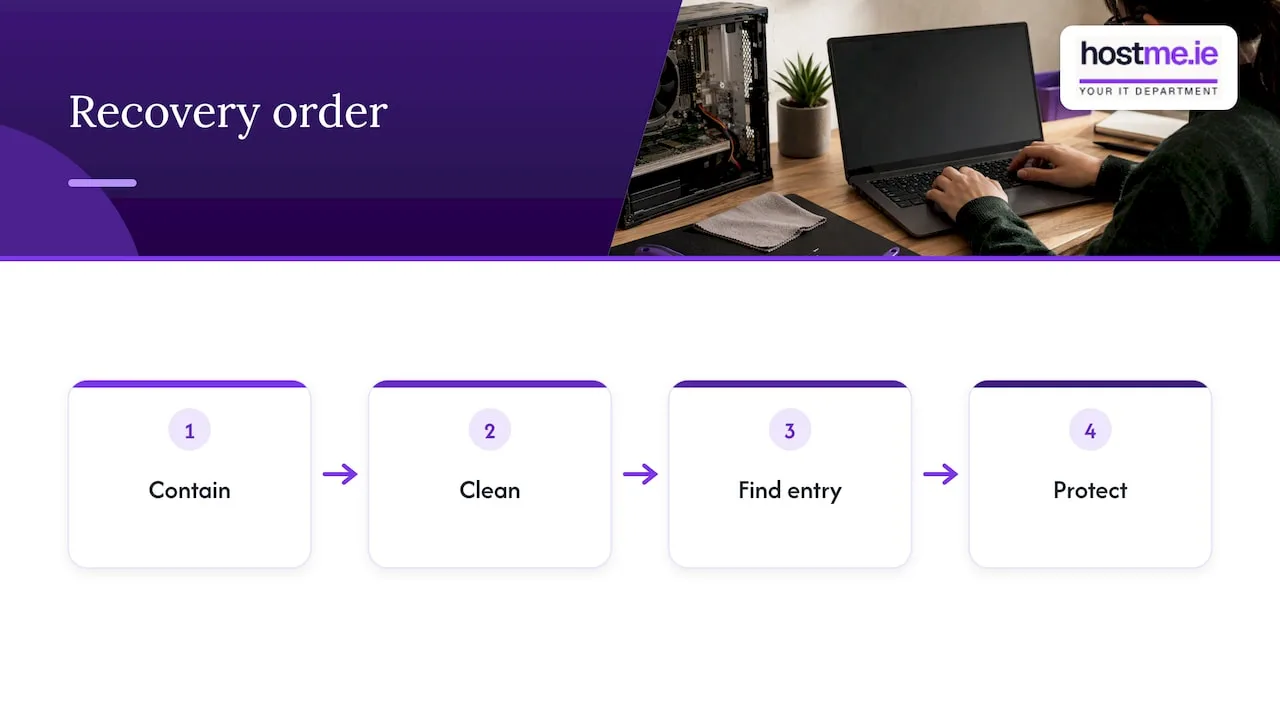
That said, a firewall in front of an infected site does not fix the infection. If you suspect your site has been compromised, read our guide on containing and recovering a hacked WordPress site first. The order of work matters: contain, clean, find the way in, then protect.
A cleanup service is also not a substitute for backups. A clean, recent backup from before the problem is often the quickest and most reliable way back. Our piece on business cloud backup in Ireland explains what to keep and how often to test restores.
Speed and availability
Cloudflare’s CDN is its headline benefit. Pages are cached and delivered from locations near your visitors, which usually helps load times for sites with visitors in several countries. If your customers are mostly in Galway and Mayo and your host is in Ireland, you will notice less gain than a US-facing site would.
There is a trade-off with scale. Cloudflare serves a large share of the internet: one 2026 analysis puts it at around 24.7% of websites in August 2026, citing W3Techs. That analysis also notes that its outages, including those in late 2025 and mid-2026, affect a wide range of sites at once. When Cloudflare has a bad day, your site can have one too, even if your own server is fine. Sucuri’s footprint is smaller and more CMS-focused, which the same source says makes it less exposed to global proxy-layer outages.
This is not a reason to avoid Cloudflare. It is a reason to know your exit plan. Keep your DNS records documented, know where your domain is registered and know who can change nameservers if you ever need to route around a problem. Our domains service is one place that work sits.
What it costs over a year
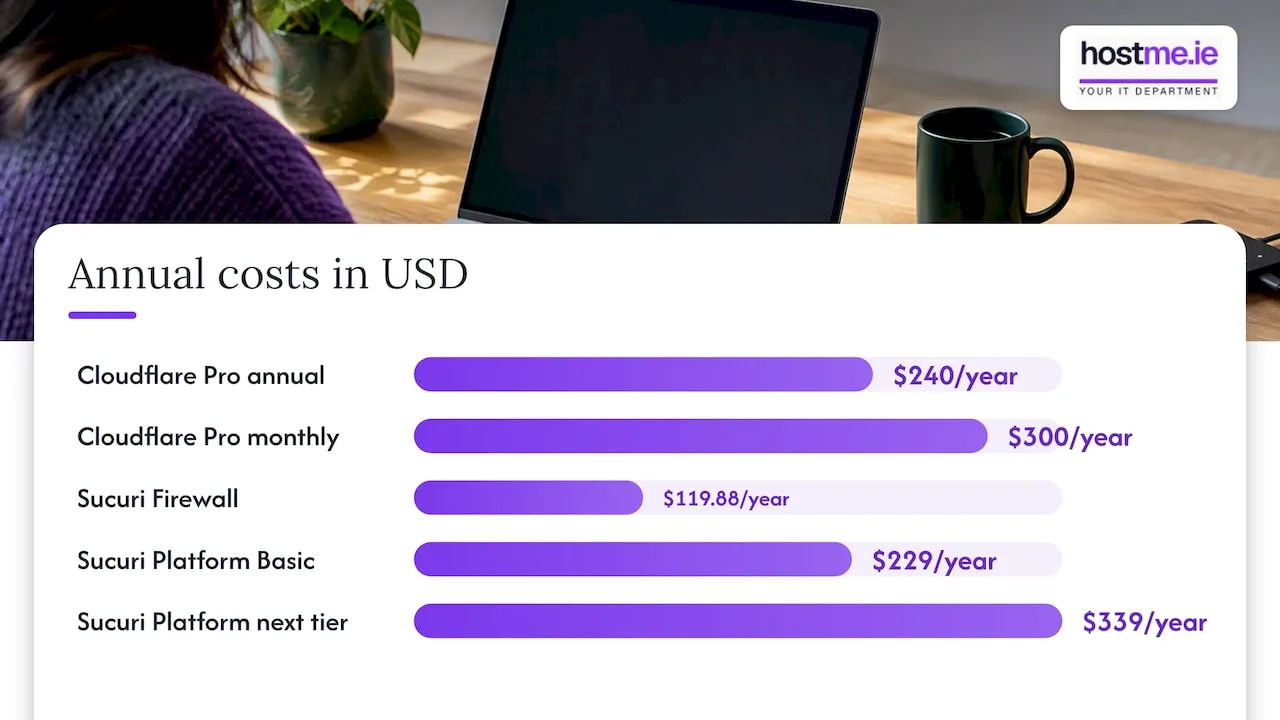
Here is a simple way to compare, using the published prices. These are worked figures, not quotes.
| Scenario | Published price | Over 12 months |
|---|---|---|
| Cloudflare Free | $0/month | $0 |
| Cloudflare Pro, billed annually | $20/month | $240 |
| Cloudflare Pro, billed monthly | $25/month | $300 |
| Sucuri Firewall, entry plan | $9.99/month | $119.88 |
| Sucuri Security Platform, Basic | $229/year | $229 |
| Sucuri Security Platform, next tier | $339/year | $339 |
The yearly totals are simple multiplication of the published monthly or annual price. Cloudflare’s Business plan, at $200/month billed annually, is more than most sole traders will ever need.
The cheapest option is not always the cheapest outcome. A free plan you never configure protects less than you think. A $229 plan you never read the reports for protects less than you hope. Budget some time, or someone’s time, for set-up and for checking alerts.
Which one should you choose?
Use these criteria rather than a vendor ranking.
- Your site is new or clean, and you want speed and basic protection. Start with Cloudflare Free or Pro. It is quick to set up and costs little.
- Your site has been hacked before, or you run several WordPress plugins you cannot keep up with. Sucuri’s Platform is worth a look because cleanup is included. Check the plan’s site limits and scan frequency first.
- You only need a firewall. Both work. Compare the firewall-only plan from Sucuri with Cloudflare Pro on what you can configure and what support you get.
- You take card payments on your own site. Look at how your payment provider handles card data, and speak to your payment provider about your compliance questionnaire. A WAF can help, but it does not settle compliance on its own.
- You have no one to look after it. Pick the option that someone will actually monitor. An unmonitored tool is a false comfort.
A third path also exists. Some hosting plans include server-level protection, backups and updates, so you may not need to add a separate firewall service at all. That is worth checking before you pay for either tool. See our Irish web hosting page for how we approach it.
Can you use both?
Yes, but it is rarely needed on a small site. Sucuri documents how its firewall works when Cloudflare is also in place, so the combination is supported. In practice, stacking two proxies adds complexity: two sets of DNS settings, two places to debug a blocked visitor and two bills. Choose one unless you have a clear reason.
What neither tool will do
A firewall is one layer. It does not:
- Update your WordPress core, themes or plugins.
- Stop someone logging in with a stolen or reused password.
- Protect your email or your Microsoft 365 accounts.
- Replace a tested backup.
- Remove the need to delete plugins you no longer use.
For logins and accounts, multi-factor authentication does more than most firewall settings. For the wider picture of what a small office network needs, our small business firewall checklist is a useful companion, and our Security & SSL service covers the website side.
Our view
We get asked this question a lot in a different form: “Do I need to pay for one of these?” Our honest answer is that it depends on how much the website matters to your income and who looks after it.
For a brochure site on decent hosting with current updates and backups, Cloudflare’s free or Pro plan is usually a sensible, low-cost layer. We would rather you spend your first hour on updates, backups and logins than on comparing firewalls.
For a site that earns money directly, or that has been hacked once already, we would pay more attention to cleanup and recovery. That is where Sucuri’s Platform has a clear job. But we would still insist on off-site backups, because a backup you control is always your fastest way back.
The thing we see go wrong is not the choice of tool. It is the set-up nobody owns: nameservers changed years ago, an unknown login at the registrar, a WAF rule blocking the contact form and nobody noticing. Whichever service you choose, write down who owns the account, where the DNS is and who to call. We would rather help you work that out before there is a problem.
— hostme.ie
Getting help with the decision
If you would rather not work this out alone, we can look at your site, your hosting and your DNS, then recommend what fits and set it up. Scope and cost are agreed before work begins. Ad-hoc help and separately scoped projects are available. Managed support has an initial 12-month term, and we agree the terms with you first.
The next step is to tell us about your site through our Security & SSL page. You can also reach us by WhatsApp, phone or email, whichever you prefer. If a site is already hacked, start with the recovery guide while you get in touch.
FAQ
Is Cloudflare or Sucuri better for WordPress?
It depends on the problem. Cloudflare is stronger on speed, DNS and DDoS absorption, and it has a free tier. Sucuri is more focused on CMS security and includes malware removal in its Platform plans. If you have been hacked before, that cleanup is often the deciding factor.
Does Cloudflare remove malware from a website?
No. Cloudflare filters traffic and can block many attacks, but it does not clean infected files on your server. If your site is already compromised, you need a cleanup process first, then protection. Sucuri’s Platform plans include removal, and a developer or IT support provider can also do it.
Is Sucuri’s cheaper plan enough?
The firewall plans, from $9.99/month, protect your site but do not include malware cleanup. The Security Platform plans start at $229/year and do include it. Choose based on whether you want cleanup included, and check each plan’s site limits before you buy.
Can Cloudflare go down and take my site with it?
Yes, if your traffic is routed through it and it has an outage. Cloudflare serves a very large share of the web, so incidents can affect many sites at once. Keep your DNS records documented and know how to change them in an emergency.
Do I need either if my host already has security?
Not necessarily. Many hosts include server-level protection and backups. Ask your host what is covered, then decide whether the extra layer is worth the cost and the extra set-up.
Sources
- Cloudflare pricing
- Sucuri Website Security Platform
- Sucuri Web Application Firewall
- Cloudflare WAF managed rules documentation
- Sucuri docs: support for Cloudflare
- Sucuri vs Cloudflare 2026, HostPro Reviews
- Cloudflare WAF vs Sucuri, FAUN toolbox
- Stop trying to fail over from Cloudflare
- Cloudflare vs Akamai market share 2026