Teams vs Zoom: Which Suits a Small Irish Business?
Teams or Zoom for your small business? Compare meetings, chat, limits, cost, security and fit with Microsoft 365, with a clear way to choose in Ireland.

If your business already pays for Microsoft 365, Microsoft Teams is usually the better choice. It is built in, it keeps chat and files next to your meetings, and you may be paying for it already. Zoom is the better choice if most of your calls are with customers or suppliers who just want to click a link and join, or if your team does not use Microsoft 365 at all.
That is the short answer. The rest of this guide shows how to test it against your own business: who you meet, what you already pay for, and who will look after the set-up.
TL;DR
- Already on Microsoft 365? Use Teams. Meetings, chat, calendar and files sit together, and the cost is mostly covered by what you pay for already.
- Mostly meeting people outside your business? Zoom is simple for guests and built around the meeting itself.
- Free plans differ. Per one Irish IT comparison, Teams free allows 60-minute group meetings and Zoom free allows 40 minutes.
- Security settings matter more than the brand. Lobbies, multi-factor authentication and recording rules apply on both.
- Running both is fine, but only if you have a reason. Two tools means two sets of accounts to look after.
Table of Contents
- What each tool is for
- Side-by-side comparison
- Meetings: the part most people use
- Chat, files and day-to-day teamwork
- What they cost
- Security and privacy
- AI features
- Disadvantages to weigh
- How to choose: a five-minute check
- Can you use both?
- Perspective: what we see with small businesses
- Help with set-up
- FAQ
- Sources
What each tool is for
They look alike. Both do video meetings, chat, screen sharing and whiteboards. The difference is where each one started.
Teams is a collaboration hub inside Microsoft 365. Chats stay in place after a meeting ends, and files are shared through SharePoint and OneDrive. Zoom started as a meeting tool and added chat, whiteboards and more later. Zoom Workplace now covers meetings, chat, phone, mail and calendar, docs, whiteboard and more, depending on plan. That comparison of focus, hub versus meeting-first, is set out in the same Irish comparison.
For a small business, that translates into two questions:
- Do your staff spend their day inside Outlook, Word, Excel and SharePoint?
- Do you spend your day on calls with people who do not have your tools?
If the first answer is yes, Teams fits. If the second is yes, Zoom deserves a look.
Side-by-side comparison
| Area | Microsoft Teams | Zoom |
|---|---|---|
| Best known for | Internal collaboration inside Microsoft 365 | Meetings with people outside your business |
| Chat and files | Persistent chat, files via SharePoint and OneDrive | Chat, docs and whiteboard included in Workplace |
| Free plan group meetings | 60 minutes | 40 minutes |
| Paid meeting length | Up to 30 hours | Up to 30 hours on listed Workplace plans |
| Participants (paid) | 300 on Business plans, 1,000 on Enterprise | 100 on listed Workplace plans, 300 on Business, 1,000 on Enterprise |
| Admin | Microsoft 365 admin centre | Zoom admin portal |
| AI | Copilot, bundled or as an add-on | AI Companion on paid plans |
| Best fit | Businesses already on Microsoft 365 | Client-facing, mixed-tool businesses |
The limits above come from Microsoft’s meeting capacity comparison, Zoom’s Workplace page and the Irish comparison. Plans change, so check the vendor page before you buy.
Meetings: the part most people use
For a normal small-business call, both work well. You will not notice big differences in a five-person catch-up.
The differences show up at the edges:
- Guests. Zoom has a reputation for being easy for people outside your business to join. Teams can also be joined from a browser: Microsoft says you can use Teams in a web browser without installing the app. Still, guests who have never used Teams may need a minute more.
- Breakout rooms. Both support them. A University College London comparison notes that Teams has lower maximum attendee and room capacities, and that participants cannot choose their own breakout room. If you run training sessions or workshops, that matters. For most small teams, it does not.
- Webinars and large events. If you present to big audiences regularly, check the plan limits on both before you commit.
- Meeting length. On paid plans, the 30-hour cap is not a practical limit. On free plans it is: Zoom’s free group meetings end after 40 minutes for everyone on the call.
If a customer call keeps getting cut off, that is a plan problem, not a technical fault. Upgrade the host’s plan or move the call to a tool you already pay for.
Chat, files and day-to-day teamwork
This is where Teams pulls ahead for a business that already uses Microsoft 365. A project can have its own channel, with chat, shared files and meeting recordings in one place. Microsoft also lists calendar connection to Outlook or Google, file sharing, task assignment and polls on its Teams page.
Zoom’s chat and docs work, but if your files and email already live in Microsoft 365, Zoom becomes a second place to look. A common pattern is that a business adopts Zoom for meetings, then finds that documents still travel by email attachment. That is not Zoom’s fault, but it is a real cost in time.
If you are comparing Teams with a chat-first tool instead, see our guide to Teams vs Slack for a small Irish business.
What they cost
Cost is where the answer often becomes obvious.
Teams
Teams is included in Microsoft 365 business plans. Microsoft Ireland lists Microsoft 365 Business Basic at €6.07 per user per month, paid yearly, excluding VAT. It includes business email, Teams calling and meetings, and more than 10 additional apps. So if you are choosing a first business platform, you get email, files and Teams together.
If you only want meetings, Microsoft’s Teams Essentials plan is aimed at small businesses, with meetings up to 30 hours, up to 300 participants and 10 GB of cloud storage per user. Microsoft also lists Teams Enterprise EEA at €7.41 per user per month, paid yearly, excluding VAT, with up to 1,000 participants. Prices were as listed on Microsoft Ireland on 24 October 2026 and can change.
For the full set of Excel, PowerPoint, Outlook and a business email domain, Microsoft points to Microsoft 365 Business Standard on the same Teams pricing page.

Zoom
Zoom’s small-business plans split by size: Workplace Pro for 1 to 9 users and Business for 10 to 250 users. Business includes 300 participants per meeting, unlimited whiteboard boards, a scheduler, single sign-on and managed domains.
Zoom says paid Workplace plans start at $14.16 per user per month and include AI meeting summaries and My Notes. That figure is in US dollars, so check the euro price and VAT on Zoom’s own checkout before you budget.
What this means in practice
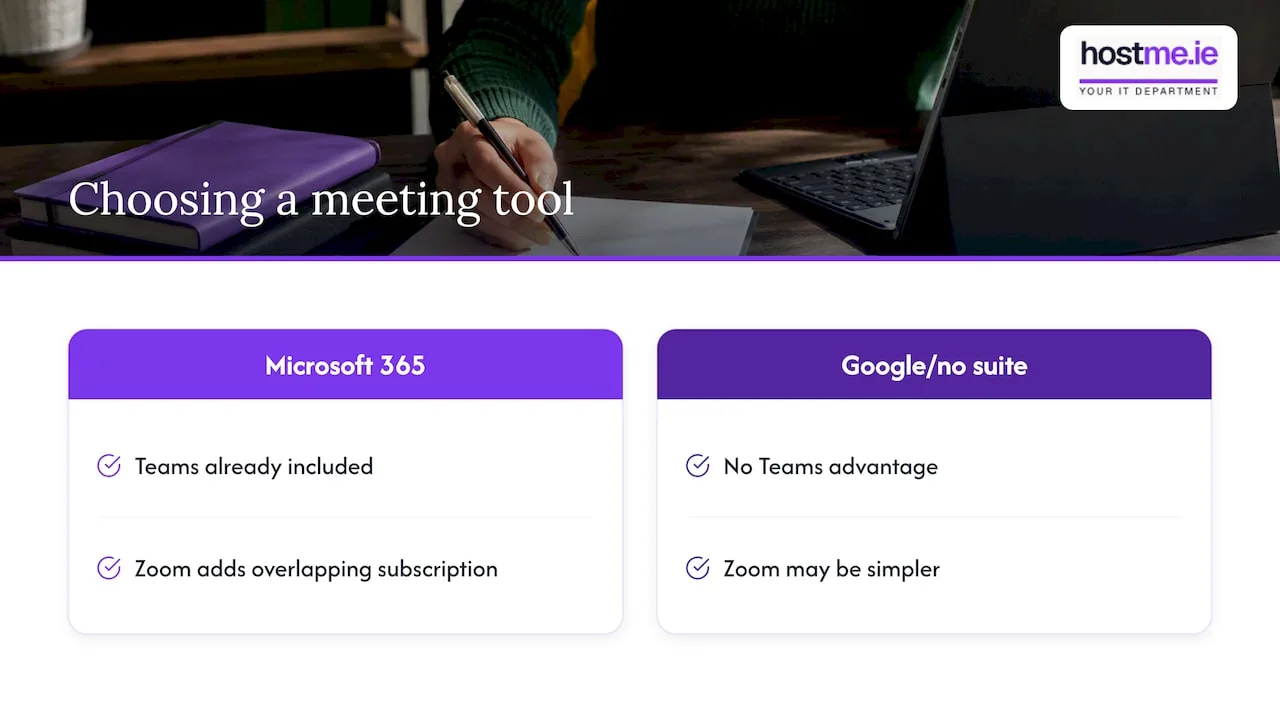
A worked example, using the figures above and not a real client: a business with five staff on Microsoft 365 Business Basic at €6.07 each already has Teams. Adding Zoom means paying a second per-user subscription for a tool that overlaps with the first. Unless you can name the meetings Zoom handles better, you are paying twice for similar features.
The reverse also holds. A business on Google Workspace, or with no suite at all, has no Teams advantage. There, Zoom may be the simpler choice. If you are weighing up the suite itself, read Microsoft 365 vs Google Workspace for business.
Security and privacy
Both tools are used by large organisations, so neither is unsafe by default. Most problems on small-business calls come from settings, not software.
Teams ties into Microsoft’s wider security tools, including Purview, Defender and Intune, according to the Irish comparison, which also says Zoom meets SOC 2, ISO 27001 and HIPAA standards on paid plans. A small business is unlikely to use most of those controls, but Teams being managed in the same admin centre as your email and devices does simplify things.
Whichever you pick, a few habits matter. An Irish security firm’s guidance for SMEs recommends:
- turning on multi-factor authentication for every account
- using waiting rooms or lobbies so you decide who enters
- avoiding Personal Meeting IDs for sensitive meetings
The same source notes that data protection rules, including GDPR, expect you to tell participants when a meeting is recorded, and to store recordings securely with restricted access. If you record client calls, tell people at the start and decide who can open the recordings afterwards. Recordings saved in Microsoft 365 are covered by the same permissions as your other files, which is one more reason to keep them tidy. If you have never checked whether those files are backed up, see our guide to Microsoft 365 backup for small businesses.
If you have any doubt about GDPR obligations for your specific business, ask the Data Protection Commission or a solicitor. We can set up the tools, but we do not give legal advice.
AI features
Both platforms now offer AI meeting help, such as summaries and notes. Zoom says AI Companion is included on eligible paid plans at no extra cost, though that is Zoom’s own claim and not an independent test. On the Microsoft side, Copilot is bundled with Business Standard with Copilot or sold as an add-on on other plans.
Before paying for either, ask what you would use it for. Meeting notes are a sensible first task. Our approach to AI is to start with one useful task and check it saves time before adding more.
Disadvantages to weigh
No tool is perfect. These are the honest trade-offs.
Teams
- It has more to learn. Channels, teams, chats and files can confuse new staff without a short introduction.
- It assumes Microsoft 365. Outside that suite, much of the advantage disappears.
- Guests who have never used it may need a few minutes to join the first time.
- Settings live in the Microsoft 365 admin centre, so someone needs to look after them.
Zoom
- The free plan stops group meetings at 40 minutes.
- It is another subscription and another login if you already pay for Microsoft 365.
- Files and email stay elsewhere, so documents may end up scattered.
- Its AI and integration claims come from Zoom itself, so test them on your own calls.
The trade-offs are real, but none is a deal-breaker. They are things to plan for.
How to choose: a five-minute check
Answer these in order. Stop at the first clear answer.
- Do you pay for Microsoft 365 now? If yes, start with Teams. Only add Zoom if a clear need remains.
- Do you pay for Google Workspace instead? Google Meet is already included, so compare it too before adding either one.
- Who do you meet most often? If it is customers, suppliers or the public, try Zoom for a few weeks alongside Teams and see which your guests find easier.
- Do you need chat and shared files for staff? Teams does this inside the suite you may already own.
- Who will set it up? Whichever tool you choose, someone must manage accounts, lobby rules and recording settings. Budget for that.
A useful test is to run one real client meeting on each tool. Ask the guest afterwards whether joining was easy. That tells you more than any feature table.
Can you use both?
Yes. Teams and Zoom can work side by side, and some businesses do exactly that: Teams for staff, Zoom for outside calls. Zoom’s own comparison page describes integrations with Teams, calendars and files.
The cost is complexity. You will have two sets of links in calendar invites, two places for recordings and two sets of permissions. If you do use both, pick one as the default for staff so nobody has to ask which link to send.
Perspective: what we see with small businesses
We support Microsoft 365 and business email for Irish sole traders and small businesses, so we start from your existing set-up and not from a feature list. When a business already has Microsoft 365, Teams is usually the practical answer, because the licence, the calendar and the files are already there. Our work is making it tidy: sensible channel names, lobby and recording settings, and a short walk-through so staff are not guessing.
When a business has a real client-facing reason for Zoom, we say so and help it work alongside the rest. We would rather you pay for one tool that gets used than two that overlap. Scope is agreed before any work begins.
— hostme.ie
Help with set-up
If you want Teams set up properly, or want a second opinion before you pay for another subscription, we can help. Our Microsoft Teams admin service covers the settings that matter: who can join, how meetings are controlled and where files are kept. You deal with one person to contact, with remote support and on-site work where agreed. For wider help with your systems, see our IT support page. The simplest way to start is a WhatsApp message describing what you use now. Phone and email also work.
FAQ
Is Microsoft Teams similar to Zoom?
Yes, in the basics. Both offer video meetings, chat, screen sharing and whiteboards. Teams is built as a hub inside Microsoft 365, while Zoom is meeting-first and often chosen for external calls.
Is Zoom only free for 40 minutes?
Group meetings on Zoom’s free plan end after 40 minutes, and the limit follows the host’s account. Paid plans remove that cap. If you keep hitting it, either upgrade the host or use a tool you already pay for.
Which is cheaper for a small business?
If you already have Microsoft 365, Teams is effectively included, so it is usually cheaper. Microsoft Ireland lists Business Basic at €6.07 per user per month, paid yearly, excluding VAT. Zoom is a separate subscription, so compare it with what you already pay.
Do I need to install Teams to join a meeting?
No. Microsoft says Teams can be used in a web browser, so guests can join without installing the desktop or mobile app. Hosts and staff are better off with the app for the full feature set.
How do I keep meetings secure?
Turn on multi-factor authentication, use a lobby or waiting room, and avoid Personal Meeting IDs for sensitive calls. Tell participants before you record and store recordings with restricted access. These steps apply on both tools.
Sources
- Zoom vs Microsoft Teams: Which Should You Choose in 2026? (Digicom)
- Microsoft Teams for enterprise (Microsoft Ireland)
- Microsoft Teams pricing for business (Microsoft Ireland)
- Microsoft 365 business products (Microsoft Ireland)
- Meetings and events feature and capacity comparison (Microsoft Learn)
- Download Teams desktop and mobile apps (Microsoft)
- Zoom Workplace (Zoom)
- Zoom AI for small business (Zoom)
- Zoom AI note taker (Zoom)
- Microsoft Teams vs Zoom Workplace (Zoom)
- Comparison of Zoom and Microsoft Teams (UCL)
- Securing Zoom, Teams and Google Meet for Irish SMEs (Pragmatic Security)
- Is there a Zoom meeting time limit? (Read AI)