Teams vs Slack: Which Suits a Small Irish Business?
Teams or Slack for a small Irish business? Compare euro pricing, meetings, integrations and running both, with a clear rule for choosing in 2026.

For most small Irish businesses already paying for Microsoft 365, Microsoft Teams is the sensible choice, because chat, meetings and files come with the licence you already have. Slack is the better pick if your team lives in chat all day, uses a wide mix of third-party apps, or runs on Google Workspace instead of Microsoft. There is no universal winner, so the decision comes down to the tools you already use.
This guide compares the two on cost in euro, meetings, integrations, phone calling and day-to-day running. It also covers what happens if you try to use both.
TL;DR
- Already on Microsoft 365? Use Teams. It is included in Microsoft’s business plans, so you are not paying twice for chat.
- Chat-first team, Google Workspace, or lots of niche apps? Slack is worth a trial.
- Slack is not automatically cheaper. Teams Essentials is €3.50 per user a month, paid yearly, before VAT. Slack Pro is €6.75 on annual billing.
- Running both is possible but messy unless you name one place for decisions, files and customer requests.
- Decide on the whole stack: email, files, calendar, phone and security, not just the chat app.
Table of Contents
- The short answer by type of business
- What each tool is built for
- What it costs in Ireland
- The free Slack plan has a catch
- Meetings and calls
- Integrations and automation
- Can you use Slack and Teams together?
- Our view at hostme.ie
- A simple way to decide
- Setup matters more than the choice
- Getting help with Teams
- FAQ
- Sources
The short answer by type of business
Most of the Teams vs Slack decision is made before you compare a single feature. Computerworld’s conclusion is that your existing technology should drive the choice. Teams is especially strong for a Microsoft 365 business. Slack suits organisations that want best-of-breed tools, use Google Workspace, or rely heavily on Salesforce.
Here is how that looks for typical small businesses:
| Your situation | Likely better fit |
|---|---|
| Email in Outlook, files in OneDrive or SharePoint, Word and Excel daily | Teams |
| Sole trader who mostly talks to customers, with one or two helpers | Teams, or neither (email and WhatsApp may be enough) |
| Google Workspace for email and docs, and a team that chats all day | Slack |
| Many specialist apps (project tools, support desks, developer tools) | Slack |
| Frequent video meetings with customers or suppliers who use Microsoft | Teams |
| Need a business phone number inside the same app | Teams, with a separate calling plan |
If you recognise yourself in the first row, you can probably stop reading the feature lists and spend your time on setup instead. A well-configured Teams is worth more than a better tool left half-used.
What each tool is built for
The two products are aimed at slightly different ways of working.
Slack is messaging-first. Conversations live in channels, you can join a channel for a project or topic, and a large app directory plugs into them. Slack describes itself as pulling data, apps and conversations into one view. Treat that as the vendor’s pitch.
Teams combines chat, meetings, calling and file sharing in one place. Salesforce’s own comparison describes Teams as bundling those with Microsoft security controls. Salesforce owns Slack, so read its comparison as a positioning view and check claims elsewhere.
Reviewers say much the same. In G2’s comparison, Slack scores higher for integrations (9.0 against 8.7), mobile app (9.1 against 8.8), live chat (9.5 against 9.2) and desktop app (9.5 against 9.1). Teams scores higher for video conferencing (8.9 against 8.1). G2 shows 15,974 Teams reviews at 4.4 out of 5 and 34,263 Slack reviews at 4.5 out of 5.
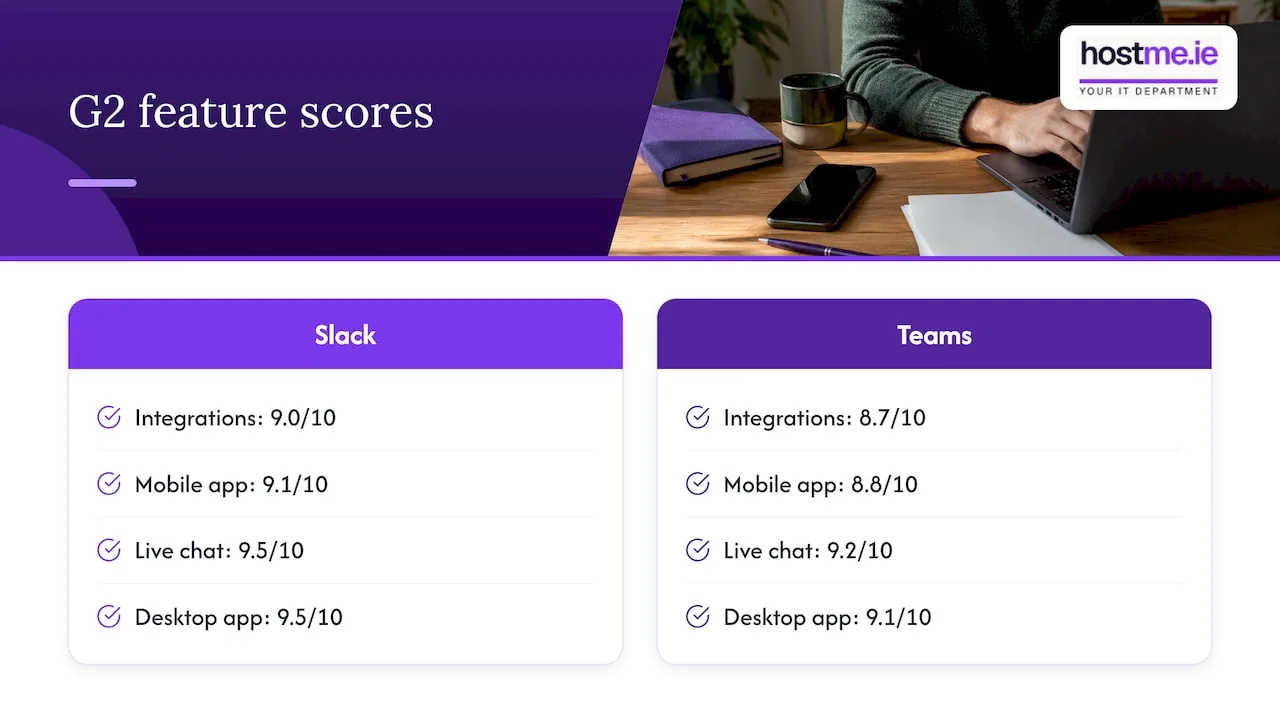
Those are review-platform scores, not a guarantee of fit. A small business should test with its own phones, laptops and habits before paying for anything.
What it costs in Ireland
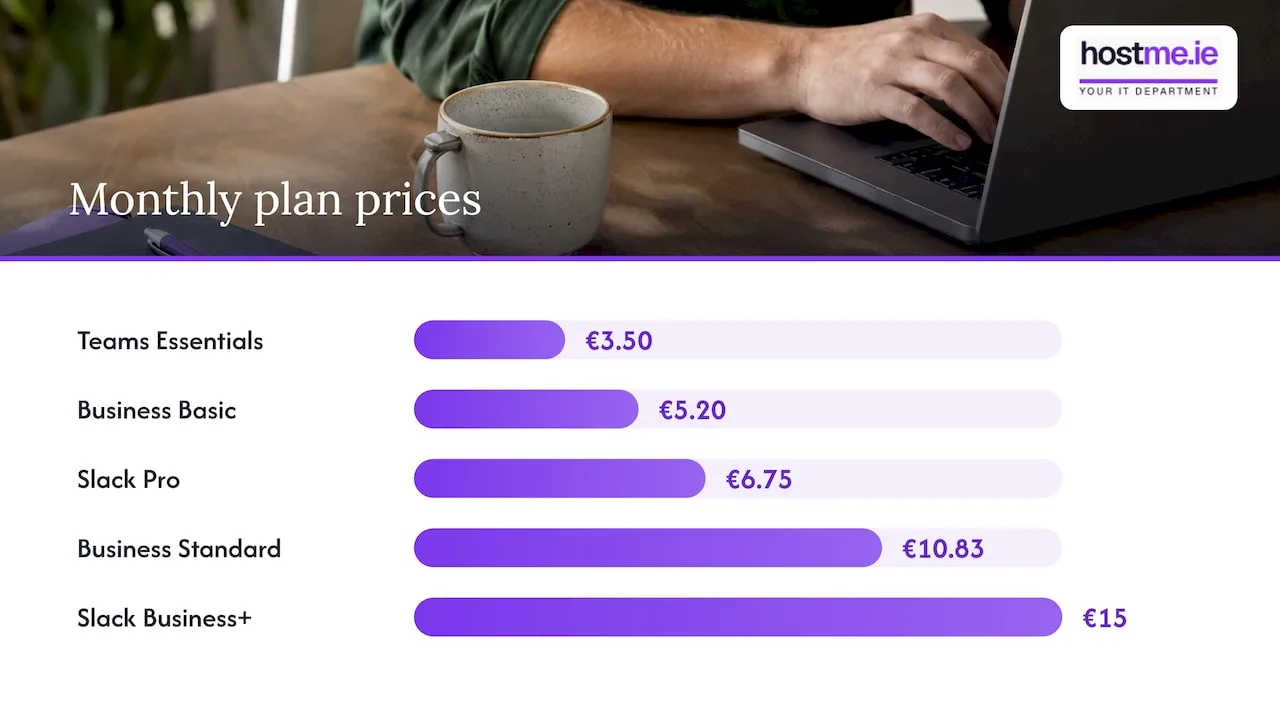
Price is where many small businesses go wrong, because they compare a chat licence with a whole suite.
All figures below are per user, per month, on annual billing, and exclude VAT. They were the published prices when we checked in October 2026, and vendors change them.
| Plan | Price per user/month | What you get |
|---|---|---|
| Teams Essentials | €3.50 | Chat, meetings, 10 GB storage per user |
| Microsoft 365 Business Basic | €5.20 | Teams plus Microsoft 365 web and mobile services |
| Microsoft 365 Business Standard | €10.83 | Adds desktop Office apps |
| Slack Pro | €6.75 | Messaging, channels, integrations |
| Slack Business+ | €15 | Adds more advanced features |
Sources: Microsoft’s Irish Teams business plans page for the Microsoft rows, and Slack’s pricing summarised by meetergo for Slack. Microsoft’s Teams Essentials page confirms the €3.50 figure, billed yearly and excluding VAT.
A few things follow from this:
- Slack is not automatically cheaper than Teams. Teams Essentials undercuts Slack Pro on price per user.
- Business Basic and Standard include more than chat. They add Microsoft 365 services that Slack does not replace. If you would otherwise buy email and file storage elsewhere, Microsoft can be better value.
- Slack makes sense on cost if you already have email and documents covered by Google Workspace or another provider, and you only need the chat layer.
- Monthly billing costs more. The meetergo summary lists Slack Pro at €8.25 on monthly billing and Business+ at €18.
- Check where your data sits. The same source says EU data residency on Slack starts at the Business+ tier. If where your data is stored matters to your customers, check the current terms before you buy.
A worked example, clearly hypothetical: a business with five staff on Slack Pro pays 5 × €6.75 = €33.75 a month before VAT, on top of whatever it pays for email and documents. The same five on Microsoft 365 Business Basic pay 5 × €5.20 = €26 a month before VAT, with email, storage and Teams included. Your real bill depends on seats, add-ons, VAT and discounts, so treat this only as arithmetic on the published prices.
The free Slack plan has a catch
Slack has a free plan, and it looks attractive for a tiny team. The cost is less obvious than the price.
G2 reviewers point to restricted message history and fewer advanced features on the free tier. That matters more than it sounds. A quote agreed in a channel, a supplier’s delivery instructions or a customer’s decision can drop out of reach after a while.
Before choosing any free plan, ask:
- How far back do we need to search?
- Do we need to work with people outside the business?
- Which integrations do we need, and are they included?
- What happens when we outgrow the free plan?
If the answers are uncomfortable, a paid plan from day one is cheaper than migrating later.
Meetings and calls
This is where Teams pulls ahead for many small firms. G2 reviewers rate its video conferencing higher, and it is likely to be the app your accountant, supplier or public body invites you to. Even a business that prefers Slack for daily chat often ends up joining Teams meetings.
Phone calling needs separate thought. Microsoft’s Ireland availability page says Calling Plans can be bought in Ireland, with domestic, international and pay-as-you-go options. A calling plan is a separate decision and a separate cost from the chat licence. If you want your existing business number inside Teams, confirm number porting and calling requirements before you choose a licence.
Slack can launch and join Teams calls through an integration, so a Slack-first business is not shut out of Teams meetings.
Integrations and automation
Slack’s strength is its breadth of connected apps and the quality of its chat experience. If your day depends on a specific project tool, support desk or developer tool, check that it has a good Slack connection and a good Teams one. Both platforms support many apps, so look at the exact apps you use rather than the headline count.
Teams’ strength is how closely it ties into Microsoft 365: Outlook calendars, files in SharePoint and OneDrive, and Planner-style task tools. If you run Dynamics 365 Sales Hub or Customer Service Hub, the Microsoft connection is a real advantage, because your records and conversations sit in the same family of products.
Can you use Slack and Teams together?
Yes, but it is not a single shared workspace. Zapier documents a Slack integration for setting up and joining Teams calls from Slack. Relaying messages between the two may need a separate interoperability tool.
If you do run both, decide this first:
- Where do decisions live? Pick one system of record.
- Where do files live? One place, not two.
- Where do customer or supplier requests go? A single channel or inbox.
- Who owns notifications? Otherwise people mute both and miss things.
Test permissions, threads, edits, files and notifications with a small group before rolling it out. Running two chat tools can mean more app switching and duplicate conversations. For a business of under ten people, we would normally suggest choosing one.
Our view at hostme.ie
We are one person to contact for small business IT, and the pattern we see in this decision is simple: the chat app is rarely the real problem. The problems are who has access to what, whether files are in one place, and whether anyone has set up the tool properly.
So we start with your existing setup. If you use Microsoft 365, Teams is already there, and getting value from it is mostly a matter of configuration: sensible team and channel structure, guest access rules, file sharing and who can create what. If you use Google Workspace, Slack is a fair option and we would look at it alongside Google’s own tools before you commit.
Our practical advice:
- Choose by your email and document system first, and chat second.
- Trial with two or three people for a couple of weeks, using real work.
- Agree a short written rule on where things go.
- Set permissions and guest access before staff start inviting people.
We support Microsoft Teams administration, and we do not claim to cover every product in every category. If you are leaning towards a tool outside what we support, we will say so before any work starts, and agree scope before anything begins.
— hostme.ie
A simple way to decide
Work through these steps in order. Stop at the first one that gives a clear answer.
- List what you pay for now. Email, file storage, calendar, video calls. Include anything free you rely on.
- Check your email platform. On Microsoft 365 already? Teams is almost certainly the answer. On Google Workspace? Slack and Google’s own chat are both reasonable.
- Note who you meet with. If customers and suppliers send Teams links, you will use Teams regardless.
- List your must-have apps. Check each has a connection for the tool you are considering.
- Decide on phone. If you want calls in the same app, price a calling plan.
- Cost it on annual billing, with VAT. Use the table above and check the vendor pages for current figures.
- Trial for two weeks with a small group and a clear rule about where information goes.
If you are a sole trader with no staff, you may not need either. Email, a shared calendar and a phone number can be enough, and adding a chat tool just creates another place to check.
Setup matters more than the choice
A few things go wrong again and again when small businesses adopt a chat tool, whichever one they pick.
- Too many channels or teams. Start with a handful: general, a channel per major job type, and one for urgent issues.
- Open guest access. Decide who may invite outsiders, and review the guest list from time to time.
- No backup thinking. Chat and files can feel safe because they are in the cloud, but you still need a plan. Our guide to Microsoft 365 backup for small businesses explains why.
- Phones left unmanaged. If staff read business chat on personal phones, look at mobile device management for small businesses.
- Security left at defaults. Microsoft 365 Business Premium adds security features; see our Business Premium setup page. On Google, read Google Workspace security for small teams.
If you are moving between Microsoft 365 tenants, for example after a merger or a change of business name, chat and teams need planning too. Our tenant migration checklist covers the steps.
Getting help with Teams
If you have chosen Teams, or are on Microsoft 365 and not yet using it well, our Microsoft Teams administration service covers the setup and ongoing admin: structure, permissions, guest access and tidy-up of existing teams. For wider day-to-day help, see our IT support page.
Ad-hoc help and separately scoped projects are available. Managed support has an initial 12-month term. We agree scope, cost and contract terms before any work begins.
The easiest next step is to message us on WhatsApp with a few lines about your current email, how many people you have and what you want chat to do. Phone and email also work if you prefer. You can also use the contact form.
FAQ
Is Slack cheaper than Microsoft Teams?
Not necessarily. On Microsoft’s Irish pricing, Teams Essentials is €3.50 per user a month on annual billing before VAT, while Slack Pro is €6.75 on the same basis. Microsoft 365 Business Basic is €5.20 and includes email and storage as well. Slack can still work out cheaper overall if you would otherwise be buying a heavier Microsoft plan you do not need.
Is Slack compatible with Teams?
Partly. Slack has an integration that lets you start and join Teams calls, but the two do not share one workspace. Relaying messages between them usually needs an extra tool. Test permissions, files and notifications before you rely on it.
Does anyone still use Slack?
Yes. G2 lists 34,263 Slack reviews with an average of 4.5 out of 5, more reviews than it shows for Teams. Slack remains popular with teams that value a chat-first experience and a large app mix. It is a strong option, just not always the best fit for a business already on Microsoft 365.
Do I need Slack or Teams as a sole trader?
Probably neither. If you work alone or with one helper, email, a shared calendar and your phone may cover it. Consider Teams if customers expect video calls, since it is likely to come with your Microsoft 365 plan anyway.
Sources
- Compare Microsoft Teams for Business Pricing (Microsoft Ireland)
- Microsoft Teams Essentials (Microsoft Ireland)
- Slack Pricing 2026 (meetergo)
- Compare Microsoft Teams and Slack (G2)
- How to communicate across Slack and Teams (Zapier)
- Slack vs. Teams: Which is best for your business? (Computerworld)
- Slack vs Teams: Features & Pricing (Salesforce)
- Slack vs Microsoft Teams (Slack)
- Availability in Ireland (Microsoft Learn)