IT Asset Inventory Checklist for Small Businesses
A practical IT asset inventory checklist for Irish sole traders and small businesses: what to list, which fields to record, and how to keep it up to date.

An IT asset inventory is a single list of everything your business uses to work: laptops, phones, routers, software, cloud accounts and the suppliers who hold your data. To build one, walk round the business, record each item with an owner and a location, add the software and online accounts, then set a short monthly review. The checklist below shows exactly what to write down and where people usually go wrong. If you would rather have one person to contact to do the first pass with you, hostme.ie can help through our IT support service.
TL;DR
- List every device, piece of software, online account and outside supplier that touches your business data, not just the computers.
- Give each item an owner, a location, a purchase date, a warranty or renewal date and a status.
- Keep secrets out of the list: no passwords, licence keys or recovery codes.
- Set a short monthly review and update the list the day someone joins, leaves, or you buy or retire equipment.
- Start with our free business IT inventory worksheet or any spreadsheet. The habit matters more than the tool.
Table of Contents
- What an IT asset inventory is, and why a small business needs one
- The checklist: what to list
- Which fields to record
- How to build it, step by step
- Keeping it up to date
- When a spreadsheet is enough, and when you want help
- How hostme.ie can help
- Our view: the inventory is the first IT job, not an admin chore
- FAQ
- Sources
What an IT asset inventory is, and why a small business needs one
An inventory is a record of what you have, where it is and who uses it. Atlassian describes IT inventory management as the first step of IT asset management: you list hardware, software licences and cloud services, even items not currently in use. Asset management then uses that list to make decisions, such as reusing a licence nobody needs.
It is not the same as your accounts. A fixed asset register for your accountant tracks long-term purchases for depreciation. An IT inventory is practical. It answers questions like these:
- Which laptop did we give to the person who left in March, and did it come back?
- Which devices are too old to receive security updates?
- Who holds the admin login for the website, the domain and the email?
- Which subscriptions renew next month?
Ireland’s National Cyber Security Centre (NCSC) puts this first in its guidance for small firms. Its cyber security guidance for small business says to list all your assets, such as phones, laptops and other equipment, and to include third-party suppliers, such as cloud providers, that manage systems and data on your behalf. It also says to keep the list updated. You cannot protect, back up or replace what you have not written down.
The checklist: what to list
Work through these groups in order. For a sole trader this can take under an hour. For a ten-person office, allow a morning.
1. Computers and mobile devices
- Desktops and laptops, including the old one in the cupboard that still has data on it
- Phones and tablets, business-owned or personal devices used for work email
- Anything a family member or contractor uses for your business
2. Network and office equipment
- Router or broadband modem and any Wi-Fi access points
- Firewall, if you have a separate one (our small business firewall checklist explains what to check)
- Switches, printers, scanners and card terminals
- Network storage (NAS) boxes and external drives
- Battery backup units (UPS)
3. Software and licences
- Operating systems and their versions
- Microsoft 365 or Google Workspace, with the plan and the number of seats
- Accounting, payroll, CRM, booking and stock software
- Antivirus or security tools
- Design, AI and other paid tools
If your subscriptions have crept up over the years, our software subscription tracker guide is a good companion to this list.
4. Online accounts and services
- Domain name registrar and where DNS is managed
- Website hosting and WordPress admin
- Business email provider
- Cloud storage and backup service
- Social media and advertising accounts
- Bank and payment portals that more than one person uses
For each one, record who owns the account and which email address is its administrator. Our business account ownership checklist covers why this matters when someone leaves.
5. Outside suppliers who hold your data
This is the group most small businesses skip. The NCSC specifically names third-party suppliers that manage systems and data for you. Your bookkeeper’s portal, your web developer, your payroll provider and your cloud backup service all belong here. Note what they hold and who your contact is.
Which fields to record
A list of names is not much use. The fields turn it into something you can act on. A public-sector example shows the pattern: the Longford and Westmeath Education and Training Board’s ICT asset policy asks for asset ID, serial number, description including model, type, owner, department, purchase date, supplier and cost, and says every asset must have a named owner. You do not need that formality, but the same fields scale down well.
For a small business, this is a sensible minimum:
| Field | Why you want it | Example (fictional) |
|---|---|---|
| Asset ID | A short label you can stick on the device | LT-003 |
| Type and make/model | Tells you what it is and whether it is still supported | Laptop, 14-inch business model |
| Serial number | Needed for warranty, insurance and theft reports | Taken from the underside label |
| Assigned to | Who is responsible for it | Office manager |
| Location | Where it actually is | Home office, Tuam |
| Purchase date and cost | Planning replacements and insurance | March 2023, €780 |
| Warranty or renewal date | Avoids surprise expiries | March 2026 |
| Operating system or version | Shows what has stopped getting updates | Windows 11 |
| Holds business data? | Shows what needs encryption and backup | Customer files: yes |
| In backup? | Shows gaps at a glance | Yes / No |
| Status | Where it is in its life | In use |
Two of these are easy to confuse. Assigned user and location answer different questions. A laptop may belong to one person but sit at a second site, and a printer may have no owner but serve a whole office. Record both, or finding a device later becomes guesswork.
For status, five words are enough: ordered, in use, spare, repair, retired. Add “disposed” if you want a record that the device left the building.
What never goes in the list
Do not put passwords, licence keys, multi-factor recovery codes or BitLocker recovery keys in the inventory. The list will be shared, emailed and copied. Store secrets in a password manager and note only where they are kept. If you are planning disk encryption, our guide to BitLocker for small businesses explains why recovery keys should be sorted before rollout.
How to build it, step by step
- Decide the scope. Anything that holds business data, connects to your network or is paid for by the business. Include personal phones if they read your work email.
- Make the sheet. One row per item, no merged cells, a frozen header row. Use dropdown lists for status and location so the entries stay consistent. Our free business IT inventory worksheet gives you a starting point.
- Walk round and record hardware. Check each device physically and read the serial number from the label or from the system settings. Do not rely on memory. Photograph labels if that is quicker.
- Label each device. A simple sticker with the asset ID matches the item to the row in seconds.
- Add software and subscriptions. Open the billing pages and your bank statements for the last twelve months. Recurring charges you had forgotten about are common.
- Add accounts and suppliers. Note the administrator, the renewal date and what data sits with each.
- Mark the gaps. Add a note against anything out of support, missing a backup, or with no clear owner. This is the useful part of the exercise.
- Store it somewhere safe. Keep the file in your business Microsoft 365 or Google account, with version history on, and limit who can edit it.
Where it goes wrong: people list only laptops, skip cloud accounts, and never assign owners. A list without owners goes stale within months, because nobody feels responsible for it.
A fictional example
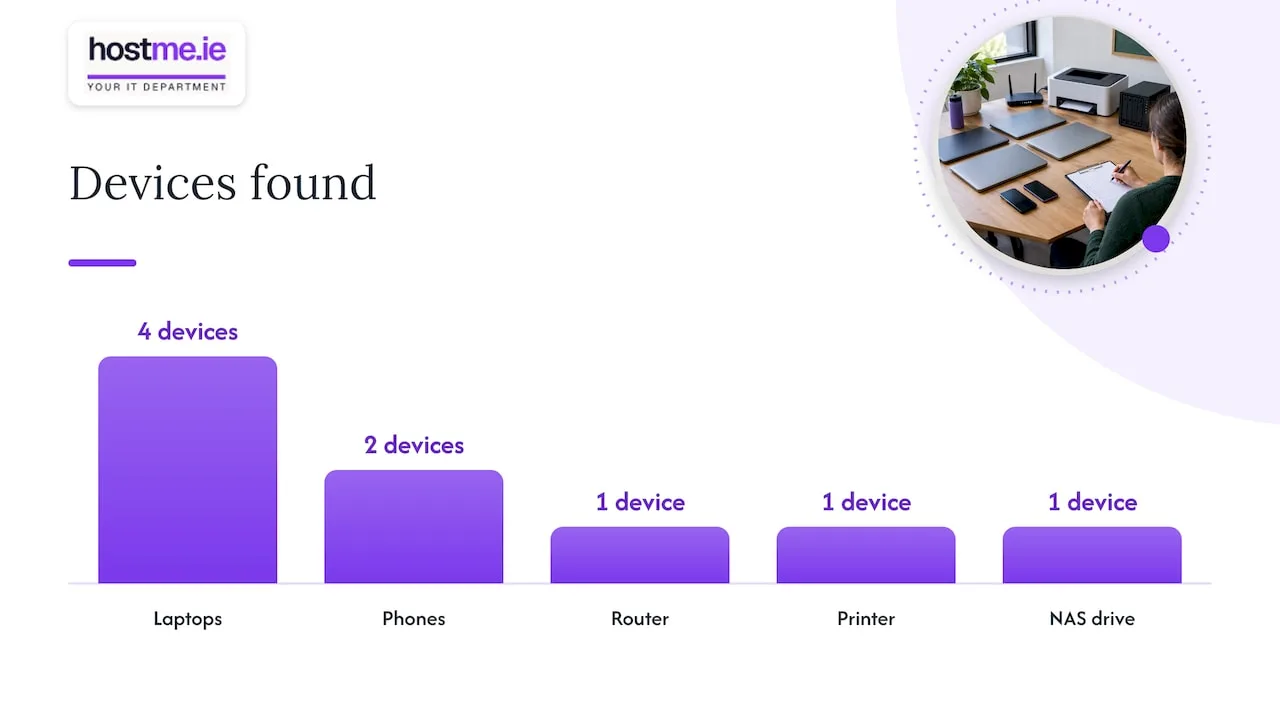
Imagine a three-person bookkeeping office. The first pass finds four laptops, two phones, a router, a printer and a NAS drive. It also finds a domain registered years ago under a former contractor’s email address, and one laptop with no backup. None of that showed up when they thought of “IT” as computers. Two rows now carry a note: change the domain contact, and add the laptop to the backup. That is the kind of result a first pass produces. (This is an invented illustration, not a client story.)
Keeping it up to date
A list is only useful while it is true. Most inventories fail at the point where someone joins or leaves, or when a device is bought and never recorded.
Build these habits in:
- When someone joins: record the devices and accounts they receive that day.
- When someone leaves: recover the hardware, remove their access and record the device as returned or retired.
- When you buy or dispose of equipment: add or retire the row straight away. Wipe a retired device that held customer data before it leaves your hands.
- Monthly, about 15 minutes: check warranty and renewal dates coming up in the next 90 days, flag anything in repair or missing, and confirm the status of new items.
- Once a year: check the whole list against the physical equipment and your subscription payments, ideally before you renew insurance or plan next year’s spending.
The NCSC recommends regularly updating applications and systems and keeping devices up to date, and the inventory is what lets you see which ones are overdue. Add a column for “supported until” so unsupported operating systems stand out in a sort.
When a spreadsheet is enough, and when you want help
For one site and a handful of people, a spreadsheet is a perfectly good tool. It stops being enough when you cannot say who changed what, when entries disagree, or when nobody has time to reconcile it. That is usually the point at which owners ask someone else to look after the upkeep rather than buying more software.
There is also a difference between a list and a plan. A list shows you have eleven laptops. The decisions that follow are different: which ones are due for replacement, which need disk encryption, which are not covered by backup. Those link directly to other work, such as Microsoft 365 backup, your disaster recovery plan and an emergency contact sheet.
How hostme.ie can help
If you want the inventory built alongside someone who knows your systems, hostme.ie provides business IT support for Irish sole traders and small businesses, especially in County Galway and County Mayo. You deal with one person, with remote support and on-site work where agreed, and the scope is agreed before any work begins. We cover the systems small businesses actually use: computers and office systems, Microsoft 365 and business email, backups, hosting and cloud support, and AI tool setup. We also support Dynamics 365 Sales Hub and Customer Service Hub.
Ad-hoc help and separately scoped projects are available, and managed support has an initial 12-month term. Scope, cost and contract terms are agreed before work starts. To ask about an inventory review, start from our IT support page, where phone, WhatsApp and email are all listed as ways to get in touch. Local pages for Tuam and Claremorris are also available.
Our view: the inventory is the first IT job, not an admin chore
We start most small business IT conversations with the same question: what do you actually have? It sounds basic, but the answers decide everything else. You cannot back up a laptop you forgot existed. You cannot move email to a new Microsoft 365 setup if nobody knows who owns the domain. You cannot plan a replacement budget without ages and warranty dates.
That is why we treat the inventory as the foundation of good support rather than paperwork. It tells us, and you, where the risks are, what is worth spending on first and what can wait. It also keeps support simple. When something fails, one person who already knows your devices, accounts and suppliers can get to the cause faster than starting from scratch each time.
Our advice is to keep it short and keep it true. Eleven well-chosen fields that are updated monthly beat forty fields that nobody opens. Agree the scope first, assign an owner to every line, and use the list to make one decision per month: replace, renew, back up or retire.
hostme.ie
FAQ
What should be included in an IT asset inventory?
Include hardware, software, online accounts and any outside supplier that holds your data. For each item record an owner, location, serial or account ID, purchase date, warranty or renewal date and status. The NCSC’s small business guidance asks you to list phones, laptops and other equipment, and to include third parties such as cloud providers.
How often should I update my IT asset inventory?
Update it whenever something changes: a new starter, a leaver, a purchase or a disposal. Add a monthly check of about 15 minutes for renewals and missing items, and a full review once a year. Small, regular updates keep the list accurate without becoming a project.
Is an IT asset inventory the same as an asset register for my accountant?
No. An accounting register tracks purchases and depreciation. An IT inventory records what each device or service is, who has it, whether it is supported and whether it is backed up. The two can share purchase dates and costs, but the IT list is built for day-to-day decisions and security.
Do I need special software to keep an inventory?
Not for a small business on one site. A well-structured spreadsheet with a frozen header, dropdown lists and one row per item does the job. What matters is that every row has an owner and a review date.
Should personal phones and laptops be included?
Yes, if they are used for business email, files or accounts. Record the device, the person responsible and what business data it can reach. That makes it possible to remove access cleanly when someone leaves.
Sources
- NCSC Ireland: Cyber security for small business
- Longford and Westmeath Education and Training Board: ICT Asset Management Policy
- Atlassian: What is IT inventory management?