Mac vs PC for Business: How to Choose in 2026
Mac or Windows PC for your Irish small business? Compare software, security, cost, repairs and tax, with a simple way to decide before you buy.

For most Irish small businesses, the software you must run decides this, not the badge on the laptop. If your accounts package, industry tool or Excel files only work properly on Windows, buy Windows PCs. If your work lives in Microsoft 365, Google Workspace and web apps, either platform works, and the decision comes down to budget, who looks after the machines and what you already own.
This guide walks through the questions that matter for a sole trader or a small team: software, security, management, repairs, cost, tax and planned AI tools. It ends with a short checklist you can run in an afternoon.
TL;DR
- Check your must-have software first. Windows-first accounting, ERP and industry tools can rule a Mac out.
- If you work mainly in Microsoft 365, Google Workspace, Zoom or Slack, both platforms run these, so choose on budget and support.
- Both platforms have built-in disk encryption. What matters is that it is switched on and recovery keys are stored safely.
- A mixed fleet is fine if you standardise your cloud tools. Avoid mixing without anyone responsible for managing the devices.
- Laptops can usually be claimed through capital allowances, but confirm your own position with your accountant.
Table of Contents
- The short answer by type of business
- Software compatibility: where the choice is usually made
- Security: both are fine if set up properly
- Managing devices as you grow
- Repairs and support in Ireland
- Cost: purchase price versus total cost
- Planning for AI tools
- Perspective: pick the software first, then the device
- A five-step way to decide
- Where hostme.ie can help
- FAQ
- Sources
The short answer by type of business
Simple rules save a lot of debate. Use these as a starting point, then test them against your own software list.
| Your situation | Likely better fit | Why |
|---|---|---|
| Desktop accounting such as Sage 50 or QuickBooks Desktop Pro | Windows | These are built for Windows, and Sage 50 on a Mac needs remote desktop or a virtual machine |
| Heavy Excel work with VBA macros or Microsoft Access | Windows | Some of these have limited or no native support on macOS |
| Mostly web apps, email, documents and video calls | Either | Microsoft 365, Google Workspace, Zoom and Slack run on both |
| Creative work, or you already use an iPhone and iPad daily | Mac is worth a look | Continuity across Apple devices is often cited as a productivity gain |
| Tight budget, several staff, wide choice of price points | Windows | More hardware choice and flexible pricing |
| Specialist trade software from a supplier | Ask the supplier | Their supported list beats any general guide |
Software compatibility: where the choice is usually made
Start here, because it is the one factor that can make a platform impossible.
List what you actually run
Write down every program and online service the business depends on. Include the ones that only one person uses, such as the payroll package, the job-quoting tool or the machine software in the workshop. Our free business IT inventory worksheet is a quick way to do it.
For each item, note whether it is:
- Web-based. It runs in a browser and does not care about the operating system.
- Installed with a Mac version. Check the supplier’s own system requirements page.
- Installed for Windows only. This is the group that decides the question.
Common trouble spots
Most modern cloud tools behave the same on both platforms. The problems tend to sit with older or specialist software. Reviews of this topic point to ERP systems, specialised accounting platforms, finance tools using advanced Excel features and industrial or manufacturing software as often Windows-first or Windows-only.
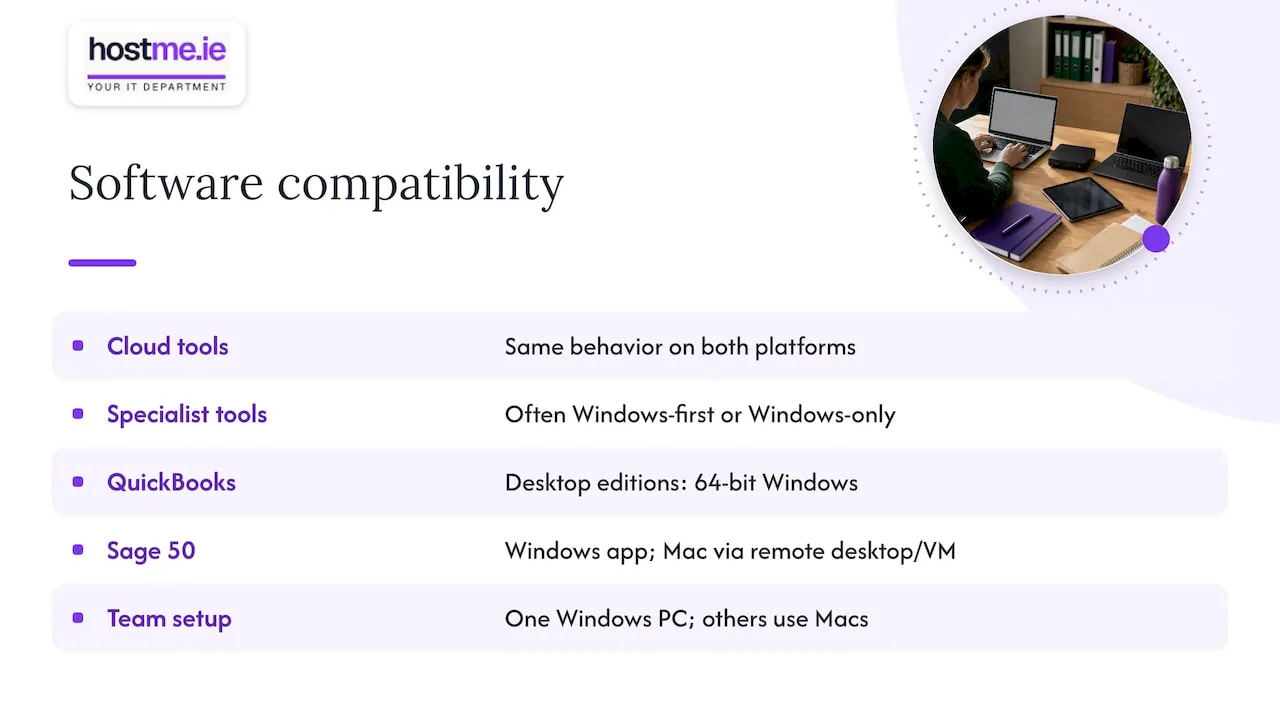
Desktop accounting is the example we see raised most by small firms. QuickBooks Desktop Pro, Premier and Enterprise are designed for 64-bit Windows, while the Mac edition has its own separate requirements. Sage 50 is a desktop application for Windows. It can be reached from a Mac through remote desktop or a virtual machine, but that adds a layer someone must set up and maintain.
If one person in the business needs a Windows-only tool, you do not have to move everyone. You can give that person a Windows PC and keep the rest on whatever suits them.
Microsoft 365 on both
Word, Excel, Outlook and Teams run on both Mac and Windows, and so do Google Workspace, Zoom and Slack. The apps look slightly different, and some advanced Excel features differ, so test your most complex spreadsheets before you commit. If you are still deciding between the two office suites, our Microsoft 365 vs Google Workspace comparison covers that choice.
Security: both are fine if set up properly
You will read that Macs are safer and Windows is riskier. There is some truth in it: Windows is targeted by malware more often because it has the larger market share. That is not a reason to leave a Mac unmanaged. Phishing, weak passwords and a lost laptop cause most small business incidents, and they affect both platforms equally.
Both have built-in disk encryption. macOS has FileVault, and Windows PCs have BitLocker and Windows Defender, as summarised here. Encryption protects the data if a laptop is lost or stolen, but only if it is switched on and you can recover the machine if the owner forgets a password.
So whichever you choose:
- turn on disk encryption on every laptop;
- keep recovery keys somewhere safe that is not the laptop itself;
- use multi-factor authentication on email and cloud accounts;
- keep updates switched on;
- run endpoint protection that suits your fleet.
If you go with Windows, our BitLocker guide for small businesses explains why you should store recovery keys before rollout. For antivirus and endpoint choices, see our endpoint protection comparison.
Managing devices as you grow
With one or two machines, management is mostly habit. With five or more, it helps to have a consistent way to set up, update and wipe devices.
Both platforms can be managed centrally. Apple’s own guidance for businesses says Mac fleets can be configured remotely with zero-touch deployment using an MDM tool such as Intune. That matters if you already use Microsoft 365, because Intune can cover Windows and Mac devices from one place.
What we recommend in practice:
- Decide one owner for devices in the business, even if that is you.
- Record every device, its user and its purchase date.
- Set a standard configuration, so a new starter’s laptop is ready the same way every time.
- Plan a rollout rather than enrolling devices ad hoc. Our MDM guide for small businesses lays out a safe sequence.
One point from the Rippling piece is worth knowing: Macs are often seen as easier to run without dedicated IT staff, thanks to simpler security. That is a fair point for very small teams. It only holds if the software you need runs on them.
Repairs and support in Ireland
Windows PCs are often more modular, so parts such as memory, storage and batteries can be easier to replace, and there are many repairers. Mac repairs may need Apple or a certified provider and can take longer outside major cities. For a business in Galway or Mayo, that is worth thinking about. If your laptop is your income, ask yourself how you would work for a week if it failed.
The practical answer is the same on either platform:
- keep backups so a dead machine is an inconvenience, not a disaster;
- keep your files in OneDrive, SharePoint or Google Drive so you can pick up on another device;
- know where your nearest repairer is before you need one;
- consider a spare or loan laptop for a business that cannot stop.
Our cloud backup article explains how to get the backup side right.
Cost: purchase price versus total cost
PCs are generally cheaper to buy and give you more price points. Macs usually cost more upfront. Some analyses argue that Macs can have a lower total cost of ownership through fewer support tickets and higher resale values. That is a vendor’s view, and your results depend on how long you keep devices and what you pay for support.
To compare fairly, add up for each option over three to four years:
- purchase price per device, including VAT considerations if you are VAT-registered;
- software you must buy or replace, for example a Windows-only package that forces a virtual machine licence;
- accessories and adapters;
- support time, both yours and anyone you pay;
- what the machine is worth at the end.
For a typical sales or office user, the specification matters more than the platform. Our laptop spec guide for sales teams shows what to look for without paying for features you will not use.
Can you claim it as a business expense?
Generally yes. In Ireland, laptops and computers are treated as plant and machinery, which attract capital allowances at 12.5% a year over eight years. Keep the invoice and a record of when you first used the item. If you use the computer for both business and personal use, the claim must be apportioned by the business-use share. For a limited company, the receipt should be in the company’s name. Revenue publishes its own guidance on capital allowances. Your accountant can confirm how it applies to your tax position before you buy.
Tax treatment is the same for a Mac and a PC, so it should not tip the decision.
Planning for AI tools
ChatGPT, Claude and Microsoft Copilot are mostly browser or app based, so they work on both platforms. The better question is not Mac or Windows, but whether your cloud tools are consistent. The advice in the Rayda guide is to standardise your productivity and cloud software rather than focus only on the operating system, and that applies directly to AI. If everyone uses the same email, files and chat tools, an AI workflow behaves the same for all of them.
If you want to use Microsoft Copilot, check the licence and account requirements first. That is a Microsoft 365 matter, not a device matter.
Perspective: pick the software first, then the device
We see small businesses spend weeks arguing about Mac versus PC and an hour on the question that matters: what does the business need to run?
Our advice is to start with the inventory. List your software, check who needs what, and let that choose the platform. For many businesses that means Windows because of an accounting or industry package. For others it means either, and the deciding factor is who will look after the machines.
That is where having one person to contact helps. Whichever you choose, you want the devices set up consistently, email and Microsoft 365 configured properly, backups running, disk encryption on and recovery keys stored. We help with that, with scope agreed before any work begins.
A mixed setup is fine too, as long as someone is responsible for it. What causes problems is a collection of different devices bought one at a time with no record of who has what.
hostme.ie
A five-step way to decide
- Inventory your software. Mark each item as web-based, Mac-compatible or Windows-only.
- Ask your suppliers. For specialist or older tools, ask the vendor for their supported platforms in writing.
- Set a per-user budget. Include software, accessories and support, not only the sticker price.
- Consider repair and spare cover. Decide how you would carry on if a device failed.
- Plan management. Decide how devices will be set up, encrypted, updated and backed up.
If steps 1 and 2 show everything works on both, you are free to choose on preference and price. If not, the decision is already made.
A useful test before a bulk purchase is to buy one device, move one real user onto it for a couple of weeks and see what breaks. It costs little and shows problems that a spec sheet will not.
Where hostme.ie can help
If you want help working out which devices suit your business, or setting them up once chosen, we can help through our IT support service. We are one person to contact, working remotely, with on-site work where agreed. We will agree scope and cost before work begins. Ad-hoc help and separately scoped projects are available, and managed support has an initial 12-month term.
The simplest next step is to message us on WhatsApp with a list of the software you use and how many people you have. If you are still at the early stage, our guide to small business technology setup shows where to start.
FAQ
Is a Mac or a PC better for a small business?
Neither wins every time. A PC is usually the safer choice if you rely on Windows-only accounting or industry software, and it is often cheaper. A Mac can suit a business that works mainly in cloud tools and values simple management and long device life.
Why do many businesses choose Windows over Mac?
Mainly compatibility. Businesses often stay with Windows to keep legacy or specialist software working. Wider hardware choice and flexible pricing are also reasons.
Can I run Microsoft 365 on a Mac?
Yes. Microsoft 365, Google Workspace, Zoom and Slack work on both platforms. Some features, such as Microsoft Access and certain complex Excel VBA macros, have limited or no native support on macOS, so check your own files.
Can I write off a computer as a business expense in Ireland?
Yes, through capital allowances on qualifying equipment, at 12.5% a year over eight years, apportioned for personal use. Keep the invoice and speak to your accountant for your own case.
Can I mix Macs and PCs in one business?
Yes. It works well when you standardise on shared cloud tools and manage the devices with a common tool such as Intune. It works badly when devices are bought ad hoc and nobody keeps track of them.
Sources
- Mac vs Windows for Business Teams: 2026 Guide, Rayda
- Mac vs PC for work: Pros, cons and key differences, Deel
- Mac or PC for Workforce: Differences and How to Choose, Rippling
- Mac vs PC: Total Cost of Ownership Calculator, ProjectWizards
- What are QuickBooks System Requirements?, Ace Cloud Hosting
- What Is Sage 50?, Clarity Ventures
- Apple at Work: Mac Adoption Blueprint, March 2024
- The Business Owner’s Guide to Capital Allowances, Intax
- Claiming Tax Relief on Business Equipment, Icon Accounting
- Capital allowances and deductions, Revenue