Duo vs Microsoft Authenticator: Which Suits a Small Business?
Duo or Microsoft Authenticator for your small business? Compare cost, Microsoft 365 setup, remote access and recovery, with a plain recommendation.

If your business runs on Microsoft 365, Microsoft Authenticator is usually the right place to start. It is included with your plan, it works natively with Microsoft sign-in, and it covers what most sole traders and small offices need. Cisco Duo earns its extra cost when staff also sign in to servers, VPNs or non-Microsoft apps and you want one MFA policy across all of them.
This guide compares the two as a small business owner would need to: what each one is, what it costs, how it fits with Microsoft 365, what happens when a phone is lost, and how to avoid the double-prompt problem. It also covers Microsoft’s own built-in MFA (Entra MFA), because the real choice is often between that and Duo, not between two phone apps.
TL;DR
- Microsoft Authenticator is a free phone app that works with Microsoft 365 sign-in. It is the simplest choice for most Microsoft 365 businesses.
- Cisco Duo is a separate MFA service. It suits businesses that need one policy across Microsoft apps, Windows logins, Remote Desktop and other systems.
- Duo’s paid plans start at $3 per user per month, and you still need your Microsoft licensing. Authenticator adds no separate charge.
- Running both without planning can give staff two prompts at every sign-in. That is a configuration issue, and it is fixable.
- Whichever you pick, agree the setup, the recovery plan and who is the backup administrator before you switch it on.
Table of Contents
- They are not the same kind of product
- Side by side
- What each one costs
- How each works with Microsoft 365
- Remote Desktop, servers and other apps
- Security strength and recovery
- Why staff sometimes get two prompts
- Can Duo Mobile replace Authenticator?
- Is Microsoft discontinuing Authenticator?
- Which should you choose?
- Our view
- Get MFA set up without the double prompts
- FAQ
- Sources
They are not the same kind of product
People search “Duo vs Microsoft Authenticator” as if both were phone apps. They are not quite comparable.
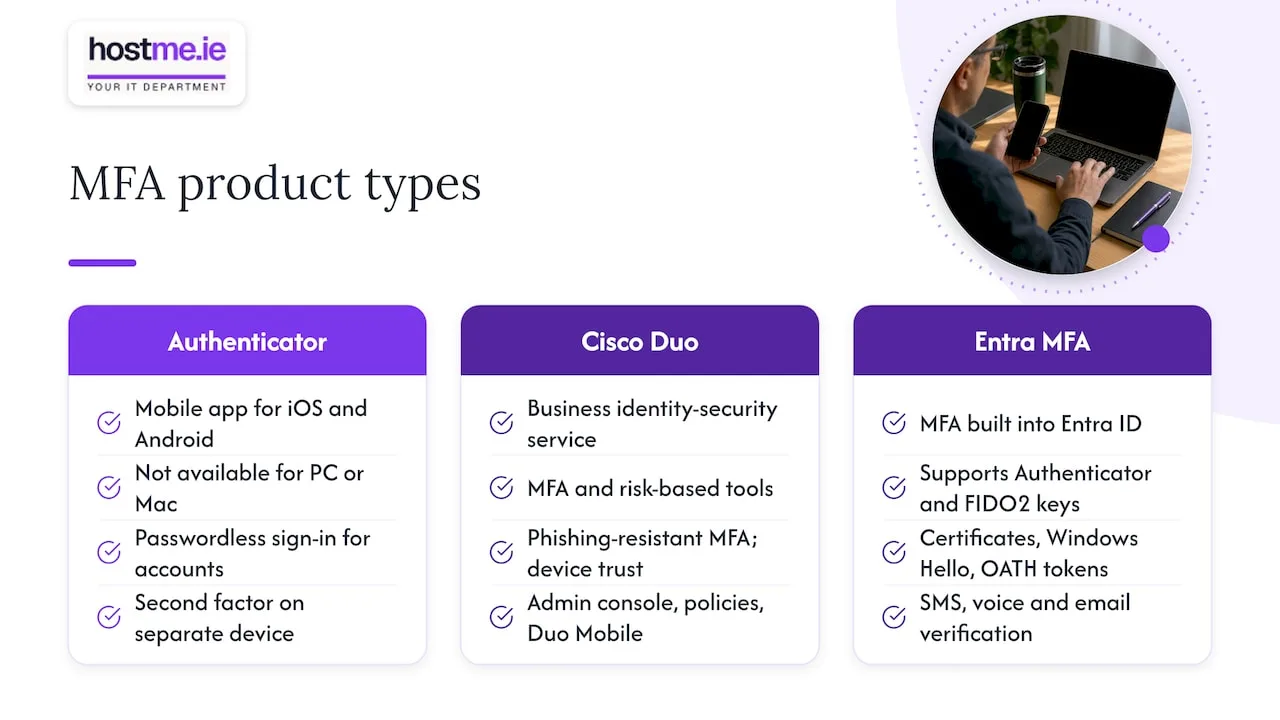
Microsoft Authenticator is a mobile app for iOS and Android. Microsoft describes it as a way to sign in to your accounts without a password, and it is not available for PC or Mac. That is deliberate: keeping the second factor on a separate device from the one where you type the password is part of the security design.
Cisco Duo is a business identity-security service. Cisco says it offers MFA, risk-based tools, phishing-resistant MFA, device trust and wider identity security. Duo Mobile is the phone app your staff use, but the product is the service behind it, with an admin console and policies.
Microsoft Entra MFA is the third piece. Microsoft Entra ID has MFA built in, and supports Authenticator, FIDO2 security keys, certificate-based sign-in, Windows Hello for Business, OATH tokens, SMS, voice calls and email verification. Authenticator is one method inside that system. When people ask “Duo vs Azure MFA”, this is what they mean.
So the honest question is: do you want Microsoft to handle MFA for Microsoft sign-ins, or do you want Duo as a separate layer across more of your systems?
Side by side
| Microsoft Authenticator / Entra MFA | Cisco Duo | |
|---|---|---|
| What it is | Phone app plus MFA built into Entra ID | Separate MFA and access-security service |
| Cost | Included in your Microsoft 365 plan; advanced policies need Entra ID P1 | Free tier for small teams; paid plans from $3 per user per month |
| Microsoft 365 sign-in | Native | Through Entra External MFA or Duo Single Sign-On |
| Windows logon and Remote Desktop | Possible, with more configuration | Documented, with direct integrations |
| Non-Microsoft apps | Possible through Entra | A core strength |
| Passkeys and passwordless | Supported | Phishing-resistant options available |
| Admin work | One console you already use | A second console and policies to maintain |
The sections below explain each row.
What each one costs
Microsoft Authenticator and Entra MFA
The Authenticator app itself is free. Basic MFA comes with Microsoft 365 business plans through security defaults. If you want finer rules, such as only asking for MFA from unfamiliar locations or unmanaged devices, you need Conditional Access. Microsoft lists Entra ID P1, which provides Conditional Access, as included in Microsoft 365 Business Premium. Check the current price for your plan on Microsoft’s Irish pricing pages, as it changes.
Duo
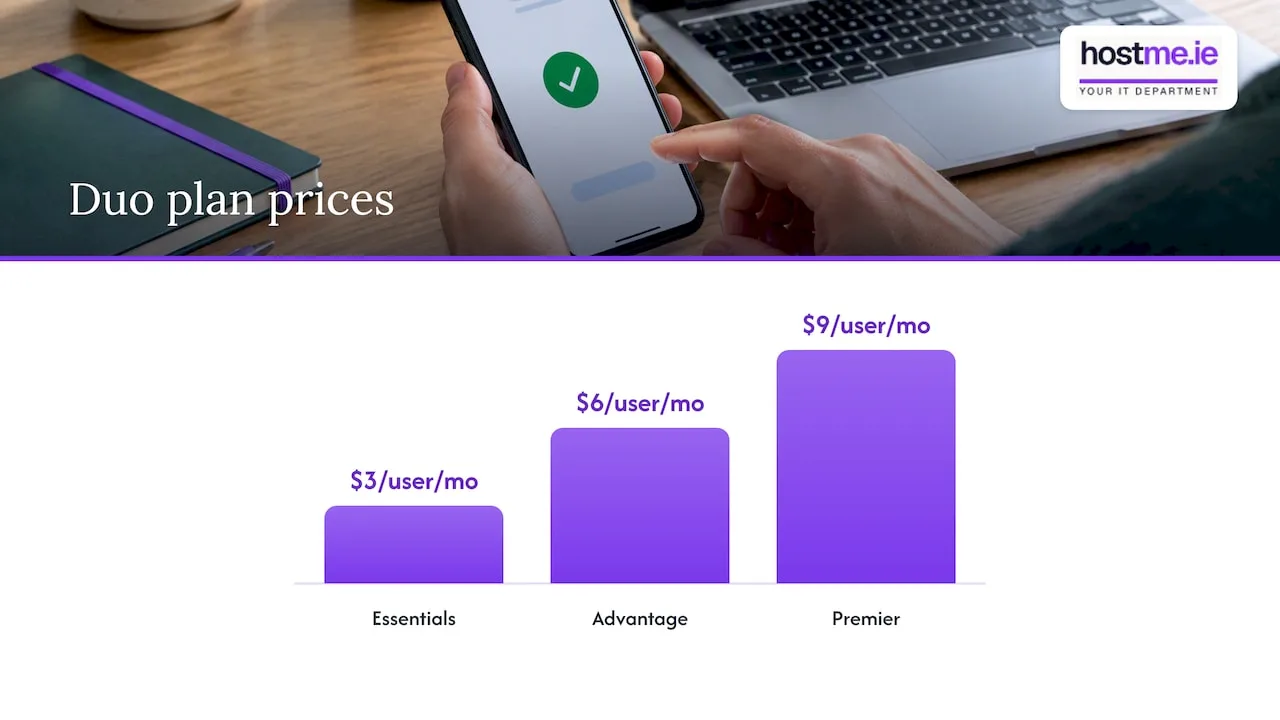
Cisco publishes Duo prices at $3 per user per month for Duo Essentials, $6 for Advantage and $9 for Premier. TechRepublic reports a free tier for up to 10 users, with those paid prices as of February 2025. Prices are in US dollars, so your euro cost will move with the exchange rate and any VAT.
The point many small businesses miss is that Duo does not replace your Microsoft licensing. If you connect it to Entra ID, you are paying for Duo and for the Microsoft plan, and the Entra integration depends on Entra licensing that includes the right features. Confirm the exact licence requirement with Cisco’s current documentation before you commit.
A rough example (illustrative, not a quote): a team of eight on a Microsoft plan that already has Conditional Access would add Duo Essentials at $3 each per month, which is $24 a month before tax. A team of ten or fewer might start on the free tier instead. Whether that spend is worth it depends on what Duo protects that Microsoft’s own MFA does not.
How each works with Microsoft 365
This is where most of the practical differences sit.
Authenticator needs no bridge. Staff sign in, get a push notification or enter a code, and Entra decides whether access is granted. Microsoft Learn describes Authenticator push as less intrusive, more reliable and more secure than SMS or voice, with verification codes still useful where there is no data or mobile signal.
Duo connects in one of two ways:
- Entra External MFA. In Cisco’s documented flow, the user enters their normal Entra credentials, picks Duo as the external MFA method, completes the Duo prompt, and approval returns to Entra before access is granted. Conditional Access still applies.
- Duo Single Sign-On. Duo SSO can act as the identity provider for federated Microsoft 365 domains and require Duo two-factor authentication before Microsoft 365 access. Cloud-only users continue to use Microsoft’s own sign-in form, so this route suits fewer small businesses.
The Conditional Access catch
If you use Conditional Access, read this before buying. Cisco documents a limitation: the older Duo custom control does not satisfy a policy that requires Microsoft’s own multifactor claim. Duo can meet that requirement through SSO federation or AD FS configured to pass an MFA claim. External MFA is the newer route, so make sure whoever sets it up uses current Cisco guidance rather than an older tutorial.
Remote Desktop, servers and other apps
If your staff only use Microsoft 365 in a browser and on their phones, this section may not apply to you.
If you run a Windows server, use Remote Desktop, or have older systems on site, Duo is stronger. Cisco lists integrations for Windows Logon and RDP, AD FS, Outlook Web App, RD Web, RD Gateway and RRAS, and says Duo protects both Microsoft and non-Microsoft federated applications. Cisco also says Duo can enforce device-health policies on those logins.
This is the clearest reason to choose Duo: one set of rules for Microsoft 365, the office server and a VPN. A small accountancy or engineering firm with a server in the back room and staff dialling in from home is a good example of that fit. A five-person office on Microsoft 365 alone is not.
Security strength and recovery
Both can give strong protection if set up well. What matters more is the method your staff use.
- Passkeys and security keys. Authenticator supports passkeys, passwordless sign-in, push and OATH codes. Microsoft says Authenticator passkeys are free, device-bound and based on WebAuthn, and provide phishing-resistant sign-in.
- SMS and voice are the weakest options. Microsoft’s NIST-aligned guidance notes these can be exposed to SIM swaps and number porting, whereas passkeys, FIDO2 keys, Windows Hello and Authenticator passkeys use cryptographic credentials.
- Physical keys. If you want the strongest protection for owners and administrators, look at phishing-resistant physical security keys alongside either product.
When a phone is lost
This is where small businesses get caught. If someone gets a new phone and Authenticator is their only registered method, they can be locked out. In that case an administrator should reset the MFA registration so the user can register again at next sign-in.
So before rollout:
- Register at least two methods for every user.
- Keep two administrator accounts, with at least one holding a Microsoft built-in method, which Cisco itself advises as an administrator backup when using Duo.
- Write down who resets MFA for a user who has lost their phone, and how you will check it is really them.
A password manager also helps people cope with the number of sign-ins. We cover that in our guide to password managers for small businesses.
Why staff sometimes get two prompts
A common complaint after adding Duo is being asked twice. Duo explains that Authenticator and Duo are separate mechanisms, so if both are configured in Entra ID, users must complete both.
To stop it, make sure Authenticator is not also being required. Duo’s guidance is to disable the applicable Require MFA Conditional Access setting, per-user MFA and Security Defaults. Cisco also says administrators can disable or exclude Authenticator registration for Duo users and disable system-preferred MFA.
Do this carefully and in order. Turning off Security Defaults without a replacement policy leaves you with no MFA at all. Test with one account first.
Can Duo Mobile replace Authenticator?
In a limited way, yes. Duo Mobile can act as a standard time-based one-time password (TOTP) app for a Microsoft 365 account. One university’s guide shows the steps: choose “I want to use a different authenticator app” in Microsoft security info setup, then scan the QR code Microsoft provides.
That gives you codes, not the full Duo experience. You will not get Duo’s policies or push approvals for that sign-in. It is a workaround for a user who prefers the Duo Mobile app, not a way to deploy Duo.
Is Microsoft discontinuing Authenticator?
No. What Microsoft ended was one feature. Its FAQ says Autofill in Microsoft Authenticator was discontinued in mid-August 2025. Sign-in notifications and verification codes, which are the parts that matter for MFA, are still described there. If you used Authenticator to store passwords, move them to a proper password manager.
Which should you choose?
Choose Microsoft Authenticator and Entra MFA if:
- You are a sole trader or small office, mainly on Microsoft 365.
- You want no extra subscription and one admin console.
- You can move to passkeys or number-matched push, and keep SMS only as a fallback.
Choose Duo if:
- Staff also sign in to servers, Remote Desktop, a VPN or non-Microsoft apps, and you want one policy for all of them.
- You need device-health checks before access is granted.
- You are happy to pay for Duo on top of Microsoft licensing and maintain a second console.
Either way, before you start:
- Decide what is being protected: email only, or servers and apps too.
- Check your Microsoft plan, as it may already give you Conditional Access.
- Plan the recovery steps and train staff. Our guide to phishing training on Microsoft 365 covers the human side, since a tired user approving a prompt they did not start is the usual weak point.
If you are still deciding between platforms, our comparison of Microsoft 365 and Google Workspace helps, and a managed-device plan is covered in MDM for small businesses.
Our view
Most of the MFA problems we see in small businesses are not about picking the wrong product. They come from MFA being switched on for some people and not others, from one phone being the only recovery route, or from two systems asking for the same thing.
So we start from the simplest option that covers the systems you actually use. For a business that lives in Microsoft 365, that is usually the built-in MFA with Authenticator, set up with Conditional Access if your plan includes it. We would only suggest Duo where there is a real need beyond Microsoft sign-in, such as a server or Remote Desktop, and where the extra cost and extra admin make sense. Our support covers Microsoft 365 and business email, and we agree scope with you before any work starts.
MFA is one layer. Backups matter too, because MFA does not help if data is deleted. See Microsoft 365 backup for small businesses.
— hostme.ie
Get MFA set up without the double prompts
If you want help choosing and configuring MFA for your Microsoft 365 tenant, hostme.ie is one person to contact for practical business IT help, with remote support and on-site work where agreed. We can review how your staff sign in, agree the scope and cost first, and set up MFA with a tested recovery plan. Ad-hoc help and separately scoped projects are available. Managed support has an initial 12-month term, and we agree terms before work begins.
To start, message us on WhatsApp about our IT support. If you prefer, phone or email works too. You can also read about our security services.
FAQ
Can I use Duo Mobile instead of Microsoft Authenticator?
Yes, for codes. Duo Mobile can work as a standard TOTP app for Microsoft 365 if you choose the “different authenticator app” option during setup and scan Microsoft’s QR code. It will not give you Duo’s own push and policy features for that sign-in.
Is Microsoft Authenticator good enough for a small business?
For most Microsoft 365 businesses, yes. It supports push, codes and passkeys, and it costs nothing extra. It is strongest when you add Conditional Access, register backup methods and avoid relying on SMS.
Why am I asked for both Duo and Microsoft Authenticator?
Both are configured in Entra ID, so each asks for approval. An administrator needs to stop Authenticator being required for Duo users by reviewing Conditional Access, per-user MFA and Security Defaults. Test the change on one account first.
Is Duo free?
Cisco offers a free tier for small teams, reported as up to 10 users, and paid plans from $3 per user per month. Check Cisco’s pricing page for current terms. If you use Duo with Microsoft 365, you also pay for your Microsoft licensing.
Sources
- Download Microsoft Authenticator, Microsoft Support
- About Duo Security, Cisco Duo
- Microsoft Entra MFA, Microsoft Security
- Microsoft Entra plans and pricing, Ireland
- Duo editions and pricing, Cisco Duo
- Duo vs Microsoft Authenticator, TechRepublic
- Recommendation: migrate to Authenticator, Microsoft Learn
- Duo two-factor authentication for Microsoft Entra ID, Cisco Duo
- Duo Single Sign-On for Microsoft 365, Cisco Duo
- Duo and Conditional Access, Cisco Duo
- Cisco Duo and Microsoft integrations
- Microsoft services integration with Duo, Cisco Duo
- Microsoft Authenticator authentication method, Microsoft Learn
- NIST authenticator types and Microsoft Entra, Microsoft Learn
- Segurança Microsoft 365: 10 práticas essenciais em 2026
- Authenticator loop for business account, Microsoft Q&A
- Why am I required to authenticate with both Duo and Microsoft Authenticator, Duo Help
- Using Duo as your Microsoft 365 two-factor authentication
- Microsoft Authenticator FAQs, Microsoft Support