Small Business Disaster Recovery: Start in 20 Minutes
Build a short disaster recovery plan for your small business, set recovery targets, check Microsoft 365 backups, and practise a simple tabletop recovery test.

A workable disaster recovery plan for a small business covers four things: a short inventory of what you’d need to restore, clear recovery targets for each system, a tested backup, and a list of who does what when things go wrong. Start today by backing up your most critical files offsite, or by spending twenty minutes listing the systems you couldn’t function without. A one-page plan beats a thick manual, as long as it’s accurate and you’ve actually tested it.
TL;DR:
- Set recovery time and data loss targets by function: email may need restoration within four hours, while an archive can tolerate a day.
- Keep both local and offsite backups, plus one copy ransomware cannot reach; local copies restore quickly, while offsite copies survive a site loss.
- Test a single file or mailbox restore monthly, run a tabletop exercise twice yearly, and complete a full system restore test annually.
- If personal data may be breached, flag reporting immediately: GDPR may require notifying the Data Protection Commission within 72 hours of becoming aware.
Table of Contents
- Your one-page disaster recovery checklist
- How to build a disaster recovery plan step by step
- Backup strategy and what Microsoft 365 actually gives you
- How to test your disaster recovery plan properly
- Who does what: roles and communication during an incident
- Keeping your plan current
- Stopping ransomware from becoming a disaster
- What disaster recovery actually costs a small business
- GDPR and your disaster recovery process
- Training staff for their disaster recovery role
- Using AI tools to support your disaster recovery planning
- Why we keep disaster recovery plans short at hostme.ie
- Getting your plan implemented properly
- FAQ
- Sources
Your one-page disaster recovery checklist
Before you write a single policy, get these basics in place. This is the checklist we’d want in front of us if your systems went down tomorrow.
- List your critical systems and data: email, accounting software, customer records, website, point-of-sale.
- Set simple recovery targets per system, for example email at four hours recovery time and one hour recovery point, accounting software at 24 hours.
- Confirm you have one recent backup stored offsite or in the cloud, not just on the same machine or network.
- Arrange secure emergency access to admin and backup accounts, including MFA recovery. Store any offline recovery material in a locked location accessible only to authorised people; see this guide on website maintenance to protect and grow your business online.
- Write down two or three emergency contacts and agree who has the authority to call an incident.
- Note your website host, domain registrar and any third-party suppliers you’d need to contact.
This gives you a starting inventory and contact list; complete and test the backup and recovery steps before relying on the plan.
How to build a disaster recovery plan step by step
A usable plan follows a logical order: understand what matters most, record what you have, decide how fast you need it back, then write down exactly how to get it there.
- Run a brief business impact analysis. List your core functions (sales, invoicing, customer communication, production) and rank them by how quickly their loss would hurt you.
- Build an asset inventory. Record every system, where it’s hosted, who manages it, and any third-party dependency, such as your accountant’s software or a supplier’s portal.
- Set RTO and RPO per function. Recovery time objective is how long you can be without a system; recovery point objective is how much data loss you can tolerate. Email might need an RTO of four hours and an RPO of one hour; a rarely used archive folder might tolerate a day of each.
- Choose your backup type. Local backups restore fastest but won’t survive fire or theft on the premises; cloud backups survive a site loss but may take longer to pull down; most small businesses do best with both.
- Set retention windows. Decide how far back you need to recover from, weighing cost against how long you might not notice a problem.
- Write restore steps precisely. Name the exact backup job, the admin console URL, and the file path you’d use. Vague notes like “restore from backup” waste time when minutes count.
- Assign roles and capture contacts offline. One person owns the decision to declare an incident; others handle communications and technical recovery.
Pro Tip: Print the plan and store a copy somewhere other than the office, your phone contacts aren’t accessible if your phone is the thing that’s lost.
Smaller organisations often do well following a tiered approach: start with a basic plan and add detail as the business grows, an approach UNDRR’s SME continuity guidance sets out explicitly for businesses without dedicated IT staff.
Backup strategy and what Microsoft 365 actually gives you
Your backup frequency decides your RPO: back up once a day and you can lose up to a day’s work, back up every hour and you lose far less, but storage and processing cost more as you tighten that window. Most sole traders and small teams find the right balance with a hybrid setup.
- Use local backups for the fastest restores when a single device or drive fails.
- Use cloud backups so a flood, fire or theft at your premises doesn’t take your data with it.
- Review your retention window regularly: Microsoft 365 Backup policies default to a one-year recovery window, and you choose which OneDrive, SharePoint and Exchange items they cover, according to Microsoft’s backup policy guidance.
Many small businesses forced to close after a disaster do not reopen, according to IBHS’s small-business continuity toolkit, which is exactly why a tested backup matters more than an elaborate one.
For Microsoft 365 specifically, restore history is kept for up to 366 days, and express restore is the quicker option for OneDrive and SharePoint recoveries, per Microsoft’s restore documentation. A short, sensible policy covers OneDrive files, SharePoint document libraries and Exchange mailboxes, with express restore enabled wherever it’s offered.
How to test your disaster recovery plan properly
A plan nobody has tested is a guess. Testing is where you find the gaps before a real incident does.
- Run a tabletop exercise twice a year. Walk through a scenario on paper or in a meeting; these usually surface missing credentials or outdated contact details rather than technical faults.
- Do a monthly quick restore test. Pull back a single file or mailbox to confirm the backup job actually works.
- Do a full restore test annually. Recover an entire system or server to a test environment to confirm timing matches your RTO.
- Record what broke and fix it before the next test, not after the next real incident.
Pro Tip: Test from somewhere other than your main office network; if your password manager only opens on an office machine, you’ll find that out at the worst possible time.
Who does what: roles and communication during an incident
Confusion costs more time than the incident itself. Agree these roles before you need them.
- Incident owner: decides when something counts as a disaster and triggers the plan.
- Communications lead: sends a short, pre-written message to staff and customers, and updates it as the situation changes.
- Technical lead: runs the restore steps from your documented plan.
- Supplier contacts: your IT support provider, hosting company and domain registrar, listed with direct phone numbers.
Keep a printed contact list away from your main office. Store credentials and recovery material separately in a secure, access-controlled location, with a tested emergency-access process.
Keeping your plan current
Review your plan every six months, and immediately after any major change: new software, a new staff member with system access, or a change to a supplier. Update your RTO and RPO figures whenever you add a service that didn’t exist when you wrote the plan. Log every real incident and near miss, note what you’d change, and keep a printed copy somewhere accessible without power or internet.
Stopping ransomware from becoming a disaster
Disaster recovery and cybersecurity overlap more than most small business owners expect. A ransomware attack that encrypts your files is a disaster recovery event just as much as a flood or a power cut, and the plan that gets you back online is the same one.
Build these habits into your plan rather than treating them as separate from it:
- Keep at least one backup copy that ransomware can’t reach from your main network, often called an immutable or air-gapped copy.
- Patch operating systems and software promptly; most ransomware exploits known, unpatched vulnerabilities.
- Use multi-factor authentication on email and admin accounts, since stolen passwords are a common entry point.
- Restrict who has administrator access to back up systems, so a compromised staff account can’t delete your recovery copy along with your live data.
- Check your firewall configuration and review it against a small business firewall checklist to close the gaps attackers look for first.
When you test restores, include a scenario where the “disaster” is encrypted files rather than lost hardware. The steps differ slightly: you may need to isolate infected devices before restoring, and you’ll want a backup copy old enough to predate the infection.
What disaster recovery actually costs a small business
You don’t need an enterprise budget to build something that works. The real cost drivers are how tight your RTO and RPO targets are, and whether you’re paying for redundancy you don’t need.
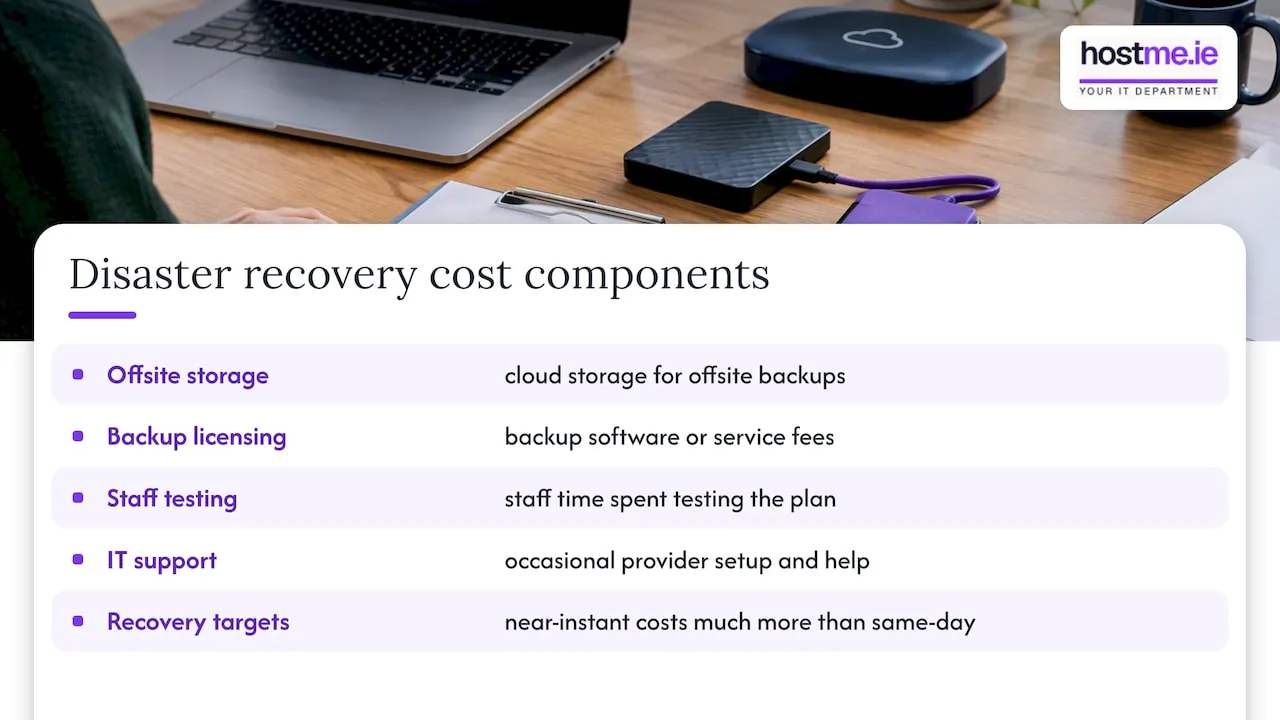
Costs typically fall into a few categories: cloud storage for offsite backups, any backup software or service licensing, staff time spent testing the plan, and occasional support from an IT provider to set it up correctly. Tighter recovery targets, such as near-instant failover for a system, cost considerably more than a same-day restore target, which is why setting realistic RTO and RPO values per function matters more than defaulting to “as fast as possible” for everything.
A sensible approach is to spend proportionally to the cost of downtime for each function. Email and invoicing, where an outage directly stops you earning, justify tighter targets and a bit more spend. An archive folder you touch twice a year doesn’t. Review your backup and hosting costs annually against what each system would actually cost you in lost time if it went down, and adjust accordingly.
GDPR and your disaster recovery process
If you hold personal data on customers, staff or suppliers, which almost every small business does, your disaster recovery plan needs to account for data protection obligations, not just uptime.
Under GDPR, a serious data breach, including one caused by a ransomware attack or lost backup, may need to be reported to the Data Protection Commission within 72 hours of becoming aware of it. Build this timeline into your incident response steps so the communications lead knows to flag it immediately, not after systems are restored. Your backup provider and any cloud service handling personal data should be able to confirm where that data is stored and how it’s protected, since you remain responsible for it as the data controller. Document which systems hold personal data as part of your asset inventory, so you know exactly what’s affected if a breach occurs.
Training staff for their disaster recovery role
A plan only works if the people named in it know what to do without having to reread it under pressure.
Run a short briefing when the plan is written or updated, covering who declares an incident, who they report to, and where the printed contact list is kept. New staff should see the relevant section of the plan during onboarding, particularly anyone with admin access to email, backups or financial systems. A tabletop exercise doubles as training: walking through a scenario teaches the technical lead and communications lead their roles far better than reading a document does. Keep training brief and specific to each person’s role rather than running one long session covering everything for everyone.
Using AI tools to support your disaster recovery planning
Tools like Microsoft Copilot and ChatGPT can speed up the groundwork of building a disaster recovery plan, though they don’t replace testing it. You can use them to draft a first version of your business impact analysis, turn a messy list of systems into a structured inventory, or generate a template communications message for staff and customers to adapt.
Copilot, where it’s integrated into Microsoft 365, can help you draft documentation directly alongside your existing files and mailboxes, which is useful when recording restore steps for the systems you already use. For incident response, an AI assistant can help you draft the initial customer or staff notification quickly, which you then review and send, rather than starting from a blank page while under pressure. Treat AI output as a draft to check against your actual systems, not a finished plan.
Why we keep disaster recovery plans short at hostme.ie
A short, tested plan beats a long one nobody reads. A hands-on approach means sole traders and small teams can get a working plan and a real backup in place quickly, then test it together rather than filing it away. If you want a second pair of eyes on yours, we’re easy to reach.
— hostme.ie
Getting your plan implemented properly
Writing the plan is the easy part. Setting up backups correctly, configuring Microsoft 365 recovery policies and testing restores takes a bit of hands-on time, which is where we come in.
We offer backup and recovery services, business email support, and general IT support for sole traders and small businesses, with clear scope, cost and contract terms agreed before work starts. Managed support has an initial 12-month term; separately scoped projects and ad-hoc help are also available. If you’d rather talk it through first, message us directly on WhatsApp and we’ll help you figure out where to start.
FAQ
What is a good disaster recovery plan for a small business?
A good plan is short, usually one to three pages, and covers your critical systems, recovery targets, backup location and who’s responsible for what. IBHS’s small-business toolkit is built on exactly this principle: a streamlined plan beats a long one staff never read.
What are the four Cs of disaster recovery?
Different frameworks use slightly different wording, but a common version centres on being clear, concise, current and communicated, meaning the plan is easy to follow, short enough to use under pressure, kept up to date, and known to everyone with a role in it.
What should be included in a disaster recovery plan?
At minimum, include an inventory of critical systems, recovery time and recovery point objectives for each, your backup approach, step-by-step restore instructions, and a list of roles with offline contact details. UNDRR’s SME guidance offers tiered templates that scale from a basic plan up as a business grows.
What are the main steps in disaster recovery planning?
The core steps are: run a business impact analysis, build an asset inventory, set RTO and RPO targets per function, choose and configure your backup approach, write precise restore steps, and assign roles before testing the whole plan.
How often should I test my disaster recovery plan?
Run a quick technical restore test monthly, a tabletop exercise with your team roughly twice a year, and a full restore test annually to confirm your real recovery time matches your target.
Sources
- Open for Business® EZ toolkit — IBHS
- Create, view, and edit backup policies in Microsoft 365 Backup | Microsoft Learn
- Strengthening disaster resilience of SMEs through business continuity