NAS vs Cloud Backup: Which Suits a Small Business?
NAS or cloud backup for your small business? See how they differ on cost, recovery and risk, and why most Irish firms do best with both.
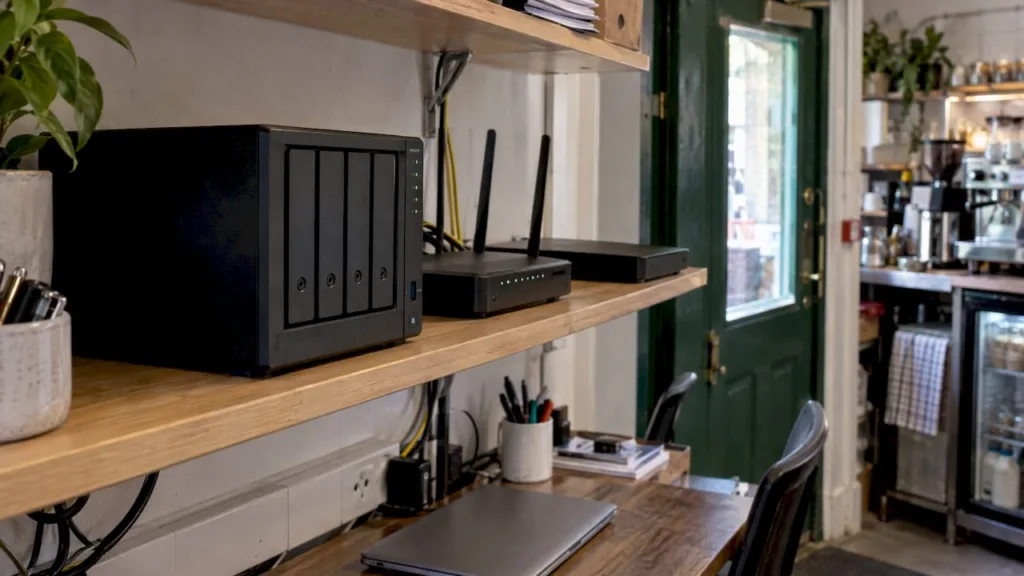
A NAS keeps a copy of your data on a box in your own office. Cloud backup keeps a copy on a provider’s servers, away from your premises. For most sole traders and small businesses the safest answer is both: the NAS for fast restores, the cloud copy for fire, theft, flood and ransomware. If you can only afford one to start, pick cloud backup, because it is the only one that survives a disaster at your own premises.
This guide explains how each works, what each costs, where each fails and how to set them up together. It is written for owner-operators and office managers, not for home users.
TL;DR
- A NAS is a storage device you own, on your own network. Cloud backup is a managed copy held off-site and reached over the internet.
- A NAS restores large files quickly but sits in the same building as your computers, so one fire, theft or ransomware attack can reach both.
- Cloud backup costs a monthly fee based on how much you store. A NAS costs more up front and then only your time and maintenance.
- RAID inside a NAS protects against a failed disk. It is not a backup.
- The usual small business answer is a hybrid: a local copy plus an off-site copy, with a restore test now and then.
Table of Contents
- What a NAS is, and what cloud backup is
- NAS vs cloud backup at a glance
- Access, control and recovery
- What each one costs
- The risks people miss
- Which one should you choose?
- A simple set-up for a small business
- Our view
- Need help setting it up?
- FAQ
- Sources
What a NAS is, and what cloud backup is
A NAS (network attached storage) is a user-owned storage device on your side of the network, whereas cloud storage sits on a provider’s servers and depends on internet access and a subscription. Synology describes its NAS as a central place on a network to store, access, back up and share data. Your computers reach it over standard file-sharing protocols such as SMB and NFS, so its folders look like another drive in the office.
Two points often get mixed up:
- A NAS is storage first. It becomes a backup only when something copies your files onto it on a schedule. Backup software has to be set up and watched.
- Cloud storage is not automatically cloud backup. Vodafone Ireland points out that everyday tools such as Google Drive or OneDrive are built for access and collaboration, not long-term recovery, so deleted, overwritten or encrypted files may not come back. If your business lives in Microsoft 365, read our guide to Microsoft 365 backup for small businesses.
Cloud backup, by contrast, is a restorable copy stored remotely and kept separate from your day-to-day systems. If the original is lost, damaged or compromised, you recover from that copy.
NAS vs cloud backup at a glance
| Question | NAS (local) | Cloud backup (off-site) |
|---|---|---|
| Where the data lives | In your office, on your network | On a provider’s servers, reached over the internet |
| Who owns the hardware | You | The provider |
| Cost pattern | Hardware bought up front, then disks to replace over time | Monthly fee based on data stored |
| Restore speed | Fast on the local network | Depends on your internet speed and the size of the restore |
| Fire, flood, theft | Exposed if kept in the same building | Not affected by what happens at your premises |
| Ransomware | Exposed if the NAS is reachable from infected computers | Safer when versions are kept and the copy is separate |
| Upkeep | You or your IT person update, monitor and replace disks | Largely handled by the provider, but jobs still need monitoring |
The table is a general pattern, not a rule for every product. Settings matter: a badly configured cloud job can be as useless as a NAS nobody checks.
Access, control and recovery
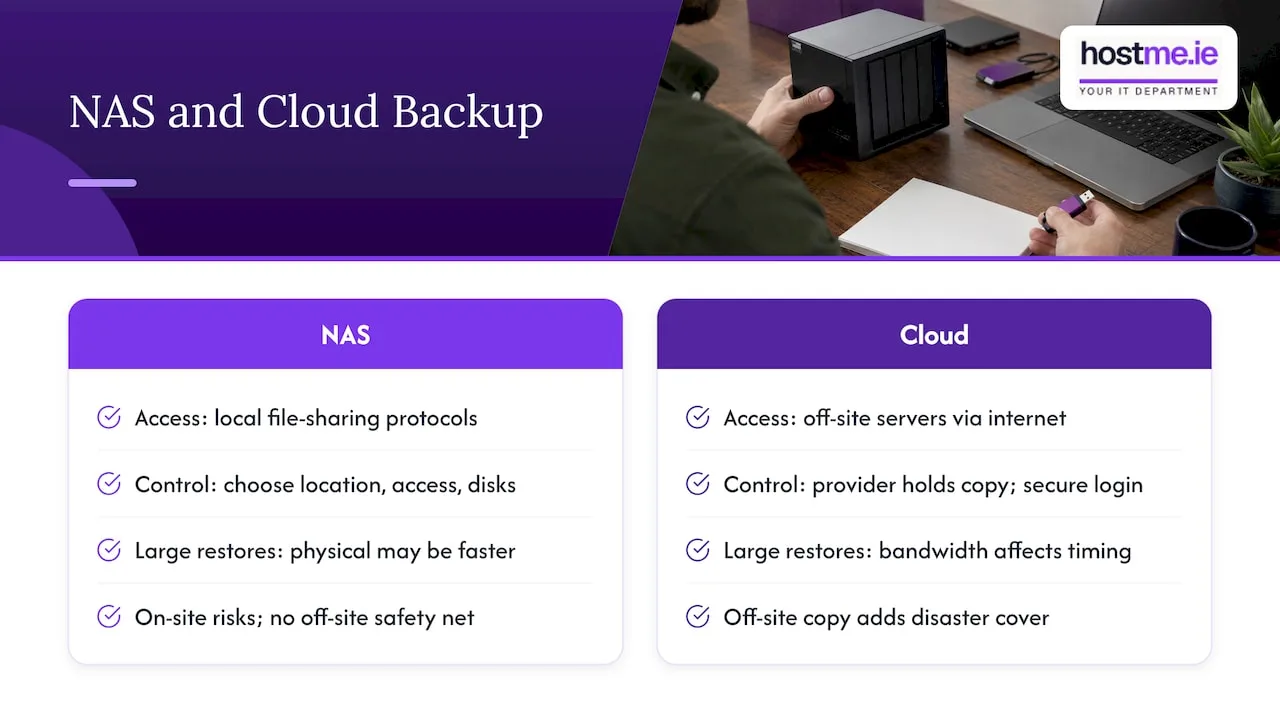
Backblaze notes that a NAS connected to your local network gives access over standard network file-sharing protocols, while cloud storage means off-site servers accessed through the internet. That one difference drives most of the trade-offs.
Control. With a NAS you decide where the data sits, who can reach it and when disks are replaced. You also carry the responsibility. With cloud backup you rely on another company to keep the copy safe, so choosing a reputable provider and keeping your login secure matters.
Recovery speed. Restoring a few documents from either is quick. Restoring a whole server or several hundred gigabytes is where they differ. Vodafone Ireland says physical backups can offer faster recovery and more control but have no off-site safety net. Cloud restores bring bandwidth into the picture: TechTarget lists restore timing and bandwidth among the things cloud brings with it. On rural broadband in parts of Galway and Mayo, that is worth testing rather than guessing.
Disaster cover. TechTarget warns that on-site backups are exposed to fire, theft, flooding, hardware failure and ransomware, especially when they sit in the same building as the primary data. Without an off-site copy, one bad day can take everything.
What each one costs
The two have different cost shapes, so compare over three to five years, not on the first invoice.
NAS costs
You pay for the unit, the disks and your time. As one Irish price point, MicroAid lists a Synology RackStation RS826RP+ 4-bay rackmount unit at €1,660.21 ex VAT, or €2,042.06 including 23% VAT. That is a rack-mounted model at the higher end, and many small offices need less. It shows that the hardware is a real purchase before you add disks or setup. If you are weighing brands, see QNAP vs Synology for a small business.
TechTarget notes that on-site backup can work out cheaper over time for large or growing data volumes because it avoids ongoing monthly or usage-based cloud fees.
Cloud backup costs
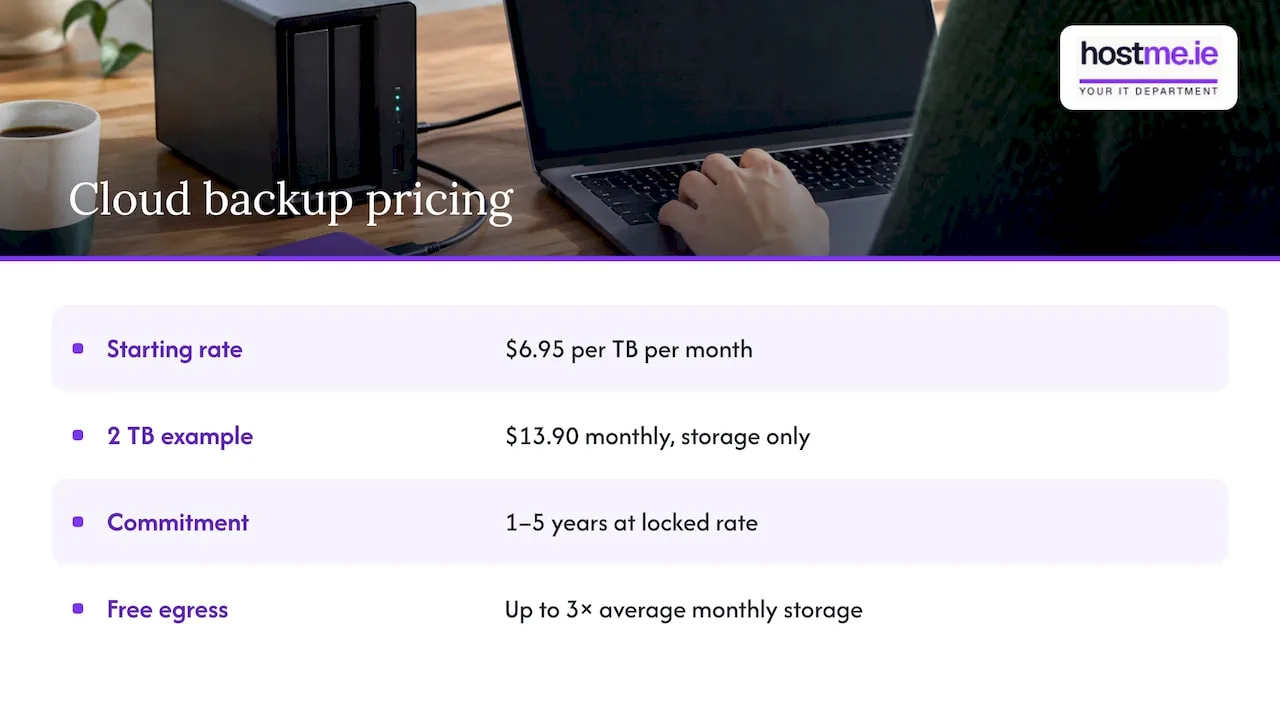
Cloud pricing follows how much you store. Backblaze B2, a storage service often used behind NAS backups, starts at $6.95 per TB per month, billed monthly on what you store, with an option to commit to one to five years at a locked rate. Prices are in US dollars, so check the current figure and your VAT position before you decide.
Worked example (illustrative arithmetic, not a quote). Say your business holds 2 TB of data. At $6.95 per TB per month, storage alone comes to $13.90 a month. Add the cost of whichever backup software or managed service runs the job. The saving is that you buy no hardware. TechTarget makes the same point: cloud avoids hardware and overhead expenses, while ongoing fees grow with your data.
One more detail. Backblaze’s pricing page says egress, meaning data you download back out, is free up to three times your average monthly storage. Restore charges differ between providers, so read that part of any price list.
The risks people miss
RAID is not a backup. RAID keeps a NAS running if one disk fails. Backblaze says RAID gives some redundancy but does not protect against all forms of data loss. Delete a folder, catch ransomware or lose the building, and RAID copies the damage or goes down with it. A Dutch IT firm says the same: RAID protects against disk failure but is not a backup in itself.
Backups that nobody has restored. A backup job that shows green can still fail on the day. Restore a sample file regularly and write down the result. Our free restore-test log is built for that.
Manual set-up. A NAS does not protect your laptops until you configure it to. The same Dutch source recommends automatic backups from workstations to the NAS, and from the NAS to an external location or cloud service.
A single copy of anything. One place is a single point of failure, wherever that place is.
Which one should you choose?
Choose cloud backup first if
- You are a sole trader with a laptop or two and a modest amount of data.
- You have no spare hardware budget and nobody to look after a device.
- Your premises have a real fire, flood or theft risk, or you work from home with no secure place for a box.
- You want a copy that stays out of reach of whatever happens in the office.
Choose a NAS first if
- Several people share large files, such as drawings, photos or video, every day.
- You need whole-folder restores in minutes, not hours.
- Your internet upload speed is slow, so a first full cloud backup would take a long time.
Even then, add an off-site copy soon after. The NAS alone leaves the building risk open.
Choose both if you hold data you cannot afford to lose
This is the pattern Vodafone Ireland calls hybrid backup: local and cloud copies together, giving fast local recovery plus off-site protection. TechTarget describes the same typical set-up: data on-site on a NAS or backup server, with further copies sent to public cloud. Backblaze ties it to the 3-2-1 idea, integrating cloud storage with a NAS to create an off-site copy and support 3-2-1 protection: three copies, on two kinds of storage, one of them off-site.
Synology units can send backups to Backblaze B2 through Hyper Backup and Cloud Sync, which Backblaze describes as automatic off-site backup with a 99.9% uptime SLA. That is one route among several. When you pick a cloud platform, the same questions apply as in any AWS vs Azure comparison: where the data sits, how you reach it and what it costs as it grows.
A simple set-up for a small business
- List what matters. Accounting files, customer records, email, shared folders, website files. Decide what you could not recreate.
- Count the data. Add up the size so you can price cloud storage and size a NAS properly.
- Decide how fast you must be back. A day? An hour? That decides whether you need local copies.
- Set up automatic jobs. Computers to NAS where you have one, then NAS or computers to the cloud. Nothing that depends on remembering.
- Keep versions. So a ransomware-encrypted file does not simply overwrite the good copy.
- Test a restore. Pick a random file and a whole folder, and time it.
- Write down who to call and where the logins are. Our IT emergency contact sheet and disaster recovery starter plan cover this.
If you are moving off an old office file server at the same time, see file server to SharePoint migration.
Our view
We see the same pattern with small businesses: the backup exists, but nobody has checked it or knows how to restore from it.
For most sole traders and small firms we would start with a copy that sits off-site, then add a local copy if restore speed matters. The two answer different problems, so the question is rarely one or the other.
We would rather agree the scope with you first: what needs protecting, how quickly it must come back, and who looks after the jobs. That is how we work as one person to contact, remotely, with on-site work where agreed. We read more about the insurance side in our piece on cloud backup for Irish businesses.
hostme.ie
Need help setting it up?
hostme.ie helps Irish sole traders and small businesses, especially in Galway and Mayo, with backup and recovery, Microsoft 365 and day-to-day IT. Ad-hoc help and separately scoped projects are available, and managed support has an initial 12-month term. Scope, cost and terms are agreed before any work starts. See our backup and recovery services, then message us on WhatsApp to talk it through. Phone and email work too.
FAQ
Is a NAS the same as cloud backup?
No. A NAS is a storage device you own and keep on your network. Cloud backup is a copy held on a provider’s servers, off-site. A NAS can be one source or one destination in a backup plan, but it is only a backup if copies are made to it on a schedule.
Is cloud backup safer than a NAS?
They fail in different ways. A NAS in your office is exposed to the same fire, theft or flood as your computers, while a cloud copy is not. Cloud depends on your login security, your internet speed for restores and the provider. Using both covers the gaps in each.
Can I back up my NAS to the cloud?
Yes, and it is a common set-up. Many NAS units include backup software that sends data to a cloud provider automatically. Synology units, for example, can use Hyper Backup with Backblaze B2. Keep versions and test a restore after the first run.
Is OneDrive or Google Drive a backup?
Not on its own. Vodafone Ireland explains that these tools are designed for access and collaboration, not long-term recovery. If you rely on one, compare them in OneDrive vs Google Drive for a small Irish business and add a separate backup.
Sources
- What Is NAS? Benefits and a Beginner’s Guide | QNAP
- NAS for business | Synology
- What is NAS? | AWS
- Cloud backups: How to protect your data | Vodafone Ireland
- NAS vs. Cloud Storage | Backblaze
- The pros and cons of on-site backup | TechTarget
- Synology RackStation RS826RP+ | MicroAid Ireland
- B2 Cloud Storage pricing | Backblaze
- Backblaze B2 with Synology NAS
- NAS Storage & Backup | De Jongens van de WiFi