Exchange Online Plan 1 vs Plan 2: Mailboxes and Holds
Compare Exchange Online Plan 1 and Plan 2, mailbox sizes, archiving and hold licensing. Plan business email changes while preserving required protections.

Start with mailbox size, archive needs and the protections your business must retain. Exchange Online Plan 1 and Plan 2 are different options; Plan 1 with the Exchange Online Archiving add-on is also a valid route for archive capacity and litigation hold. Check your existing Microsoft 365 bundle before buying another licence.
TL;DR:
- Plan 2 has a 100 GB primary mailbox and an archive that can grow incrementally to 1.5 TB when auto-expanding archiving is enabled.
- Plan 2 supports litigation hold. Plan 1 plus Exchange Online Archiving can also support litigation hold; it is not just a storage upgrade.
- Compare the required features and current quote for each option. Hostme business quotes show prices excluding VAT, with VAT separately identified.
- Check shared-mailbox size, archives, holds and access before removing a departed user’s licence. Some features still need a licence.
- Do not remove a hold merely to downgrade a licence. Preserve required retention and confirm a supported licence and storage plan before changing anything.
Table of Contents
- What are the key differences between Plan 1 and Plan 2 at a glance?
- How do list prices compare, and how do add-ons change the maths?
- How do mailbox sizes and archives differ?
- Which plan covers litigation hold, in-place hold and DLP?
- Is the archiving add-on cheaper than upgrading every seat?
- How do you decide for your business?
- How do you assign or change an Exchange Online licence?
- How Hostme can help with Exchange licence choices
- Need hands-on help with business email and Microsoft 365?
- FAQ
- Sources
What are the key differences between Plan 1 and Plan 2 at a glance?
Here is the short version of what separates the two plans and the add-on that sits between them.
- Exchange Online Archiving add-on: archive capacity and litigation-hold rights for eligible Plan 1 mailboxes. Check DLP licensing separately; it is not supplied by the archiving add-on alone.
The deciding question: which combination covers the mailbox size, archive, preservation and DLP features each user actually needs? A licence enables a feature; the appropriate settings and policies still need to be configured.
How do list prices compare, and how do add-ons change the maths?
Ask for a current quote for the exact licences and commitment period you need. Compare equivalent terms and identify any existing bundle entitlement first. Hostme quotes business prices excluding VAT and shows VAT separately.
An add-on is not automatically the cheapest choice. Compare the full cost of the eligible options and avoid buying a feature already included in your current bundle.
Compare Plan 1, Plan 2 and Plan 1 with Exchange Online Archiving against the requirements of each mailbox. The add-on does not enlarge the primary mailbox; a larger primary mailbox and a larger archive are different requirements.
How do mailbox sizes and archives differ?
Microsoft’s Exchange Online limits list a 50 GB primary mailbox and 50 GB archive for Plan 1, and a 100 GB primary mailbox for Plan 2. Eligible auto-expanding archives can grow incrementally to 1.5 TB after activation. Plan 1 needs the Archiving add-on for auto-expansion; it still has a 50 GB primary mailbox.
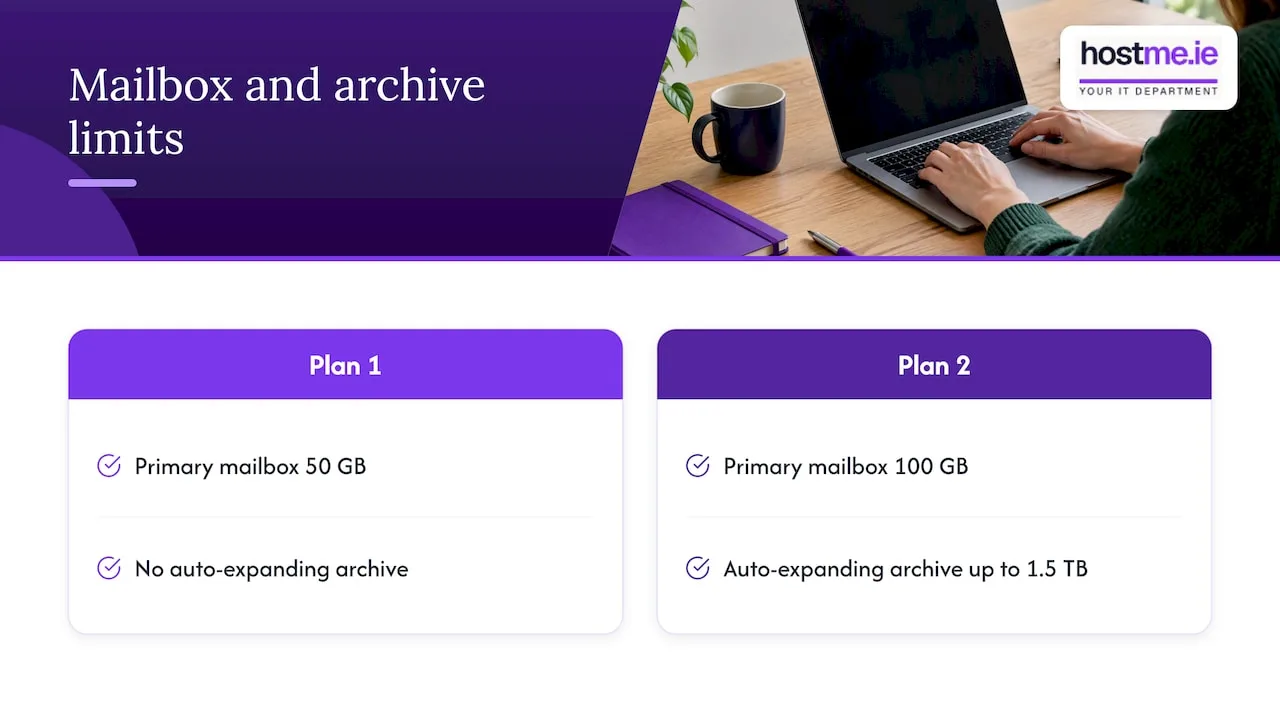
The graphic compares the base plans. Plan 1 with Exchange Online Archiving can also use auto-expanding archiving; the primary mailbox remains 50 GB.
Check actual mailbox and archive usage before choosing a licence. A user with a full primary mailbox needs a different assessment from someone who needs to preserve older correspondence.
Shared mailboxes can be unlicensed up to 50 GB, but archives and holds can require licensing. Microsoft allows litigation hold with Plan 2 or Plan 1 plus Exchange Online Archiving. Verify delegated access and block the departed person’s sign-in; conversion alone is not complete offboarding.
Which plan covers litigation hold, in-place hold and DLP?
Microsoft’s litigation-hold guidance permits Plan 2, or Plan 1 with Exchange Online Archiving. A hold preserves deleted and changed items under its configured duration; simply enabling an archive does not automatically configure a hold.
For DLP, verify the exact workload, users and feature in the Microsoft Purview service description. Exchange Online Plan 2 is a listed entitlement for Exchange DLP; advanced features and other workloads can require different licences. Do not assume every Purview capability is included.
Legal or contractual retention needs must be established before choosing or removing protection. A plan name alone does not establish compliance. Microsoft’s legacy In-Place Hold tools are retired; follow current Microsoft Purview or litigation-hold guidance for the feature being used.
Is the archiving add-on cheaper than upgrading every seat?
It depends on your current bundle, the required features and your supplier’s quote. Compare eligible options per user; do not assume an archiving add-on is always cheaper.
The Exchange Online Archiving service description includes hold rights with the eligible add-on. Plan 2 and Microsoft 365 Business Premium already include archiving, so check existing entitlements before adding another product.
A possible mixed-licence example is:
- Most staff stay on Plan 1.
- Selected users needing a larger archive get Plan 1 plus the add-on, while keeping their primary mailboxes within 50 GB.
- Users needing holds or DLP receive an eligible licence combination for those specific features.
Different licences can be assigned within one tenant. Keep every user covered for the features they use; supplier commitments and cancellation windows also affect when purchases can change.
How do you decide for your business?
Consider all of these requirements together before selecting a licence.
- Do you have legal or contractual retention duties? If yes, establish the preservation requirements and an eligible licence combination before changing protection.
- Are any mailboxes close to or above 50 GB? If yes, check whether the primary mailbox or the archive is full. The add-on does not increase the primary-mailbox limit.
- Do you need DLP to control what leaves the business? If yes, confirm the exact DLP features and affected users against current licensing.
- Is it only a handful of heavy users? Compare eligible licences for those users using a current quote; no saving is assumed.
Document each user’s requirements and existing entitlements, then select a suitable option. Do not upgrade or downgrade everyone simply because one mailbox has a different need.
Before removing a leaver’s licence: confirm mailbox size, archive and hold requirements, delegated access and sign-in blocking. Keep the account that anchors a shared mailbox.
How do you assign or change an Exchange Online licence?
You make these changes in the Microsoft 365 admin centre. A short checklist keeps it safe:
- Check each user’s current licence before changing anything.
- Assign Plan 2 to a user, or add the archiving add-on, from the user’s licences and apps settings.
- For departed staff, verify the agreed preservation and access plan before conversion or licence removal.
- Check for holds and mailbox size before any downgrade.
Do not remove a hold simply to make a downgrade possible. Keep required protection in place and agree any retention change with the responsible business or legal owner. Verify target-licence capacity and features, apply the approved change, then check mailbox access and protection. Supplier subscription terms may restrict a commercial downgrade.
How Hostme can help with Exchange licence choices
One person to contact can be easier than juggling a reseller portal and a support queue. We map your mailbox sizes and retention needs to a licence plan, then make the changes or run the migration for you.
We can review mailbox usage, existing licences and the requirements you provide, then scope suitable changes. Send a short description of the business need; do not send passwords or recovery codes.
— hostme.ie
Need hands-on help with business email and Microsoft 365?
We help small businesses choose licences, set up business email, and move mailboxes without fuss. What we cover:
- Business email setup and licence advice
- Mailbox migration
- Microsoft 365 tenant guidance
Your next step is a single WhatsApp message to hostme.ie saying how many mailboxes you have and what you want to change. We start with a scoping chat, fees apply, and we agree the scope before any work begins.
FAQ
What is Exchange Online Plan 1 for?
Plan 1 supplies business email with a 50 GB primary mailbox. Check existing bundles and any separately required archive, hold or DLP rights before choosing it.
Does Exchange Online Plan 2 include a 100 GB mailbox?
Yes. Plan 2 has a 100 GB primary mailbox. Its eligible archive can expand incrementally up to 1.5 TB when auto-expanding archiving is enabled; this is separate from the primary mailbox.
Does Exchange Online Plan 2 include OneDrive?
Exchange Online plans cover email, calendars and contacts, not OneDrive storage. OneDrive normally comes with a wider Microsoft 365 bundle, so check what your bundle includes. Our Business Premium setup is one route if you want email and file storage together.
Does Exchange Online Plan 1 have OneDrive?
No, Plan 1 is an email-only licence and does not include OneDrive. If you need file storage as well, look at a Microsoft 365 bundle instead of a standalone Exchange seat. Bundles also change which features come included.
Can I upgrade or downgrade a user later?
A change may be possible, subject to supplier terms and technical eligibility. Check primary and archive usage, required holds and feature licensing first. Do not remove required preservation merely to fit a lower plan.
Sources
- Microsoft: Mailbox and archive limits
- Microsoft: Exchange Online Archiving service description
- Microsoft: Litigation-hold licensing and setup
- Microsoft: Shared-mailbox conversion and licence requirements
- Microsoft: Microsoft Purview feature licensing
- Microsoft: Retirement of legacy eDiscovery and In-Place Hold tools